Join us at FabCon Atlanta from March 16 - 20, 2026, for the ultimate Fabric, Power BI, AI and SQL community-led event. Save $200 with code FABCOMM.
Register now!The Power BI Data Visualization World Championships is back! It's time to submit your entry. Live now!
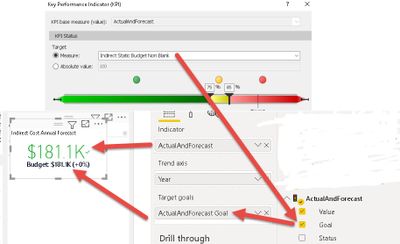
I have a measure that displays ActualsAndForecast (with value of $181.K). I have another measure called Budget which also has a vlue of 181.1K. When I create a KPI on ActualsAndForecast and select Budget as Target with <75% as green, Between 75% - 85% as Yellow and over 85% as Red. For some reason the KPI color still comes up as green when both ActualsAndForecast & Budget have the same value of $181.1K. I expected the color to be red unless I'm reading it wrong.
Solved! Go to Solution.
Hi @Anonymous ,
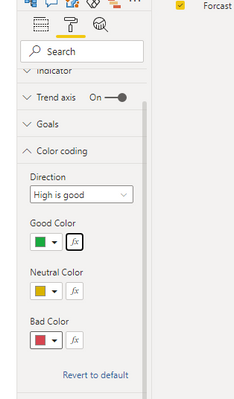
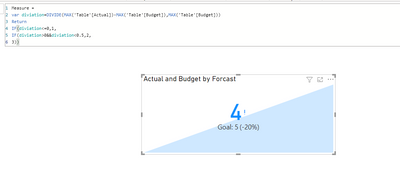
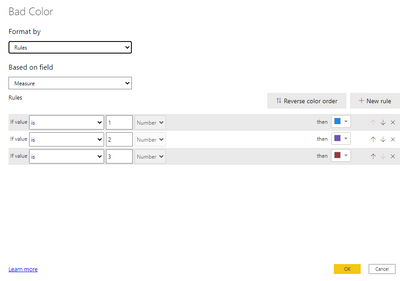
The Red,Yellow and Green indicator is color codings for direction,you can change the color showing based on color formatting per your request,see below:
For reference,see below:
https://docs.microsoft.com/en-us/power-bi/visuals/power-bi-visualization-kpi
For my sample .pbix file,see attached.
Best Regards,
Kelly
Did I answer your question? Mark my post as a solution!
have you checked the number and all its decimals explicityly? what is the explicit number rather than looking at it with a K format (ie thousands)
Proud to be a Super User!
Hi @vanessafvg
Maybe I'm reading the KPI wrong. The Red, Yellow and Green indicator is for "Status" and not necessarily for the acutal text that displays in Red/Green. Is that correct?
Hi @Anonymous ,
The Red,Yellow and Green indicator is color codings for direction,you can change the color showing based on color formatting per your request,see below:
For reference,see below:
https://docs.microsoft.com/en-us/power-bi/visuals/power-bi-visualization-kpi
For my sample .pbix file,see attached.
Best Regards,
Kelly
Did I answer your question? Mark my post as a solution!
Hi @vanessafvg
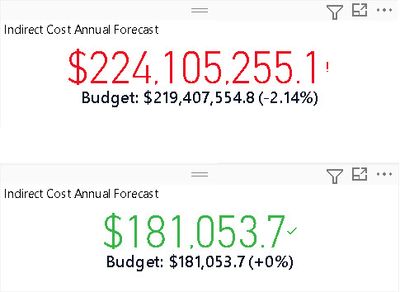
See attached pic with full numerical value. One in Red is unfiltered data and the one in green is set for a particular division. Again, I can't understand why the one in green does not display in red since Actual and Budget are same.
| User | Count |
|---|---|
| 53 | |
| 40 | |
| 35 | |
| 24 | |
| 22 |
| User | Count |
|---|---|
| 136 | |
| 111 | |
| 58 | |
| 43 | |
| 38 |