Join us at FabCon Atlanta from March 16 - 20, 2026, for the ultimate Fabric, Power BI, AI and SQL community-led event. Save $200 with code FABCOMM.
Register now!The Power BI Data Visualization World Championships is back! Get ahead of the game and start preparing now! Learn more
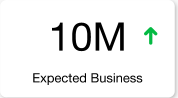
I need to implement above card type on my report. Green arrow should show last year business vs this year business, If it is high then green up and if it is down red down. Will it be possible to implement, If yes. Please provide how.
Solved! Go to Solution.
@Anonymous , We group the two-card together.
https://docs.microsoft.com/en-us/power-bi/desktop-grouping-visuals
@Anonymous , You have to combine two-card visual and use unichar with conditional formatting
https://community.powerbi.com/t5/Desktop/FORMAT-icon-set-for-use-in-a-data-card/td-p/811692
UNICHAR - Tool for Custom Icon Formatting: https://www.youtube.com/watch?v=veCtfP8IhbI&list=PLPaNVDMhUXGaaqV92SBD5X2hk3TMNlHhb&index=50
Okay but how to intigrate it in one Card,I need value and arrow in same card
@Anonymous , We group the two-card together.
https://docs.microsoft.com/en-us/power-bi/desktop-grouping-visuals
The Power BI Data Visualization World Championships is back! Get ahead of the game and start preparing now!
| User | Count |
|---|---|
| 38 | |
| 36 | |
| 33 | |
| 31 | |
| 28 |
| User | Count |
|---|---|
| 129 | |
| 88 | |
| 79 | |
| 68 | |
| 63 |