cancel
Showing results for 
Search instead for 
Did you mean: 

The Power BI Data Visualization World Championships is back! It's time to submit your entry. Live now!

Reply
Anonymous
Not applicable

Image in Power bi does not display when the data imported is binary


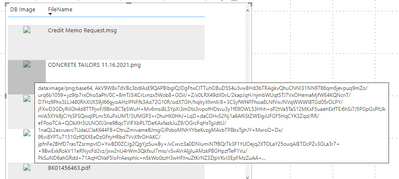
I imported a data where one field is imported as binary, which I then converted to text, and created a new column where concatenated it: "data:image/png; base64 ", & [column name] and change the 'Data category' to 'Image URL'

When I create a table with the the this column, the image is not displayed.

Upon hovering the image, it does show the concatenated string (see the snapshot below)

I am confused, as I have also tried to change 'png' to 'jpeg', 'pdf' etc.


Can you please help me with this issue.


When I 

MonikaSharma_0-1637167195223.png


edited to add, the Power BI version:

MonikaSharma_0-1637180056206.png


2 REPLIES 2
v-jingzhang
Community Support
Community Support

Hi @Anonymous 


I tried the method in this blog and was able to show the images. Try "data:image/jpeg;base64,"&[ImageData] or “data:image/;base64,”&[ImageData]


Best Regards,
Community Support Team _ Jing
If this post helps, please Accept it as Solution to help other members find it.

Anonymous
Not applicable

I still gets the same results, no image showing

Helpful resources

Announcements
December 2025 Power BI Update Carousel

Power BI Monthly Update - December 2025

Check out the December 2025 Power BI Holiday Recap!

FabCon Atlanta 2026 carousel

FabCon Atlanta 2026

Join us at FabCon Atlanta, March 16-20, for the ultimate Fabric, Power BI, AI and SQL community-led event. Save $200 with code FABCOMM.