Join us at FabCon Atlanta from March 16 - 20, 2026, for the ultimate Fabric, Power BI, AI and SQL community-led event. Save $200 with code FABCOMM.
Register now!The Power BI Data Visualization World Championships is back! Get ahead of the game and start preparing now! Learn more
Hi All,
I have 2 slicers .First Slicer has Locations and the second one has Dates.
My requirement is when I select any item in the Location Slicer, Date slicer filter should reset to all dates.
Or I can say when I select any particular location from the First Slicer, 2nd slicer should not have any interaction with Visuals.
It should display me results across all dates.
Is there any possibility to achieve this?
Thanks in Advance.
Solved! Go to Solution.
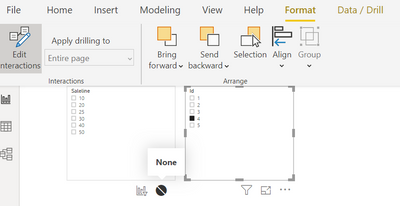
@Anonymous Select one slicer and click on format tab >> Edit interaction >> Click none icon on second slicer
On the Power BI Desktop menu, select the Format menu under Visual Tools, and then select Edit interactions.
https://docs.microsoft.com/en-us/power-bi/visuals/power-bi-visualization-slicers
hope this will help u
On the Power BI Desktop menu, select the Format menu under Visual Tools, and then select Edit interactions.
https://docs.microsoft.com/en-us/power-bi/visuals/power-bi-visualization-slicers
hope this will help u
@Anonymous Select one slicer and click on format tab >> Edit interaction >> Click none icon on second slicer
Check out the November 2025 Power BI update to learn about new features.
Advance your Data & AI career with 50 days of live learning, contests, hands-on challenges, study groups & certifications and more!