Fabric Data Days starts November 4th!
Advance your Data & AI career with 50 days of live learning, dataviz contests, hands-on challenges, study groups & certifications and more!
Get registered- Power BI forums
- Get Help with Power BI
- Desktop
- Service
- Report Server
- Power Query
- Mobile Apps
- Developer
- DAX Commands and Tips
- Custom Visuals Development Discussion
- Health and Life Sciences
- Power BI Spanish forums
- Translated Spanish Desktop
- Training and Consulting
- Instructor Led Training
- Dashboard in a Day for Women, by Women
- Galleries
- Data Stories Gallery
- Themes Gallery
- Contests Gallery
- QuickViz Gallery
- Quick Measures Gallery
- Visual Calculations Gallery
- Notebook Gallery
- Translytical Task Flow Gallery
- TMDL Gallery
- R Script Showcase
- Webinars and Video Gallery
- Ideas
- Custom Visuals Ideas (read-only)
- Issues
- Issues
- Events
- Upcoming Events
Get Fabric Certified for FREE during Fabric Data Days. Don't miss your chance! Request now
- Power BI forums
- Forums
- Get Help with Power BI
- Desktop
- Re: If 2nd Date/Time Row, Remove Both
- Subscribe to RSS Feed
- Mark Topic as New
- Mark Topic as Read
- Float this Topic for Current User
- Bookmark
- Subscribe
- Printer Friendly Page

- Mark as New
- Bookmark
- Subscribe
- Mute
- Subscribe to RSS Feed
- Permalink
- Report Inappropriate Content
If 2nd Date/Time Row, Remove Both
I'm pulling data from SQL for facility check-ins. I want only a list of people who are still in the building. In the attached screen shot, stationid 52 is a check-in station and stationid 192 is a check-out station. If memid has an entry for the stationid 192 check-out staion, I want to filter out both rows for stationid 52 and stationid 192, leaving only the rows for memid who have checked-in and no rows for memid who have checked-out. You can see in this screen shot that memid 98033 has a row for both stationid 52 and 192. I want both rows for memid 98033 filtered out.



- Mark as New
- Bookmark
- Subscribe
- Mute
- Subscribe to RSS Feed
- Permalink
- Report Inappropriate Content
This is certianly doable in Power Query, but can you provide data?
How to get good help fast. Help us help you.
How to Get Your Question Answered Quickly
How to provide sample data in the Power BI Forum
Did I answer your question? Mark my post as a solution!
Did my answers help arrive at a solution? Give it a kudos by clicking the Thumbs Up!
DAX is for Analysis. Power Query is for Data Modeling
Proud to be a Super User!
MCSA: BI Reporting- Mark as New
- Bookmark
- Subscribe
- Mute
- Subscribe to RSS Feed
- Permalink
- Report Inappropriate Content
OK, I typed the relevent columns directly into Excel and pasted that here...
| chkinid | memid | checkin | stationid |
| 5438177 | 98033 | 5/21/2020 2:17:49 PM | 52 |
| 5438178 | 130732 | 5/21/2020 2:17:56 PM | 52 |
| 5438179 | 134806 | 5/21/2020 2:18:06 PM | 52 |
| 5438180 | 76795 | 5/21/2020 2:18:14 PM | 52 |
| 5438181 | 103055 | 5/21/2020 2:18:20 PM | 52 |
| 5438182 | 97640 | 5/21/2020 2:18:26 PM | 52 |
| 5438183 | 113062 | 5/21/2020 2:18:35 PM | 52 |
| 5438184 | 98033 | 5/21/2020 2:49:17 PM | 192 |
- Mark as New
- Bookmark
- Subscribe
- Mute
- Subscribe to RSS Feed
- Permalink
- Report Inappropriate Content
Is this what you need?
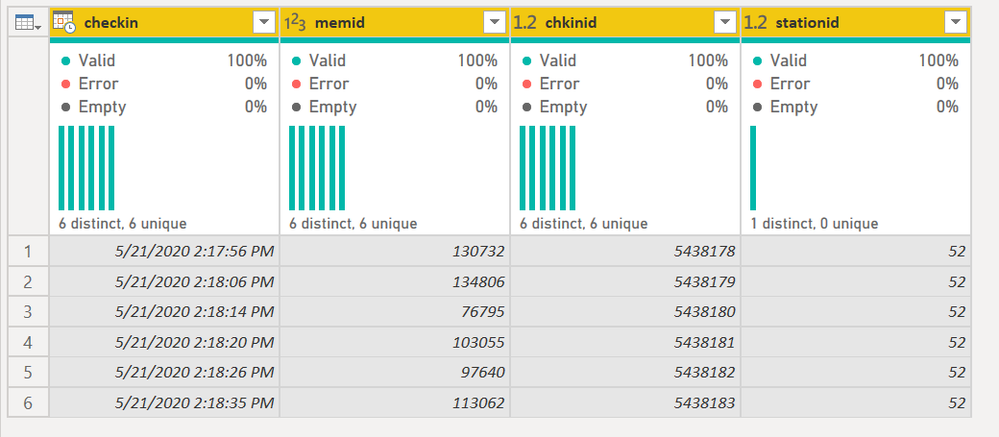
I didn't actually compare the station IDs. I just removed them if there were more than one present
You might want to add additional Group By columns (Days, employee codes or whatever) if your data is a bit more complex. See the M code below.
1) In Power Query, select New Source, then Blank Query
2) On the Home ribbon, select "Advanced Editor" button
3) Remove everything you see, then paste the M code I've given you in that box.
4) Press Done
let
    Source = Table.FromRows(Json.Document(Binary.Decompress(Binary.FromText("dZBLCsMwDAWvErwORF9L8h0K3Yfc/xqRU7qp1ZXgMYOkd55NhR3N2t7CgTmnHoQHAcFGA21IbO/XjKld+5f3DJDBmFZBeyHEI4hD/xV8QCE4ZGDdQlcepeBxLgAGLYScqzAvD+sCBV8dNKvB/LkvL/tgLQT506lEtvThMVK4bg==", BinaryEncoding.Base64), Compression.Deflate)), let _t = ((type nullable text) meta [Serialized.Text = true]) in type table [chkinid = _t, memid = _t, checkin = _t, stationid = _t]),
    #"Changed Type" = Table.TransformColumnTypes(Source,{{"chkinid", Int64.Type}, {"memid", Int64.Type}, {"checkin", type datetime}, {"stationid", Int64.Type}}),
    #"Grouped Rows" = Table.Group(#"Changed Type", {"memid"}, {{"All Rows", each _, type table [chkinid=number, memid=number, checkin=datetime, stationid=number]}}),
    #"Added Custom" = Table.AddColumn(#"Grouped Rows", "Keep", each Table.RowCount([All Rows]) < 2, type logical),
    #"Filtered Rows" = Table.SelectRows(#"Added Custom", each ([Keep] = true)),
    #"Expanded All Rows" = Table.ExpandTableColumn(#"Filtered Rows", "All Rows", {"chkinid", "checkin", "stationid"}, {"chkinid", "checkin", "stationid"}),
    #"Removed Other Columns" = Table.SelectColumns(#"Expanded All Rows",{"checkin", "memid", "chkinid", "stationid"})
in
    #"Removed Other Columns"
Did I answer your question? Mark my post as a solution!
Did my answers help arrive at a solution? Give it a kudos by clicking the Thumbs Up!
DAX is for Analysis. Power Query is for Data Modeling
Proud to be a Super User!
MCSA: BI Reporting

- Mark as New
- Bookmark
- Subscribe
- Mute
- Subscribe to RSS Feed
- Permalink
- Report Inappropriate Content
Hi @Anonymous
Try this:
let
    Source = Table.FromRows(Json.Document(Binary.Decompress(Binary.FromText("dZBLCsMwDAWvErwORF9L8h0K3Yfc/xqRU7qp1ZXgMYOkd55NhR3N2t7CgTmnHoQHAcFGA21IbO/XjKld+5f3DJDBmFZBeyHEI4hD/xV8QCE4ZGDdQlcepeBxLgAGLYScqzAvD+sCBV8dNKvB/LkvL/tgLQT506lEtvThMVK4bg==", BinaryEncoding.Base64), Compression.Deflate)), let _t = ((type text) meta [Serialized.Text = true]) in type table [chkinid = _t, memid = _t, checkin = _t, stationid = _t]),
    #"Changed Type" = Table.TransformColumnTypes(Source,{{"chkinid", Int64.Type}, {"memid", Int64.Type}, {"checkin", type text}, {"stationid", Int64.Type}}),
    whos_checkedout_ = Table.SelectRows(#"Changed Type",each [stationid] = 192 )[memid],
    final_ = Table.SelectRows(#"Changed Type",each not List.Contains(whos_checkedout_,[memid]) )
in
    final_
Please mark the question solved when done and consider giving kudos if posts are helpful.
Contact me privately for support with any larger-scale BI needs
Cheers

- Mark as New
- Bookmark
- Subscribe
- Mute
- Subscribe to RSS Feed
- Permalink
- Report Inappropriate Content
Thanks for this... some weirdness, though (and both methods got the exact same results):
- It's not removing all people who have scanned at check-out stationid 192 (see memid 76795). It did remove memid 98033 who checked out.
- The checkin date from the query doesn't match when they actually scanned in.
- The stationid from the query doesn't match the stationid that they actually scanned in on.
- It's also not picking up any scans from memid 104958.
In the below data, I've included checkin and stationid from both the query and the table for comparision. The table names are in all caps in each column heading.
Also - I apologize for not mentioning this earlier, but stationid 56 is a secondary check in station within the facility and should not be counted as a check out when it occurs after initially scanning at stationid 52 upon entry. Stationid 187 is an alternate initial entry to the building and should be treated the same as stationid 52.
| CHKINS checkin | QUERY1 checkin | QUERY1 chkinid | QUERY1 memid | STATIONS stationid | QUERY1 stationid | STATIONS stationname |
| 5/25/2020 7:52:39 AM | 5/21/2020 2:18:26 PM | 5438182 | 97640 | 187 | 52 | Ground Level Entry |
| 5/25/2020 12:08:48 PM | 5/21/2020 2:18:06 PM | 5438179 | 134806 | 52 | 52 | Main Check In |
| 5/25/2020 12:08:56 PM | 5/21/2020 2:18:14 PM | 5438180 | 76795 | 52 | 52 | Main Check In |
| 5/25/2020 12:09:09 PM | 5/21/2020 2:18:20 PM | 5438181 | 103055 | 52 | 52 | Main Check In |
| 5/25/2020 12:59:05 PM | 5/21/2020 2:18:06 PM | 5438179 | 134806 | 56 | 52 | Health & Wellness Check In |
| 5/25/2020 1:12:59 PM | 5/21/2020 2:18:14 PM | 5438180 | 76795 | 192 | 52 | Member Check-Out |
- Mark as New
- Bookmark
- Subscribe
- Mute
- Subscribe to RSS Feed
- Permalink
- Report Inappropriate Content
FYI @Anonymous - neither solution above will work if you have the same memid check in on a different day. The below will handle it if it does. This speifically checks for the 52 and 192 codes as well, so code 171 would not cause this to get deleted for example.
But if you have multiple checkins a day, this will not work either, or a checkin at 11:50pm and a checkout at 12:03am the next day. We'd need to see a more comprehensive data set to see how to account for other possibilities, including additional columns if necessary.
1) In Power Query, select New Source, then Blank Query
2) On the Home ribbon, select "Advanced Editor" button
3) Remove everything you see, then paste the M code I've given you in that box.
4) Press Done
let
    Source = Table.FromRows(Json.Document(Binary.Decompress(Binary.FromText("dZBLCsMwDAWvErwORF9L8h0K3Yfc/xqRU7qp1ZXgMYOkd55NhR3N2t7CgTmnHoQHAcFGA21IbO/XjKld+5f3DJDBmFZBeyHEI4hD/xV8QCE4ZGDdQlcepeBxLgAGLYScqzAvD+sCBV8dNKvB/LkvL/tgLQT506lEtvThMVK4bg==", BinaryEncoding.Base64), Compression.Deflate)), let _t = ((type nullable text) meta [Serialized.Text = true]) in type table [chkinid = _t, memid = _t, checkin = _t, stationid = _t]),
    #"Changed Type" = Table.TransformColumnTypes(Source,{{"chkinid", Int64.Type}, {"memid", Int64.Type}, {"checkin", type datetime}, {"stationid", Int64.Type}}),
    #"Added Custom" = Table.AddColumn(#"Changed Type", "Date Only", each DateTime.Date([checkin]), type date),
    #"Grouped Rows" = Table.Group(#"Added Custom", {"memid", "Date Only"}, {{"All Rows", each _, type table [chkinid=number, memid=number, checkin=datetime, stationid=number, Date Only=date]}}),
    #"Added Custom1" = Table.AddColumn(#"Grouped Rows", "Remove", each List.ContainsAll([All Rows][stationid],{52,192})),
    #"Filtered Rows" = Table.SelectRows(#"Added Custom1", each ([Remove] = false)),
    #"Expanded All Rows" = Table.ExpandTableColumn(#"Filtered Rows", "All Rows", {"chkinid", "checkin", "stationid"}, {"chkinid", "checkin", "stationid"}),
    #"Removed Other Columns" = Table.SelectColumns(#"Expanded All Rows",{"memid", "chkinid", "checkin", "stationid"})
in
    #"Removed Other Columns"
Did I answer your question? Mark my post as a solution!
Did my answers help arrive at a solution? Give it a kudos by clicking the Thumbs Up!
DAX is for Analysis. Power Query is for Data Modeling
Proud to be a Super User!
MCSA: BI Reporting- Mark as New
- Bookmark
- Subscribe
- Mute
- Subscribe to RSS Feed
- Permalink
- Report Inappropriate Content
@edhans Some memid's will check in and out multiple times per day. There shouldn't be anyone checking in one day and checking out the next.
- Mark as New
- Bookmark
- Subscribe
- Mute
- Subscribe to RSS Feed
- Permalink
- Report Inappropriate Content
Thanks for this! Some weirdness, though (and both of your solutions provided the exact same results):
- Not all memid’s were removed on scan at check-out stationid 192. See memid 76795. But memid 98033 was removed.
- The checkin date/time is different in the Query than what it actually is. The Table CHKINS is correct.
- Same for the stationid – Query is not correct, but table CHKINS is correct.
- Memid 104958 is not picking up any scan in the Query, but if I look at the raw data, is clearly scanning.
Also, and I apologize for not mentioning this earlier:
- Stationid 187 is an alternate initial entry to the building and should be treated the same as stationid 52.
- Stationid 56 is a secondary scan-in area of the building and should not be treated as a check-out.
In the data I’ve included below, the table names are in all caps in the heading.
| CHKINS checkin | QUERY1 checkin | QUERY1 chkinid | QUERY1 memid | STATIONS stationid | QUERY1 stationid | STATIONS stationname |
| 5/25/2020 7:52:39 AM | 5/21/2020 2:18:26 PM | 5438182 | 97640 | 187 | 52 | Ground Level Entry |
| 5/25/2020 12:08:48 PM | 5/21/2020 2:18:06 PM | 5438179 | 134806 | 52 | 52 | Main Check In |
| 5/25/2020 12:08:56 PM | 5/21/2020 2:18:14 PM | 5438180 | 76795 | 52 | 52 | Main Check In |
| 5/25/2020 12:09:09 PM | 5/21/2020 2:18:20 PM | 5438181 | 103055 | 52 | 52 | Main Check In |
| 5/25/2020 12:59:05 PM | 5/21/2020 2:18:06 PM | 5438179 | 134806 | 56 | 52 | Health & Wellness Check In |
| 5/25/2020 1:12:59 PM | 5/21/2020 2:18:14 PM | 5438180 | 76795 | 192 | 52 | Member Check-Out |
- Mark as New
- Bookmark
- Subscribe
- Mute
- Subscribe to RSS Feed
- Permalink
- Report Inappropriate Content
Ok, Can you provide some comprehesive data that includes your scenarios? Your original data didn't have any duplication. I don't need 10,000 rows, but 30-50 with some good examples of your true data needs would help. Please use the links below to provide data in a good format. Thanks!
How to get good help fast. Help us help you.
How to Get Your Question Answered Quickly
How to provide sample data in the Power BI Forum
Did I answer your question? Mark my post as a solution!
Did my answers help arrive at a solution? Give it a kudos by clicking the Thumbs Up!
DAX is for Analysis. Power Query is for Data Modeling
Proud to be a Super User!
MCSA: BI Reporting- Mark as New
- Bookmark
- Subscribe
- Mute
- Subscribe to RSS Feed
- Permalink
- Report Inappropriate Content
Here is actual data, from when our buildng was still open before COVID-19 shutdown. The check-out stationid 192 has not been actually put into place yet. That's something new we're implementing when we get to re-open. Stationid's 52 and 187 are 1st points of entry into the building and stationid 56 is an additional area within the building where members must scan again to gain entry after they've already scanned into either 52 or 187.
| CHKINS checkin | MEMBERS scancode | STATIONS stationid | STATIONS stationname |
| 3/3/2020 7:15 | 33101 | 187 | Ground Level Entry |
| 3/3/2020 7:18 | 16666 | 52 | Main Check In |
| 3/3/2020 7:19 | 34103 | 52 | Main Check In |
| 3/3/2020 7:20 | 16666 | 56 | Health & Wellness Check In |
| 3/3/2020 7:20 | 34103 | 56 | Health & Wellness Check In |
| 3/3/2020 7:20 | 33101 | 187 | Ground Level Entry |
| 3/3/2020 7:21 | 28975 | 52 | Main Check In |
| 3/3/2020 7:21 | 34168 | 52 | Main Check In |
| 3/3/2020 7:25 | 32183 | 52 | Main Check In |
| 3/3/2020 7:26 | 17708 | 52 | Main Check In |
| 3/3/2020 7:26 | 32453 | 52 | Main Check In |
| 3/3/2020 7:26 | 34682 | 52 | Main Check In |
| 3/3/2020 7:27 | 32453 | 56 | Health & Wellness Check In |
| 3/3/2020 7:27 | 27881 | 52 | Main Check In |
| 3/3/2020 7:28 | 35999 | 52 | Main Check In |
| 3/3/2020 7:28 | 28497 | 56 | Health & Wellness Check In |
| 3/3/2020 7:29 | 32379 | 52 | Main Check In |
| 3/3/2020 7:30 | 27881 | 56 | Health & Wellness Check In |
| 3/3/2020 7:30 | 21150 | 52 | Main Check In |
| 3/3/2020 7:30 | 32379 | 56 | Health & Wellness Check In |
| 3/3/2020 7:30 | 35994 | 52 | Main Check In |
| 3/3/2020 7:31 | 32181 | 52 | Main Check In |
| 3/3/2020 7:31 | 21150 | 56 | Health & Wellness Check In |
| 3/3/2020 7:31 | 18741 | 52 | Main Check In |
| 3/3/2020 7:32 | 33706 | 52 | Main Check In |
| 3/3/2020 7:33 | 14817 | 52 | Main Check In |
| 3/3/2020 7:33 | 33706 | 56 | Health & Wellness Check In |
| 3/3/2020 7:33 | 29496 | 52 | Main Check In |
| 3/3/2020 7:34 | 14817 | 56 | Health & Wellness Check In |
| 3/3/2020 7:37 | 18963 | 52 | Main Check In |
| 3/3/2020 7:39 | 34209 | 52 | Main Check In |
| 3/3/2020 7:40 | 35885 | 52 | Main Check In |
| 3/3/2020 7:40 | 34209 | 56 | Health & Wellness Check In |
| 3/3/2020 7:41 | 35885 | 56 | Health & Wellness Check In |
| 3/3/2020 7:42 | 24307 | 52 | Main Check In |
| 3/3/2020 7:44 | 28945 | 52 | Main Check In |
| 3/3/2020 7:45 | 35499 | 52 | Main Check In |
| 3/3/2020 7:47 | 33143 | 52 | Main Check In |
| 3/3/2020 7:48 | 27711 | 52 | Main Check In |
| 3/3/2020 7:48 | 27226 | 52 | Main Check In |
| 3/3/2020 7:49 | 32569 | 52 | Main Check In |
| 3/3/2020 7:50 | 29720 | 52 | Main Check In |
| 3/3/2020 7:50 | 32569 | 56 | Health & Wellness Check In |
| 3/3/2020 7:53 | 32539 | 52 | Main Check In |
| 3/3/2020 7:55 | 34684 | 52 | Main Check In |
| 3/3/2020 7:56 | 33221 | 52 | Main Check In |
| 3/3/2020 7:56 | 34845 | 52 | Main Check In |
| 3/3/2020 7:56 | 23489 | 52 | Main Check In |
| 3/3/2020 7:57 | 23489 | 56 | Health & Wellness Check In |
| 3/3/2020 7:58 | 33812 | 52 | Main Check In |
- Mark as New
- Bookmark
- Subscribe
- Mute
- Subscribe to RSS Feed
- Permalink
- Report Inappropriate Content
@Anonymous this data has nothing but stations 52, 187 (both entry) and 56 (to be ignored if I understand your post), so there is nothing here to test or eliminate.
Or I have totally lost the plot and am not sure what the goal is.
Did I answer your question? Mark my post as a solution!
Did my answers help arrive at a solution? Give it a kudos by clicking the Thumbs Up!
DAX is for Analysis. Power Query is for Data Modeling
Proud to be a Super User!
MCSA: BI Reporting- Mark as New
- Bookmark
- Subscribe
- Mute
- Subscribe to RSS Feed
- Permalink
- Report Inappropriate Content
Check-Out stationid 192 doesn't actually exist yet. We'll start using it once we re-open. The goal is to build a report that shows who has scanned their badge at either stationid 52 or 187 and has not scanned at stationid 192 (ignoring stationid 56). I manually added some test entries scanning at stationid 192.
| CHKINS checkin | MEMBERS scancode | STATIONS stationid | STATIONS stationname |
| 3/3/2020 7:15 | 33101 | 187 | Ground Level Entry |
| 3/3/2020 7:16 | 21150 | 52 | Main Check In |
| 3/3/2020 7:18 | 16666 | 52 | Main Check In |
| 3/3/2020 7:19 | 34103 | 52 | Main Check In |
| 3/3/2020 7:20 | 16666 | 56 | Health & Wellness Check In |
| 3/3/2020 7:20 | 34103 | 56 | Health & Wellness Check In |
| 3/3/2020 7:20 | 33101 | 187 | Ground Level Entry |
| 3/3/2020 7:21 | 28975 | 52 | Main Check In |
| 3/3/2020 7:21 | 34168 | 52 | Main Check In |
| 3/3/2020 7:24 | 21150 | 56 | Health & Wellness Check In |
| 3/3/2020 7:25 | 32183 | 52 | Main Check In |
| 3/3/2020 7:26 | 17708 | 52 | Main Check In |
| 3/3/2020 7:26 | 32453 | 52 | Main Check In |
| 3/3/2020 7:26 | 34682 | 52 | Main Check In |
| 3/3/2020 7:27 | 32453 | 56 | Health & Wellness Check In |
| 3/3/2020 7:27 | 27881 | 52 | Main Check In |
| 3/3/2020 7:28 | 35999 | 52 | Main Check In |
| 3/3/2020 7:28 | 28975 | 192 | Member Check-Out |
| 3/3/2020 7:28 | 28497 | 56 | Health & Wellness Check In |
| 3/3/2020 7:29 | 34103 | 192 | Member Check-Out |
| 3/3/2020 7:29 | 32379 | 52 | Main Check In |
| 3/3/2020 7:30 | 27881 | 56 | Health & Wellness Check In |
| 3/3/2020 7:30 | 32379 | 56 | Health & Wellness Check In |
| 3/3/2020 7:30 | 35994 | 52 | Main Check In |
| 3/3/2020 7:31 | 32181 | 52 | Main Check In |
| 3/3/2020 7:35 | 16666 | 192 | Member Check-Out |
| 3/3/2020 7:48 | 27881 | 192 | Member Check-Out |
| 3/3/2020 7:49 | 35999 | 192 | Member Check-Out |
| 3/3/2020 7:50 | 32183 | 192 | Member Check-Out |
- Mark as New
- Bookmark
- Subscribe
- Mute
- Subscribe to RSS Feed
- Permalink
- Report Inappropriate Content
@Anonymous
I don't see what the problem is with my first solution then. That one eliminated all the members that had checked out (i.e, gone through 192). Froma what I understand that is exactly what you need here. 🤔
Please mark the question solved when done and consider giving kudos if posts are helpful.
Contact me privately for support with any larger-scale BI needs
Cheers
- Mark as New
- Bookmark
- Subscribe
- Mute
- Subscribe to RSS Feed
- Permalink
- Report Inappropriate Content
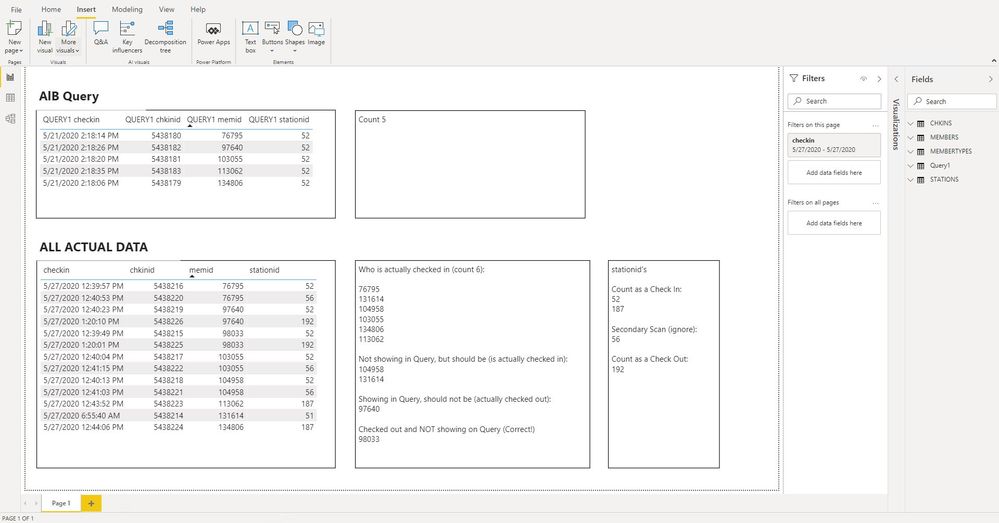
Those are not the results I'm getting. When I run the report, it's:
- listing some people who have checked out
- not listing some people who have checked in and not checked out
- the checkin date/time field is stuck at 5/21 @ 2:18pm regardless of when they actually scanned
- the stationid is stuck at 52 regardless of what stationid they scanned at.
I pasted what you wrote in the Advanced Editor. Am I missing a step? I'm very new to Power BI, maybe I'm doing something wrong?
I've attached a screnshot of my whole screen so you can see what I'm looking at that shows the results from your query vs all data and I've made notes in text boxes next to them each. The results from your query shows only columns from your query and the results from all data shows only columns from my other tables. The only filter that's on is a whole page filter of the date.
Thank you for your help!
- Mark as New
- Bookmark
- Subscribe
- Mute
- Subscribe to RSS Feed
- Permalink
- Report Inappropriate Content
I also noticed that the chkinid's in your query are all from date 5/21/2020, not from date 5/27/2020 (the date on my page filter). It's like the query is stuck on that one date and won't update to the date I'm running on the report. I even deleted the query and re-added it and it still only pulled data from 5/21/2020.
- Mark as New
- Bookmark
- Subscribe
- Mute
- Subscribe to RSS Feed
- Permalink
- Report Inappropriate Content
@Anonymous
I'm getting lost now. My query is stuck at 21st because the input for it (Source step) is what you initially posted and that only has data for the 21st. The query is intended to show the steps, you would have to update the Source step and read your full input data instead of the example.
Please mark the question solved when done and consider giving kudos if posts are helpful.
Contact me privately for support with any larger-scale BI needs, tutoring, etc.
Cheers
- Mark as New
- Bookmark
- Subscribe
- Mute
- Subscribe to RSS Feed
- Permalink
- Report Inappropriate Content
The original data had the 21st because that's what day it was then. I need this to update real-time. How do I update the source? Like I said... brand spankin' new to Power BI, so I really don't know what I'm doing yet. I just need this to work before Monday.
Thank you!
- Mark as New
- Bookmark
- Subscribe
- Mute
- Subscribe to RSS Feed
- Permalink
- Report Inappropriate Content
@Anonymous I somehow missed your earlier post this week with more data. I'll get back to this hopefully tonight. Perhaps @AlB will solve it before then, but if not, just wanted you to know I didn't bail. I just missed the notification with more data. 😁
Did I answer your question? Mark my post as a solution!
Did my answers help arrive at a solution? Give it a kudos by clicking the Thumbs Up!
DAX is for Analysis. Power Query is for Data Modeling
Proud to be a Super User!
MCSA: BI Reporting- Mark as New
- Bookmark
- Subscribe
- Mute
- Subscribe to RSS Feed
- Permalink
- Report Inappropriate Content
Ok, @Anonymous, see if this works. Here is what I did:
- Duplicated your data and changed the date to the 4th so I had 2 days to play with to ensure it handled says right.
- Added a days only field (ignoring time)
- Grouped by day and ID
- filtered for any rows that had (187 or 52) and 192 and removed them
- kept the rest. I ignored any 56 records.
let
    Source = Table.FromRows(Json.Document(Binary.Decompress(Binary.FromText("pZRLSwMxFIX/Sph1pXmcTBK3IiooLl3ULqoGKo4jTFvBf28y1RIVy72ZWWQ25577Sr7FojFzM9dSS+FOlW1mjTFKqvRX3qXzYnjb9U/iOr7HTpz32+GjWc5+BrVJppWyMv2tTsfN6rkXZ+v4+CKu+j9yn73b9NHkIZcEJQ1JrmXpno/LuOq2a3G/k1K34i52XR83m+MGh3zVBswZ6izWPjhL61Lti2w9TY5yQzU9jfdCK09cQk6hnJPE8trRHZbhbtB6TZO70r2m+WygnfeKli83bWwIgS7/3rwKoz6+PsRhH3Fyu9v+E4Lgajsq3xQx5xiijaN1ZWQ5s4oSR4NDvmqDtAbQClZfN5y2ZGMLzNAmCF+MhBgSiqtEC7GyeKlHQ1ADffCgDx70wYM+pkIfU6GPGuiDB33woI+p0AcP+uBBHzzogwd9TIU+eNAHD/rgQ/93CBv64EMfPOhjKvQxFfrgQR886IMPffChDz70wYL+8hM=", BinaryEncoding.Base64), Compression.Deflate)), let _t = ((type nullable text) meta [Serialized.Text = true]) in type table [#"CHKINS checkin" = _t, #"MEMBERS scancode" = _t, #"STATIONS stationid" = _t, #"STATIONS stationname" = _t]),
    #"Changed Type" = Table.TransformColumnTypes(Source,{{"CHKINS checkin", type datetime}, {"MEMBERS scancode", Int64.Type}, {"STATIONS stationid", Int64.Type}, {"STATIONS stationname", type text}}),
    #"Added Date" = Table.AddColumn(#"Changed Type", "Date", each DateTime.Date([CHKINS checkin]), type date),
    #"Grouped Rows" = Table.Group(#"Added Date", {"Date", "MEMBERS scancode"}, {{"All Rows", each _, type table [CHKINS checkin=datetime, MEMBERS scancode=number, STATIONS stationid=number, STATIONS stationname=text, Date=date]}}),
    #"Added Checked Out Validation" =
    Table.AddColumn(
        #"Grouped Rows",
        "Checked Out",
        each (
            List.ContainsAny([All Rows][STATIONS stationid], {187,52})
            and List.Contains([All Rows][STATIONS stationid], 192)
            )
        , type logical),
    #"Filtered out Checked Out IDs" = Table.SelectRows(#"Added Checked Out Validation", each ([Checked Out] = false)),
    #"Expanded All Rows" = Table.ExpandTableColumn(#"Filtered out Checked Out IDs", "All Rows", {"CHKINS checkin", "STATIONS stationid", "STATIONS stationname"}, {"CHKINS checkin", "STATIONS stationid", "STATIONS stationname"}),
    #"Removed Other Columns" = Table.SelectColumns(#"Expanded All Rows",{"CHKINS checkin", "MEMBERS scancode", "STATIONS stationid", "STATIONS stationname"})
in
    #"Removed Other Columns"
Did I answer your question? Mark my post as a solution!
Did my answers help arrive at a solution? Give it a kudos by clicking the Thumbs Up!
DAX is for Analysis. Power Query is for Data Modeling
Proud to be a Super User!
MCSA: BI Reporting- Mark as New
- Bookmark
- Subscribe
- Mute
- Subscribe to RSS Feed
- Permalink
- Report Inappropriate Content
I'm sorry! Your query still only shows data from the past, but I need this report to update with data real-time. The purpose is to be able to pull this report at any time to see who is in the building at that time.
Helpful resources

Power BI Monthly Update - November 2025
Check out the November 2025 Power BI update to learn about new features.

Fabric Data Days
Advance your Data & AI career with 50 days of live learning, contests, hands-on challenges, study groups & certifications and more!

FabCon Atlanta 2026
Join us at FabCon Atlanta, March 16-20, for the ultimate Fabric, Power BI, AI and SQL community-led event. Save $200 with code FABCOMM.


