cancel
Showing results for 
Search instead for 
Did you mean: 

The Power BI Data Visualization World Championships is back! Get ahead of the game and start preparing now! Learn more

Reply
naeus
New Member

Identifying COVID Cases in the Map with Individual being in multiple locations

I hope I placed this in the right forum.


We need to identify the COVID cases in the building.  It is easier when a person is only assigned to one office.  Now my struggle is how to identify the person in the map having multiple location.


Would greatly appreciate what would be the best solution. Do I have to create different column  to separate them? I use the Synoptic Designer for Power Bi to create our own map using our building image.


 Room allocation
Staff 1101, 210, 444
Staff 2100
Staff 3240, 300
Staff 4235
1 ACCEPTED SOLUTION
Anonymous
Not applicable

Hi @naeus ,


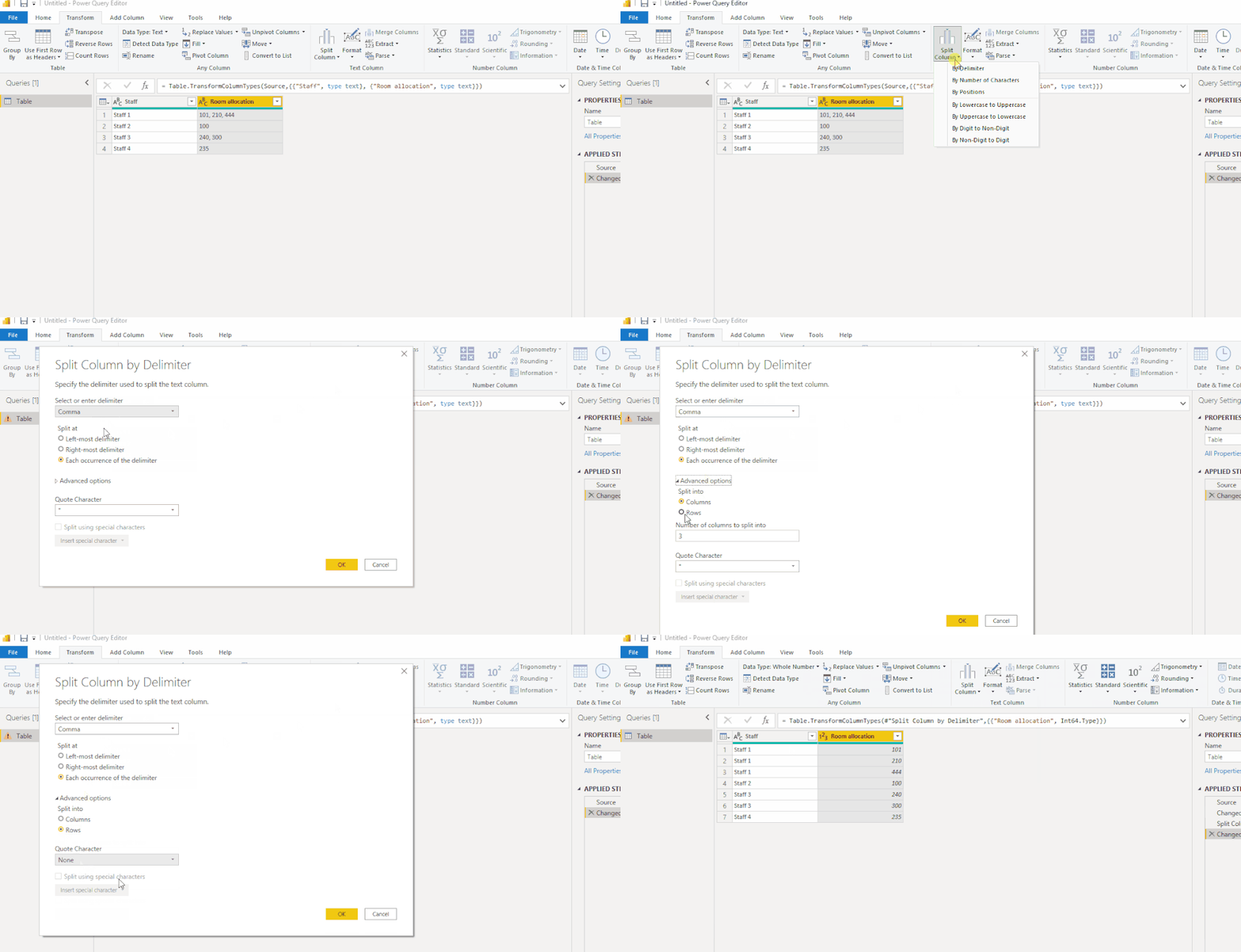
You could transform the table by clicking "Split Columns" simlply.

2.2.4.1.gif

 Or use the following formula to create a new table:

Table 2 =
VAR myvalues =
    ADDCOLUMNS ( 'Table', "RoomPaths", SUBSTITUTE ( [Room allocation], ",", "|" ) )
RETURN
    SELECTCOLUMNS (
        GENERATE (
            myvalues,
            ADDCOLUMNS (
                GENERATESERIES ( 1, PATHLENGTH ( [RoomPaths] ) ),
                "Room", PATHITEM ( [RoomPaths], [Value], INTEGER )
            )
        ),
        "Staff", [Staff],
        "Room Allocation", [Room]
    )

Here is the pbix file.


Best Regards,
Eyelyn Qin
If this post helps, then please consider Accept it as the solution to help the other members find it more quickly.

View solution in original post

4 REPLIES 4
Anonymous
Not applicable

Hi @naeus ,


You could transform the table by clicking "Split Columns" simlply.

2.2.4.1.gif

 Or use the following formula to create a new table:

Table 2 =
VAR myvalues =
    ADDCOLUMNS ( 'Table', "RoomPaths", SUBSTITUTE ( [Room allocation], ",", "|" ) )
RETURN
    SELECTCOLUMNS (
        GENERATE (
            myvalues,
            ADDCOLUMNS (
                GENERATESERIES ( 1, PATHLENGTH ( [RoomPaths] ) ),
                "Room", PATHITEM ( [RoomPaths], [Value], INTEGER )
            )
        ),
        "Staff", [Staff],
        "Room Allocation", [Room]
    )

Here is the pbix file.


Best Regards,
Eyelyn Qin
If this post helps, then please consider Accept it as the solution to help the other members find it more quickly.

thanks! this is  just the one I am looking for...

negi007
Community Champion
Community Champion

@naeus I suggest you to create two seperate tables in your data 1) master data for location 2) transaction data for staff and their location. Below could be your tables

Location Master

Index Location
1 1101
2 210
3 44
4 2100
5 3240
6 300
7 4235


Staff Transactions

Staff Location
John 1101
John 210
John 444
Rebecca 2100
Rebecca 3240
Alex 300
Top 4235


one you create above two tables, then you can link them. On selection of an employee, all the location will appear for him on the visual


Did I answer your question? Mark my post as a solution!
Appreciate your Kudos


Proud to be a Super User!


Follow me on linkedin

thanks!

Helpful resources

Announcements
November Power BI Update Carousel

Power BI Monthly Update - November 2025

Check out the November 2025 Power BI update to learn about new features.

Fabric Data Days Carousel

Fabric Data Days

Advance your Data & AI career with 50 days of live learning, contests, hands-on challenges, study groups & certifications and more!

FabCon Atlanta 2026 carousel

FabCon Atlanta 2026

Join us at FabCon Atlanta, March 16-20, for the ultimate Fabric, Power BI, AI and SQL community-led event. Save $200 with code FABCOMM.

Top Solution Authors
Top Kudoed Authors