- Power BI forums
- Get Help with Power BI
- Desktop
- Service
- Report Server
- Power Query
- Mobile Apps
- Developer
- DAX Commands and Tips
- Custom Visuals Development Discussion
- Health and Life Sciences
- Power BI Spanish forums
- Translated Spanish Desktop
- Training and Consulting
- Instructor Led Training
- Dashboard in a Day for Women, by Women
- Galleries
- Data Stories Gallery
- Themes Gallery
- Contests Gallery
- Quick Measures Gallery
- Notebook Gallery
- Translytical Task Flow Gallery
- TMDL Gallery
- R Script Showcase
- Webinars and Video Gallery
- Ideas
- Custom Visuals Ideas (read-only)
- Issues
- Issues
- Events
- Upcoming Events
To celebrate FabCon Vienna, we are offering 50% off select exams. Ends October 3rd. Request your discount now.
- Power BI forums
- Forums
- Get Help with Power BI
- Desktop
- How to work with hierarchical data?
- Subscribe to RSS Feed
- Mark Topic as New
- Mark Topic as Read
- Float this Topic for Current User
- Bookmark
- Subscribe
- Printer Friendly Page


- Mark as New
- Bookmark
- Subscribe
- Mute
- Subscribe to RSS Feed
- Permalink
- Report Inappropriate Content
How to work with hierarchical data?
Hello everyone! I'm full of questions today.
I have a table (actually dozens of similar tables, which is why I need Power Query in the first place) with data which looks like this:
| 1 | SALES | 730000 |
| 1.1 | FOOD | 500000 |
| 1.1.1 | Pizza | 200000 |
| 1.1.2 | Cheeseburger | 300000 |
| 1.2 | DRINKS | 150000 |
| 1.2.1 | Soda | 100000 |
| 1.2.2 | Juice | 50000 |
| 1.2.3 | Water | 80000 |
| 2 | EXPENSES | 170000 |
| 2.1 | Flour | 50000 |
| 2.2 | Meat | 100000 |
| 2.3 | Vegetables | 20000 |
| 3 | INVESTMENTS | 200000 |
After transforming this table in the Query Editor, I came up with something like this:
| 1 | null | null | SALES | null | null | 730000 |
| 1 | 1 | null | SALES | FOOD | null | 500000 |
| 1 | 1 | 1 | SALES | FOOD | Pizza | 200000 |
| 1 | 1 | 2 | SALES | FOOD | Cheeseburger | 300000 |
| 1 | 2 | null | SALES | DRINKS | null | 150000 |
| 1 | 2 | 1 | SALES | DRINKS | Soda | 100000 |
| 1 | 2 | 2 | SALES | DRINKS | Juice | 50000 |
| 1 | 2 | 3 | SALES | DRINKS | Water | 80000 |
| 2 | null | null | EXPENSES | null | null | 170000 |
| 2 | 1 | null | EXPENSES | Flour | null | 50000 |
| 2 | 2 | null | EXPENSES | Meat | null | 100000 |
| 2 | 3 | null | EXPENSES | Vegetables | null | 20000 |
| 3 | null | null | INVESTMENTS | null | null | 200000 |
I want to be able to analyse this data in a way that doesn't duplicate/aggregate values when it shouldn't. I can't simply filter out the 'nulls' because as you can see, in some cases my items do not branch out into smaller categories.
What should I be doing differently?
Solved! Go to Solution.

- Mark as New
- Bookmark
- Subscribe
- Mute
- Subscribe to RSS Feed
- Permalink
- Report Inappropriate Content
@Clara,
I create the following measures in the table. Then I set the value of Measure to 0 in visual level filter. If the DAX don't return your expected result, please post your desired result here.
chk1 = var maxvalue= CALCULATE(MAX(Table2[value]),ALLEXCEPT(Table2,Table2[level1dec])) return IF(maxvalue=MAX(Table2[value]),1,0)
chk2 = CALCULATE(COUNTA(Table2[level1dec]),ALLEXCEPT(Table2,Table2[level1dec]))
Measure = IF([chk1]=1 && [chk2]>1,1,0)
Regards,
Lydia

- Mark as New
- Bookmark
- Subscribe
- Mute
- Subscribe to RSS Feed
- Permalink
- Report Inappropriate Content
Okay! Here's what I came up with:
chk3 = VAR level2 = SUMX('Table1','Table1'[level2])
RETURN IF(ISBLANK(level2),1,0)
Measure = IF([chk1]=1 && [chk2]>1 && [chk3]=1,1,0)
This is possibly not the most efficient solution, but it worked in my case 🙂 Please let me know if there is a smarter way to do it!
- Mark as New
- Bookmark
- Subscribe
- Mute
- Subscribe to RSS Feed
- Permalink
- Report Inappropriate Content
@Clara,
I create the following measures in the table. Then I set the value of Measure to 0 in visual level filter. If the DAX don't return your expected result, please post your desired result here.
chk1 = var maxvalue= CALCULATE(MAX(Table2[value]),ALLEXCEPT(Table2,Table2[level1dec])) return IF(maxvalue=MAX(Table2[value]),1,0)
chk2 = CALCULATE(COUNTA(Table2[level1dec]),ALLEXCEPT(Table2,Table2[level1dec]))
Measure = IF([chk1]=1 && [chk2]>1,1,0)
Regards,
Lydia
- Mark as New
- Bookmark
- Subscribe
- Mute
- Subscribe to RSS Feed
- Permalink
- Report Inappropriate Content
@Anonymous just a follow-up question. Let's say this happens:
| 1 | SALES | 730000 |
| 1.1 | FOOD | 500000 |
| 1.1.1 | Pizza | 500000 |
| 1.1.2 | Cheeseburger | 0 |
From what I understood, chk1 "discards" the row if its value matches the maximum value for the level. In this case, it would discard 1.1 FOOD (correct) but also 1.1.1 Pizza (incorrect), leaving me only with (nonexistent) Cheeseburger sales. What would be the most efficient workaround in this case?
- Mark as New
- Bookmark
- Subscribe
- Mute
- Subscribe to RSS Feed
- Permalink
- Report Inappropriate Content
Okay! Here's what I came up with:
chk3 = VAR level2 = SUMX('Table1','Table1'[level2])
RETURN IF(ISBLANK(level2),1,0)
Measure = IF([chk1]=1 && [chk2]>1 && [chk3]=1,1,0)
This is possibly not the most efficient solution, but it worked in my case 🙂 Please let me know if there is a smarter way to do it!
- Mark as New
- Bookmark
- Subscribe
- Mute
- Subscribe to RSS Feed
- Permalink
- Report Inappropriate Content
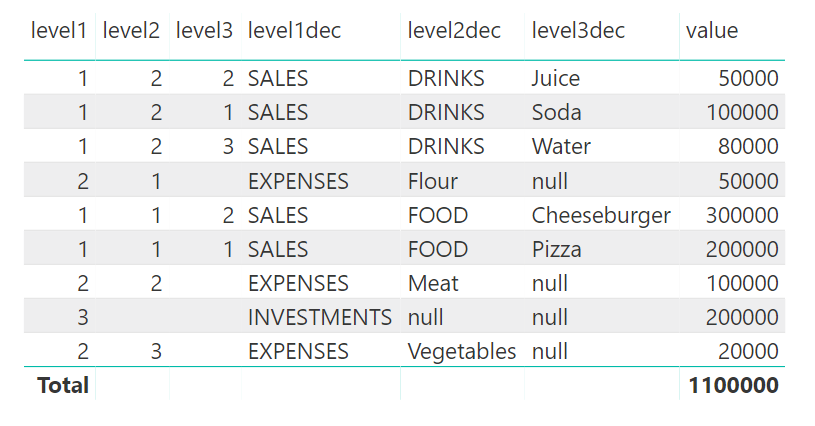
Thanks Lydia! I did some extra tweaking since I also needed to filter out some of the 'level2' values but your help was absolutely crucial!
Here's what I ended up with (exaclty as I needed (still kind of a mess but yeah)):
Helpful resources

Power BI Monthly Update - August 2025
Check out the August 2025 Power BI update to learn about new features.

Fabric Community Update - August 2025
Find out what's new and trending in the Fabric community.

| User | Count |
|---|---|
| 77 | |
| 66 | |
| 63 | |
| 51 | |
| 27 |


