Join us at FabCon Atlanta from March 16 - 20, 2026, for the ultimate Fabric, Power BI, AI and SQL community-led event. Save $200 with code FABCOMM.
Register now!The Power BI Data Visualization World Championships is back! Get ahead of the game and start preparing now! Learn more
I would like to count the number of people we would have had in a Month for a particular Year.
I currently have a table called Staff with columns:
The formula would count everyone that has a Team Member status of "Team Member" & it would stop counting when they have a status of "Ex-Team Member" which would relate back to the TerminationDate.
NB: My TerminationDate for my Team Members for some reason has a date of 1899/12/31
Solved! Go to Solution.
Hi @rush
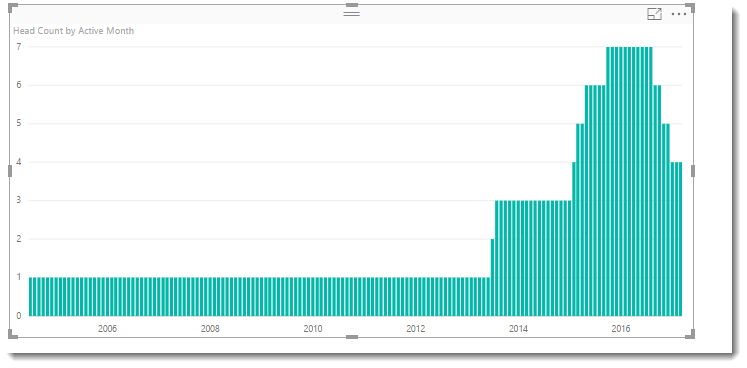
You could try this calculated table that might be close. It counts a month for an employee if they start/end part way though a month. I assumed this is what you were after.
New Table =
var MinDate = FIRSTDATE('Table1'[DateEmployed])
var Result =
SUMMARIZE(
FILTER(
CROSSJOIN(
ADDCOLUMNS(Table1,"End Date",if([TerminationDate]=DATE(1899,12,31),TODAY(),[TerminationDate])),
ADDCOLUMNS(
CALENDAR(
MinDate,
TODAY()
),
"Active Month",DATE(YEAR([Date]),MONTH([Date]),1)
)
)
, [Date] >= [DateEmployed]
&& [Date] <= [End Date])
,[Active Month],
"Head Count" , COUNT(Table1[FullName])
)
return ResultHi @rush
You could try this calculated table that might be close. It counts a month for an employee if they start/end part way though a month. I assumed this is what you were after.
New Table =
var MinDate = FIRSTDATE('Table1'[DateEmployed])
var Result =
SUMMARIZE(
FILTER(
CROSSJOIN(
ADDCOLUMNS(Table1,"End Date",if([TerminationDate]=DATE(1899,12,31),TODAY(),[TerminationDate])),
ADDCOLUMNS(
CALENDAR(
MinDate,
TODAY()
),
"Active Month",DATE(YEAR([Date]),MONTH([Date]),1)
)
)
, [Date] >= [DateEmployed]
&& [Date] <= [End Date])
,[Active Month],
"Head Count" , COUNT(Table1[FullName])
)
return Result@Phil_Seamark Is it possible to add columns in that calculated table which can be used to create a relationship with other tables as I need to be able to slice the data of the headcount?
Check out the November 2025 Power BI update to learn about new features.
Advance your Data & AI career with 50 days of live learning, contests, hands-on challenges, study groups & certifications and more!
| User | Count |
|---|---|
| 59 | |
| 43 | |
| 42 | |
| 23 | |
| 17 |
| User | Count |
|---|---|
| 190 | |
| 122 | |
| 96 | |
| 66 | |
| 46 |