cancel
Showing results for 
Search instead for 
Did you mean: 

We've captured the moments from FabCon & SQLCon that everyone is talking about, and we are bringing them to the community, live and on-demand. Starts on April 14th. Register now

Reply
Nishant77Goel
Frequent Visitor

How to use slicer selected column in formulas

Help needed!
Selected Parameter = maxx(filter('Date Value', 'Date Value'[Date Value Order] = SELECTEDVALUE('Date Value'[Date Value Order])), 'Date Value'[Date Value Fields])


This returns the name of selected column in slicer created using field parameter. 
I have 4 columns in slicer - "LAST_OPPORTUNITY_CHANGE_DT", "MBR_PGM_CREATE_DT", “MBR_PGM_ENROLL_DT","OPPORTUNITY_CREATE_DT"


Attaching test dashboard snapshot for your reference. 

Capture.PNG
Now based on the selected column name wants to create flag if the particular date of that column falls in last 180 days.
Last 180 days flag = IF([Selected Parameter] > (TODAY()-180),"1","0")


This is giving error, value coming from selected parameter is not considered as column but is considered as text. So it's not matching up with today()-180 days condition.


The value coming from selected parameter is not considered as column but is considered as text. So, it's not matching up with today()-180 days condition. If I directly consider column the formula is working fine.


Please suggest how should I approach this problem.

2 REPLIES 2
amitchandak
Super User
Super User

@Nishant77Goel , Can you share error you are getting


Also try this one as number


Last 180 days flag = IF([Selected Parameter] > (TODAY()-180),1,0)

Share with Power BI Enthusiasts: Full Power BI Video (20 Hours) YouTube
Microsoft Fabric Series 60+ Videos YouTube
Microsoft Fabric Hindi End to End YouTube

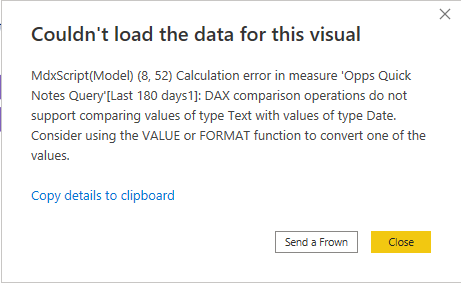
Last 180 days1 = if(SELECTEDVALUE('Date Type'[Date Type Fields]) > (TODAY()-180),1,0)
Giving below error -

Capture2.PNG

Helpful resources

Announcements
New to Fabric survey Carousel

New to Fabric Survey

If you have recently started exploring Fabric, we'd love to hear how it's going. Your feedback can help with product improvements.

Power BI DataViz World Championships carousel

Power BI DataViz World Championships - June 2026

A new Power BI DataViz World Championship is coming this June! Don't miss out on submitting your entry.

Join our Fabric User Panel

Join our Fabric User Panel

Share feedback directly with Fabric product managers, participate in targeted research studies and influence the Fabric roadmap.

March Power BI Update Carousel

Power BI Community Update - March 2026

Check out the March 2026 Power BI update to learn about new features.