Don't miss your chance to take exam DP-600 or DP-700 on us!
Request nowLearn from the best! Meet the four finalists headed to the FINALS of the Power BI Dataviz World Championships! Register now
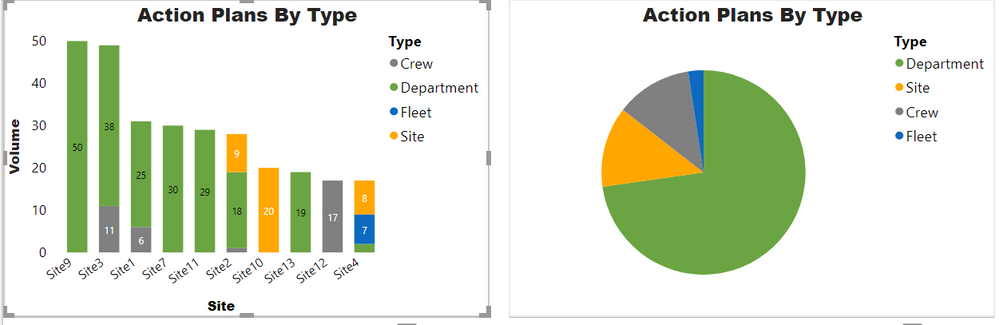
I have a stacked column chart with some data and I have a pie chart with the same data. What I want to do is that if I click on one of the x-axis values on the stack column chart the pi chart should filter the data based on that data point. This is what my data looks like.
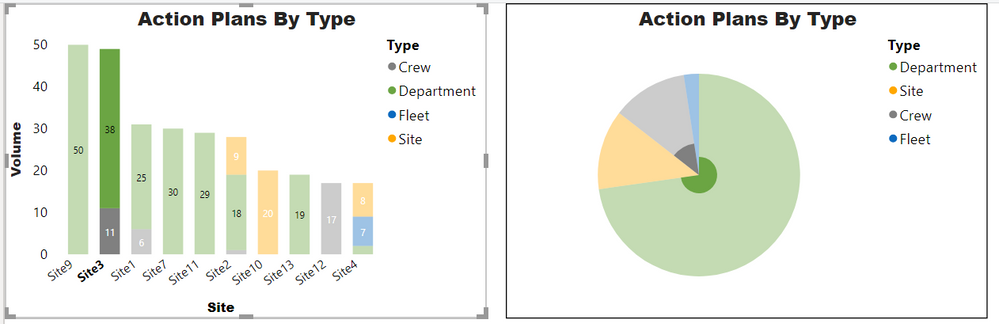
What I want on the image above is to click on Site3 and have the pie chart show the Type data only for site 3. However, when I try to do that the data ends up looking like this.
Is there a way to accomplish what I described without using a slicer?
For clarity these are my data points.
For Stacked Chart - Axis: Site, Legend: Type, Value: Volume
For pie chart: Legend: Type, Value: Volume
Solved! Go to Solution.
Click on a chart. And then click on format tab and Edit interactions.
On all other charts, you will see options have filter, highlight or stop filter.
Appreciate your Kudos. In case, this is the solution you are looking for, mark it as the Solution. In case it does not help, please provide additional information and mark me with @
Thanks.
My Recent Blog - https://community.powerbi.com/t5/Community-Blog/Comparing-Data-Across-Date-Ranges/ba-p/823601
But if you click anywhere on the pie chart, your stack bar chart will be reset without your selection, which in return deselect your pie chart as well, how can we fix it? ---- I know how to edit interactions, I've deleted the relationship from pie chart to stacked bar chart, but it doesn't work.
Click on a chart. And then click on format tab and Edit interactions.
On all other charts, you will see options have filter, highlight or stop filter.
Appreciate your Kudos. In case, this is the solution you are looking for, mark it as the Solution. In case it does not help, please provide additional information and mark me with @
Thanks.
My Recent Blog - https://community.powerbi.com/t5/Community-Blog/Comparing-Data-Across-Date-Ranges/ba-p/823601
Thanks. That's what I was looking for
Share feedback directly with Fabric product managers, participate in targeted research studies and influence the Fabric roadmap.
Check out the February 2026 Power BI update to learn about new features.
| User | Count |
|---|---|
| 50 | |
| 40 | |
| 37 | |
| 14 | |
| 14 |
| User | Count |
|---|---|
| 85 | |
| 69 | |
| 37 | |
| 28 | |
| 27 |