cancel
Showing results for 
Search instead for 
Did you mean: 

The Power BI Data Visualization World Championships is back! Get ahead of the game and start preparing now! Learn more

Reply
AnetaK
Helper V
Helper V

How to sort 100 % Stacked bar chart?

Hello,


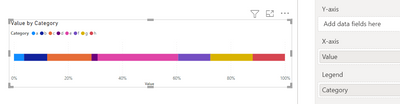
Is there a way to sort this chart from biggest to smallest values and not in the alphabetical order?

AnetaK_0-1669713469077.png


4 REPLIES 4
v-yanjiang-msft
Community Support
Community Support

Hi @AnetaK ,

According to your description, here's my solution.

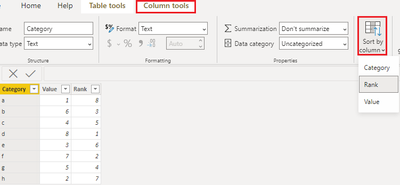
Create a calculated column.

Rank =
RANKX ( 'Table', 'Table'[Value],, DESC, DENSE )

Then select the Category column, in Column tools>Sort by column>Rank

vkalyjmsft_0-1669787972970.png

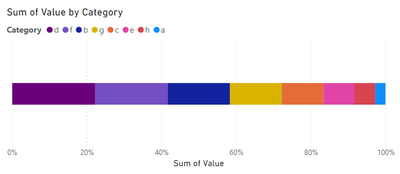
Get the expected result:

vkalyjmsft_1-1669788034175.png

I attach my sample below for your reference.


Best Regards,
Community Support Team _ kalyj

If this post helps, then please consider Accept it as the solution to help the other members find it more quickly.

What if I want to slice my table by additional dimensions?

Calculated column would not work then as this rank should be dynamic.

Would a RANKX measure do?

Hi @AnetaK ,

I can't reproduce how a dimension dynamically change the value, could you please give an example?

If we use the Category as a slicer, it still works.

vkalyjmsft_0-1669860192368.png

Best Regards,
Community Support Team _ kalyj

For example if we slice by month.
In each month a different category might be the biggest.

Helpful resources

Announcements
Power BI DataViz World Championships

Power BI Dataviz World Championships

The Power BI Data Visualization World Championships is back! Get ahead of the game and start preparing now!

December 2025 Power BI Update Carousel

Power BI Monthly Update - December 2025

Check out the December 2025 Power BI Holiday Recap!

FabCon Atlanta 2026 carousel

FabCon Atlanta 2026

Join us at FabCon Atlanta, March 16-20, for the ultimate Fabric, Power BI, AI and SQL community-led event. Save $200 with code FABCOMM.