Join us at FabCon Atlanta from March 16 - 20, 2026, for the ultimate Fabric, Power BI, AI and SQL community-led event. Save $200 with code FABCOMM.
Register now!Get Fabric Certified for FREE during Fabric Data Days. Don't miss your chance! Request now
Hello,
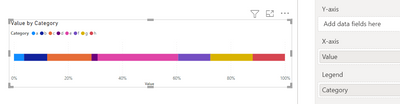
Is there a way to sort this chart from biggest to smallest values and not in the alphabetical order?
Hi @AnetaK ,
According to your description, here's my solution.
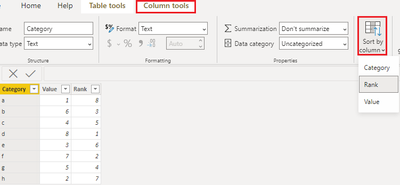
Create a calculated column.
Rank =
RANKX ( 'Table', 'Table'[Value],, DESC, DENSE )
Then select the Category column, in Column tools>Sort by column>Rank
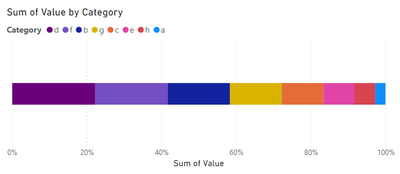
Get the expected result:
I attach my sample below for your reference.
Best Regards,
Community Support Team _ kalyj
If this post helps, then please consider Accept it as the solution to help the other members find it more quickly.
What if I want to slice my table by additional dimensions?
Calculated column would not work then as this rank should be dynamic.
Would a RANKX measure do?
Hi @AnetaK ,
I can't reproduce how a dimension dynamically change the value, could you please give an example?
If we use the Category as a slicer, it still works.
Best Regards,
Community Support Team _ kalyj
For example if we slice by month.
In each month a different category might be the biggest.
Check out the November 2025 Power BI update to learn about new features.
Advance your Data & AI career with 50 days of live learning, contests, hands-on challenges, study groups & certifications and more!