cancel
Showing results for 
Search instead for 
Did you mean: 

The Power BI Data Visualization World Championships is back! Get ahead of the game and start preparing now! Learn more

Reply
Manar
Helper II
Helper II

How to show more decimal place

Untitled.png

Hi,

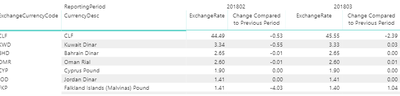
I have a report that shows changes in rates and it's supposed to show up to 10 decimal places, but in powerBi only shows 2.

I am using direct query so can't modify Format (it doesn't give me the option to do so with Direct Mode) , is there's a way to do this?

Please Help


7 REPLIES 7
Anonymous
Not applicable

@Manar did you ever solve this?


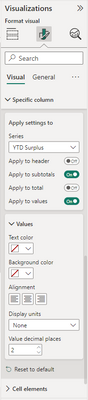
To change the decimal points, you can also go to the Visualisation pane > Format >Specific Column > Value decimal places

neoannqi_0-1690352754169.png


Anonymous
Not applicable

HI @Manar.


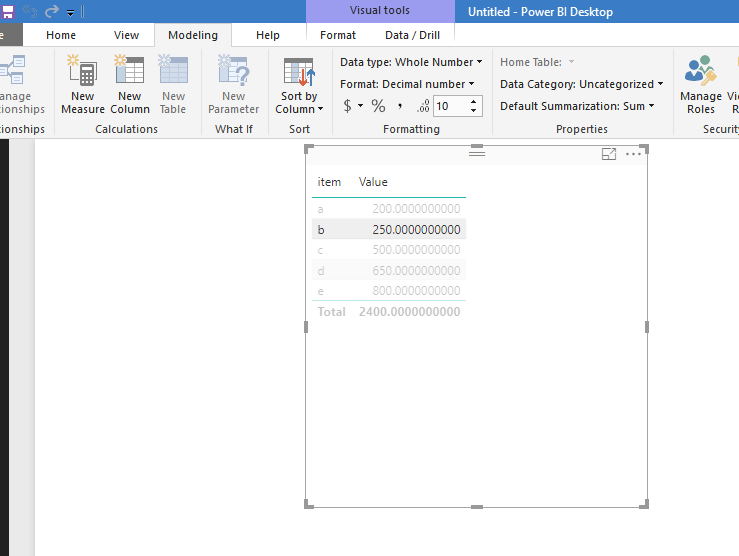
If you mean change decimal place in directquery mode, you can simply modify it at modeling tab.

13.PNG


For live connection, it is impossible to change it in power query side, you can only modify decimal format at database side.


Regards,

Xiaoxin Sheng

@Anonymous  Yes I am using live query and in my database the number has 10 decimal places even when I open the Edit query in power bi I see the number with decimals but when I put it in the visual it only shows 2 places!


Anonymous
Not applicable

HI @Manar,


Not so sure why power bi cut down you decimal place, as I said, current you can't modify decimal place in live mode.


Regards,

Xiaoxin Sheng

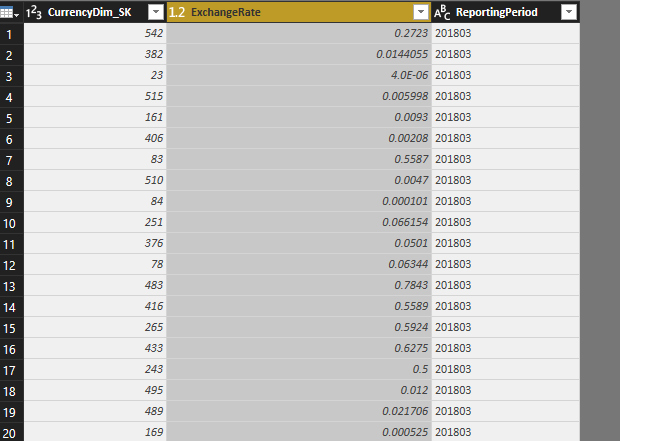
@Anonymous   the weird thing is when I click edit query it shows me the number with 4 , 5 and more decimals, but in my report I only see 2 decimal places.  

Untitled.png

Anonymous
Not applicable

HI @Manar,


Emm, I also not sure why this issue appears, maybe you cna try to contact to power bi support to know more about this.

Contact a Power BI expert today 


Regards,

Xiaoxin Sheng

Helpful resources

Announcements
November Power BI Update Carousel

Power BI Monthly Update - November 2025

Check out the November 2025 Power BI update to learn about new features.

Fabric Data Days Carousel

Fabric Data Days

Advance your Data & AI career with 50 days of live learning, contests, hands-on challenges, study groups & certifications and more!

FabCon Atlanta 2026 carousel

FabCon Atlanta 2026

Join us at FabCon Atlanta, March 16-20, for the ultimate Fabric, Power BI, AI and SQL community-led event. Save $200 with code FABCOMM.

Top Solution Authors
Top Kudoed Authors