Join us at FabCon Atlanta from March 16 - 20, 2026, for the ultimate Fabric, Power BI, AI and SQL community-led event. Save $200 with code FABCOMM.
Register now!View all the Fabric Data Days sessions on demand. View schedule
I have a paginated report that is using a Power BI direct query dataset, in the dataset, i have DAX custom date column which has only date and no time stamp when i use it in power BI, however the same column shows time stamp when i use in in a paginated report. My requirment is to remove the time stamp so i can create a calendar date pick . i wanted to know if anyone has run into this scenario and how they were able to fix the issue
Solved! Go to Solution.
Hi @Anonymous
Thanks for reaching out to us.
Can you provide a screenshot of the timestamp in the paginated report for us to check? thanks
Best Regards,
Community Support Team _Tang
If this post helps, please consider Accept it as the solution to help the other members find it more quickly.
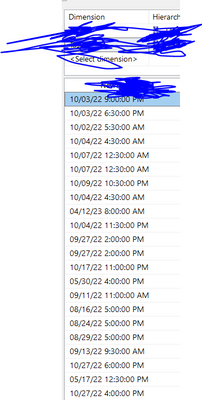
Here is the screeenshot taken from the report builder itself
Hi @Anonymous
Thanks for reaching out to us.
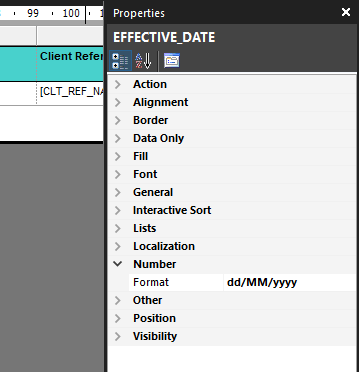
please try this setting:
Select the box where you're displaying the date. The format is in the Number section of the properties.
Best Regards,
Community Support Team _Tang
If this post helps, please consider Accept it as the solution to help the other members find it more quickly.
Check out the November 2025 Power BI update to learn about new features.
Advance your Data & AI career with 50 days of live learning, contests, hands-on challenges, study groups & certifications and more!