cancel
Showing results for 
Search instead for 
Did you mean: 

The Power BI Data Visualization World Championships is back! Get ahead of the game and start preparing now! Learn more

Reply
mpincince
Frequent Visitor

How to remove "No R Installation Detected" splash window

I had "explored" the possibility of using R with Power BI; but, for reasons I won't get into, I decided against it...at least for now.


Anyhow, now I get this splash window every time I start Power BI.

Capture.PNG


How can I stop this window from displaying?


I assume the answer lies within Options and Settings...I thought it might be under Options/R scripting...but I don't see anything helpful there.

1 ACCEPTED SOLUTION
Chihiro
Solution Sage
Solution Sage

Have you removed any visual, custom or otherwise that use R from your dashboard/report? It shouldn't give that message, if you removed all R visuals from it.


View solution in original post

5 REPLIES 5
DirkS
Frequent Visitor

I do have the same problem here. Deleted all the visuals and even the querys, leaving a completely blank report with one empty page. Opening this report still shows me the message.


I accidentally clicked on the R-Script-Visual and had an empty visual (didn't see it) on one of my report pages and saved this version. Opening the report again, showed me the message. I found the R-Visual and deleted it but as I meantioned before, the message won't disappear even after deleted everything in the report. Seems like a bug...

Anonymous
Not applicable

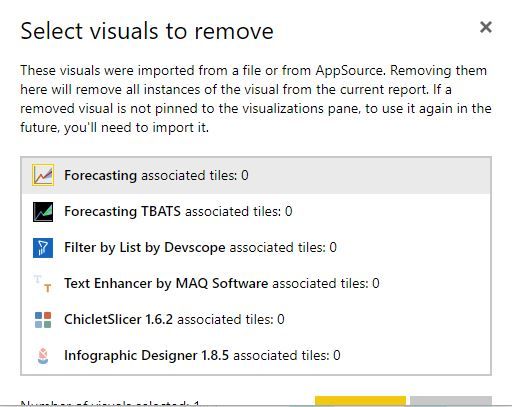
What you can try is remove the imported visuals from the pane not just the visual you accidentally clicked. That worked for me. Another bug however is if you have a long list, you may not see the buttons but the yellow one is remove.


import visual.JPG

Thank you so much! That worked for me too!

Chihiro
Solution Sage
Solution Sage

Have you removed any visual, custom or otherwise that use R from your dashboard/report? It shouldn't give that message, if you removed all R visuals from it.


Thanks @Chihiro! That was the problem. I still had the correlation plot visual loading.

Helpful resources

Announcements
Power BI DataViz World Championships

Power BI Dataviz World Championships

The Power BI Data Visualization World Championships is back! Get ahead of the game and start preparing now!

December 2025 Power BI Update Carousel

Power BI Monthly Update - December 2025

Check out the December 2025 Power BI Holiday Recap!

FabCon Atlanta 2026 carousel

FabCon Atlanta 2026

Join us at FabCon Atlanta, March 16-20, for the ultimate Fabric, Power BI, AI and SQL community-led event. Save $200 with code FABCOMM.