cancel
Showing results for 
Search instead for 
Did you mean: 

The FabCon + SQLCon recap series starts April 14th at 8am Pacific. If you’re tracking where AI is going inside Fabric, this first session is a can't miss. Register now

Reply
Anonymous
Not applicable

How to join two tables with multiple common fields but no unique identifier

Hi, I'm still quite new to Power BI especially with the modeling part. 


I'm trying to join a table called LeadTimeGrid with the following columns:

CUSTOMERREGIONFACTORYSTANDARD LEAD TIME
AppleAsiaA10
AppleAfricaB8
AppleEuropeC8
BoyEuropeC5
BoyAsiaA7
BoyNorth AmericaD7
CatNorth AmericaE3


with the main FactTable:

CUSTOMERREGIONCOUNTRYFACTORYACTUAL LEAD TIME
AppleAsiaChinaA15
CatNorth AmericaUSAE25
BoyEuropeFranceC30
AppleEuropeItalyC2


Anyway I can create a new table or visualization that has the following data fields:

CUSTOMERREGIONCOUNTRYFACTORYACTUAL LEAD TIMESTANDARD LEAD TIME
AppleAsiaChinaA1510
CatNorth AmericaUSAE253
BoyEuropeFranceC305
AppleEuropeItalyC28


None of the values are unique, and I'm not sure if I'm supposed to create a many-to-many relationship with the different fields. 

Any help?

1 ACCEPTED SOLUTION
ryan_mayu
Super User
Super User

@Anonymous 

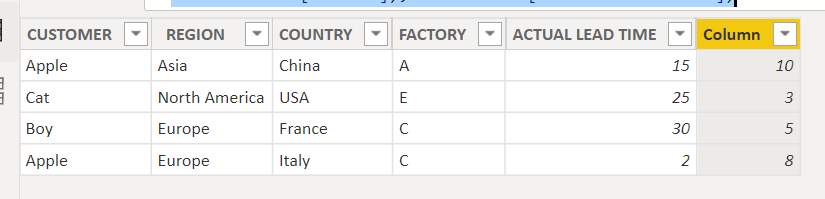
you can just create a column

Column = maxx(FILTER(LeadTimeGrid,'Fact'[CUSTOMER]=LeadTimeGrid[CUSTOMER]&&'Fact'[REGION]=LeadTimeGrid[REGION]&&'Fact'[FACTORY]=LeadTimeGrid[FACTORY]),LeadTimeGrid[STANDARD LEAD TIME])

1.PNG


Did I answer your question? Mark my post as a solution!

Proud to be a Super User!


View solution in original post

3 REPLIES 3
ryan_mayu
Super User
Super User

@Anonymous 

you can just create a column

Column = maxx(FILTER(LeadTimeGrid,'Fact'[CUSTOMER]=LeadTimeGrid[CUSTOMER]&&'Fact'[REGION]=LeadTimeGrid[REGION]&&'Fact'[FACTORY]=LeadTimeGrid[FACTORY]),LeadTimeGrid[STANDARD LEAD TIME])

1.PNG


Did I answer your question? Mark my post as a solution!

Proud to be a Super User!


Anonymous
Not applicable

Thanks for this! I actually ended up merging these two ables. Works the same.

you are welcome


Did I answer your question? Mark my post as a solution!

Proud to be a Super User!


Helpful resources

Announcements
New to Fabric survey Carousel

New to Fabric Survey

If you have recently started exploring Fabric, we'd love to hear how it's going. Your feedback can help with product improvements.

Power BI DataViz World Championships carousel

Power BI DataViz World Championships - June 2026

A new Power BI DataViz World Championship is coming this June! Don't miss out on submitting your entry.

Join our Fabric User Panel

Join our Fabric User Panel

Share feedback directly with Fabric product managers, participate in targeted research studies and influence the Fabric roadmap.

March Power BI Update Carousel

Power BI Community Update - March 2026

Check out the March 2026 Power BI update to learn about new features.