cancel
Showing results for 
Search instead for 
Did you mean: 

The Power BI Data Visualization World Championships is back! Get ahead of the game and start preparing now! Learn more

Reply
admin11
Memorable Member
Memorable Member

How to insert Target Vari % on my Sales Vs Target GAP chart ?

Hi All

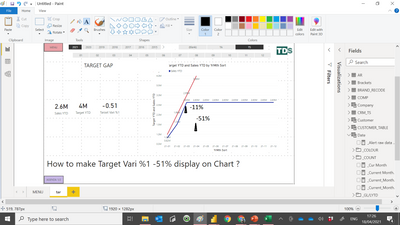
My sales vs target chart now only can display sales and target amount. 

I like to add vari % on the chart . by create a marker . So that i can see the % vari on very month.

admin11_0-1618738018171.png

https://www.dropbox.com/s/teq9clgobgnulvt/PBT_V2021_400%20TS_SI%20SAMPLE.pbix?dl=0


Paul

1 ACCEPTED SOLUTION
aj1973
Community Champion
Community Champion

@admin11 

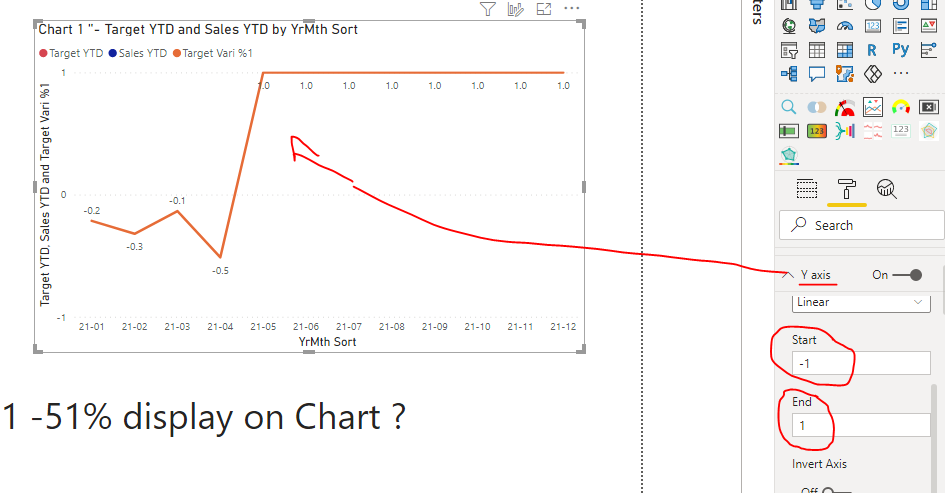
When you add the measure to the Line chart, it is displaying but because the scale of the Y axis is too big then you see a constant line...Example if you change the start and end you see the measure displaying like you want

aj1973_1-1618751231449.png


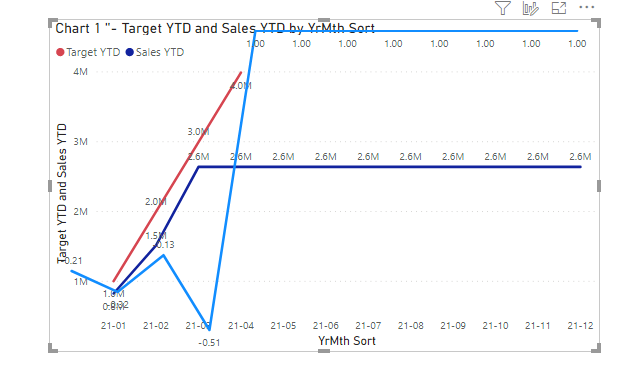
A work around could like putting 2 Line charts on top of each others and with little adjustements you can get a view like this

aj1973_2-1618751620638.png

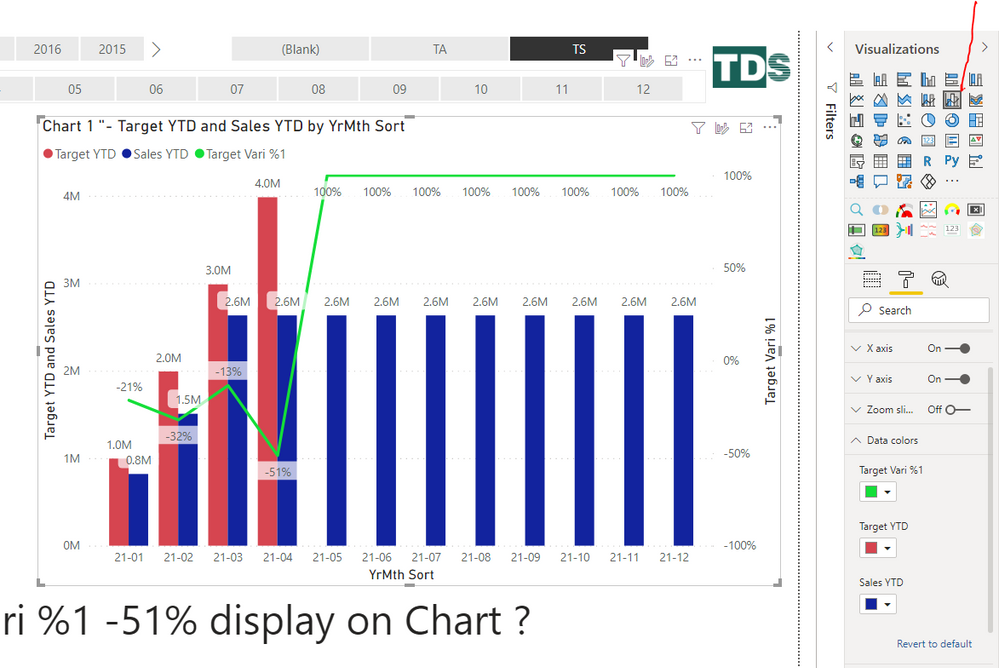
Or you can use a different visual

aj1973_3-1618752473171.png


Regards
Amine Jerbi

If I answered your question, please mark this thread as accepted
and you can follow me on
My Website, LinkedIn and Facebook

View solution in original post

2 REPLIES 2
aj1973
Community Champion
Community Champion

@admin11 

When you add the measure to the Line chart, it is displaying but because the scale of the Y axis is too big then you see a constant line...Example if you change the start and end you see the measure displaying like you want

aj1973_1-1618751231449.png


A work around could like putting 2 Line charts on top of each others and with little adjustements you can get a view like this

aj1973_2-1618751620638.png

Or you can use a different visual

aj1973_3-1618752473171.png


Regards
Amine Jerbi

If I answered your question, please mark this thread as accepted
and you can follow me on
My Website, LinkedIn and Facebook

@aj1973 

Thank you very much for your help. i like the bar chart you manage to add the target vari. which is what i need.

Helpful resources

Announcements
Power BI DataViz World Championships

Power BI Dataviz World Championships

The Power BI Data Visualization World Championships is back! Get ahead of the game and start preparing now!

November Power BI Update Carousel

Power BI Monthly Update - November 2025

Check out the November 2025 Power BI update to learn about new features.

FabCon Atlanta 2026 carousel

FabCon Atlanta 2026

Join us at FabCon Atlanta, March 16-20, for the ultimate Fabric, Power BI, AI and SQL community-led event. Save $200 with code FABCOMM.