FabCon is coming to Atlanta
Join us at FabCon Atlanta from March 16 - 20, 2026, for the ultimate Fabric, Power BI, AI and SQL community-led event. Save $200 with code FABCOMM.
Register now!- Power BI forums
- Get Help with Power BI
- Desktop
- Service
- Report Server
- Power Query
- Mobile Apps
- Developer
- DAX Commands and Tips
- Custom Visuals Development Discussion
- Health and Life Sciences
- Power BI Spanish forums
- Translated Spanish Desktop
- Training and Consulting
- Instructor Led Training
- Dashboard in a Day for Women, by Women
- Galleries
- Data Stories Gallery
- Themes Gallery
- Contests Gallery
- QuickViz Gallery
- Quick Measures Gallery
- Visual Calculations Gallery
- Notebook Gallery
- Translytical Task Flow Gallery
- TMDL Gallery
- R Script Showcase
- Webinars and Video Gallery
- Ideas
- Custom Visuals Ideas (read-only)
- Issues
- Issues
- Events
- Upcoming Events
View all the Fabric Data Days sessions on demand. View schedule
- Power BI forums
- Forums
- Get Help with Power BI
- Desktop
- Re: How to identify duplicates - same amount and d...
- Subscribe to RSS Feed
- Mark Topic as New
- Mark Topic as Read
- Float this Topic for Current User
- Bookmark
- Subscribe
- Printer Friendly Page


- Mark as New
- Bookmark
- Subscribe
- Mute
- Subscribe to RSS Feed
- Permalink
- Report Inappropriate Content
How to identify duplicates - same amount and date
I am working with employee expense submissions and want to identify lines for the same date and amount and count the number of "duplicates" identified, by employee. I'm relatively new to PowerBi and none of my searches are giving me what I need... Help!
My data is quite large - 50k-100k rows. Below is a sample.
| Employee ID | Employee Name | Expense Date | Amount |
| 1 | Rick | 10/04/2019 | 6.57 |
| 1 | Rick | 11/21/2019 | 4.40 |
| 2 | Derek | 09/08/2019 | 80.00 |
| 2 | Derek | 08/22/2019 | 200.00 |
| 2 | Derek | 08/22/2019 | 200.00 |
| 2 | Derek | 08/22/2019 | -200.00 |
| 3 | Steve | 09/03/2019 | 5.46 |
| 4 | Jim | 12/19/2019 | 16.45 |
| 5 | Donna | 08/12/2019 | 0.00 |
| 5 | Donna | 10/11/2019 | 2.50 |
| 5 | Donna | 09/13/2019 | 12.00 |
| 5 | Donna | 08/09/2019 | 8.50 |
| 5 | Donna | 08/09/2019 | 2.00 |
| 6 | Arnold | 08/16/2019 | 55.00 |
| 6 | Arnold | 09/13/2019 | 18.00 |
| 6 | Arnold | 11/25/2019 | 0.00 |
| 6 | Arnold | 11/25/2019 | 0.00 |
| 6 | Arnold | 12/06/2019 | 135.93 |
| 7 | Sally | 10/27/2019 | 0.00 |
| 7 | Sally | 10/16/2019 | 31.05 |
| 7 | Sally | 10/20/2019 | 101.91 |
| 7 | Sally | 12/10/2019 | 67.25 |
| 8 | Thomas | 09/25/2019 | 945.00 |
| 9 | Juan | 10/24/2019 | 3.60 |
Solved! Go to Solution.


- Mark as New
- Bookmark
- Subscribe
- Mute
- Subscribe to RSS Feed
- Permalink
- Report Inappropriate Content
@ssbagley looked into it and the measure is working as desired.
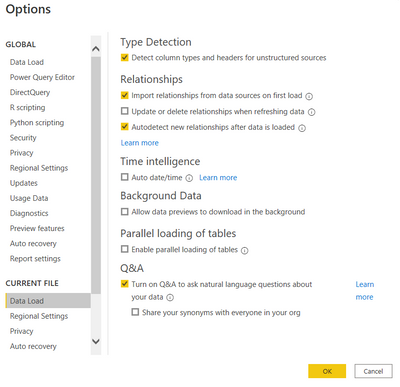
You need to put all the axis on Don't Summarize
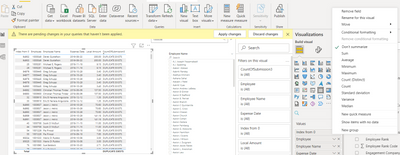
Also, don't use date hierarchy and do the following
- Mark as New
- Bookmark
- Subscribe
- Mute
- Subscribe to RSS Feed
- Permalink
- Report Inappropriate Content
One new question - assuming the code discussed, how can I EXCLUDE a field? So, I still want all lines where Employee number, Name, Date and Amount match, but where the field containing credit card number (for example) is not the same.
- Mark as New
- Bookmark
- Subscribe
- Mute
- Subscribe to RSS Feed
- Permalink
- Report Inappropriate Content
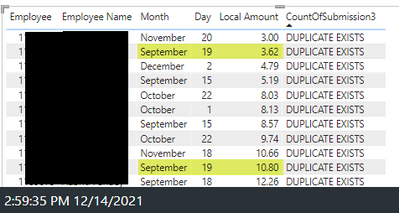
I added the index column and we're getting closer; however, the "duplicate exists" flag is appearing any time there are two amounts on the same day for the same person. The amounts need to be the same.
So, person 1 submitted $5 twice on 09/19/2019 = duplicate. I would expect to see
Person 1 $5 09/19/2019
Person 1 $5 09/19/2021
Here is a screenshot from my data with the index column option, but the lines highlighted in yellow are not true duplicates:
- Mark as New
- Bookmark
- Subscribe
- Mute
- Subscribe to RSS Feed
- Permalink
- Report Inappropriate Content
@ssbagley put the index column in the viz
- Mark as New
- Bookmark
- Subscribe
- Mute
- Subscribe to RSS Feed
- Permalink
- Report Inappropriate Content
It didn't change the results. 😞

- Mark as New
- Bookmark
- Subscribe
- Mute
- Subscribe to RSS Feed
- Permalink
- Report Inappropriate Content
@ssbagley can you please send the representative dataset /pbix?
- Mark as New
- Bookmark
- Subscribe
- Mute
- Subscribe to RSS Feed
- Permalink
- Report Inappropriate Content
I can't - this is confidential data so I cannot share.
- Mark as New
- Bookmark
- Subscribe
- Mute
- Subscribe to RSS Feed
- Permalink
- Report Inappropriate Content
This is my code:
- Mark as New
- Bookmark
- Subscribe
- Mute
- Subscribe to RSS Feed
- Permalink
- Report Inappropriate Content
@ssbagley this is the same code as mine and you can see that it perfectly works on my dataset. For me to be able to understand, why it does not do the trick in your dataset, I need to take a look at the reprentative datset.
- Mark as New
- Bookmark
- Subscribe
- Mute
- Subscribe to RSS Feed
- Permalink
- Report Inappropriate Content
- Mark as New
- Bookmark
- Subscribe
- Mute
- Subscribe to RSS Feed
- Permalink
- Report Inappropriate Content
@ssbagley looked into it and the measure is working as desired.
You need to put all the axis on Don't Summarize
Also, don't use date hierarchy and do the following
- Mark as New
- Bookmark
- Subscribe
- Mute
- Subscribe to RSS Feed
- Permalink
- Report Inappropriate Content
Incredible! I cannot thank you enough for your help! 👏
- Mark as New
- Bookmark
- Subscribe
- Mute
- Subscribe to RSS Feed
- Permalink
- Report Inappropriate Content
How do I upload/attach a file?
- Mark as New
- Bookmark
- Subscribe
- Mute
- Subscribe to RSS Feed
- Permalink
- Report Inappropriate Content
@ssbagley gdrive/1drive/any other file uploading service
- Mark as New
- Bookmark
- Subscribe
- Mute
- Subscribe to RSS Feed
- Permalink
- Report Inappropriate Content
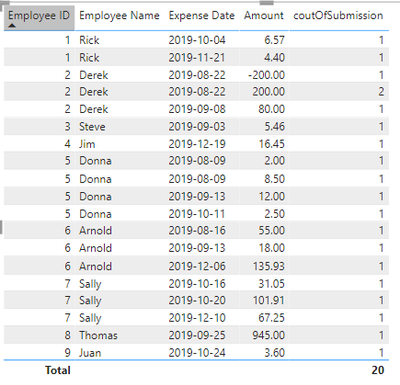
@ssbagley you can utilize a measure like this
coutOfSubmission =
CALCULATE (
    COUNT ( 'Table'[Amount] ),
    ALLEXCEPT (
        'Table',
        'Table'[Employee ID],
        'Table'[Expense Date],
        'Table'[Amount]
    ),
    FILTER ( VALUES ( 'Table'[Amount] ), 'Table'[Amount] <> 0 )
)
It counts the amount by ID,Date,Amount Partition for any non-zero Amount
- Mark as New
- Bookmark
- Subscribe
- Mute
- Subscribe to RSS Feed
- Permalink
- Report Inappropriate Content
But this only "counts", right? I need to identify lines where the same date and amount appear more than once (duplicate submissions). For example, if Employee 1 submitted $5 three times on 10/04/2019 - that would flag. But if Employee 2 only submitted $5 one time on 10/5/2019, that would not flag.
- Mark as New
- Bookmark
- Subscribe
- Mute
- Subscribe to RSS Feed
- Permalink
- Report Inappropriate Content
@ssbagley if you want to do it through measure, you need an index column
coutOfSubmission =
VAR _count =
    CALCULATE (
        COUNT ( 'Table'[Amount] ),
        ALLEXCEPT (
            'Table',
            'Table'[Employee ID],
            'Table'[Expense Date],
            'Table'[Amount]
        ),
        FILTER ( VALUES ( 'Table'[Amount] ), 'Table'[Amount] <> 0 )
    )
RETURN
    IF (
        _count > 1,
        "Duplicate Submission Exists",
        "No Duplicate Submission Exists"
    )
The same can be used for calcukated column without requiring an index column
Please find attached

Helpful resources

Power BI Monthly Update - November 2025
Check out the November 2025 Power BI update to learn about new features.

Fabric Data Days
Advance your Data & AI career with 50 days of live learning, contests, hands-on challenges, study groups & certifications and more!

FabCon Atlanta 2026
Join us at FabCon Atlanta, March 16-20, for the ultimate Fabric, Power BI, AI and SQL community-led event. Save $200 with code FABCOMM.


