cancel
Showing results for 
Search instead for 
Did you mean: 

Data Days is here! Join us now for 60+ days of learning, challenges, and connection. Learn more

Reply
condolar
Helper I
Helper I

How to have Team - Username sub groups in a table

Hi guys,


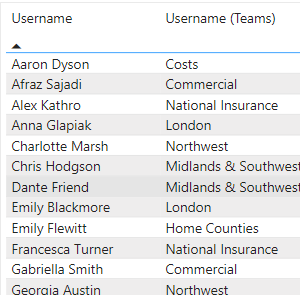
Need some help in displaying usernames under 'team' sub categories, this is how my table looks currently:

condolar_1-1659455613858.png


but this is the desired finish:

condolar_0-1659455525394.png


I have created a group and added the relevant people but it just displays the group name, not like in this sub heading format.


Any help much appreciated!!


1 ACCEPTED SOLUTION
bcdobbs
Community Champion
Community Champion

If you use a matrix and drag in the team first into the rows area. Then drag username beneath it. I think it should work unless I'm missing something.


Ben Dobbs

LinkedIn | Twitter | Blog

Did I answer your question? Mark my post as a solution! This will help others on the forum!
Appreciate your Kudos!!

View solution in original post

2 REPLIES 2
bcdobbs
Community Champion
Community Champion

If you use a matrix and drag in the team first into the rows area. Then drag username beneath it. I think it should work unless I'm missing something.


Ben Dobbs

LinkedIn | Twitter | Blog

Did I answer your question? Mark my post as a solution! This will help others on the forum!
Appreciate your Kudos!!

Superstar mate, much appreciated!

Helpful resources

Announcements
Fabric Data Days is here Carousel

Fabric Data Days 2026

Don't miss out on Data Days, June 15 through August 7. Learn Fabric, Power BI, SQL, AI and more.

May Power BI Update Carousel

Power BI Monthly Update - May 2026

Check out the May 2026 Power BI update to learn about new features.

Power BI DataViz World Championships carousel

Power BI DataViz World Championships - June 2026

A new Power BI DataViz World Championship is coming this June! Don't miss out on submitting your entry.