cancel
Showing results for 
Search instead for 
Did you mean: 

View all the Fabric Data Days sessions on demand. View schedule

Reply
Chenxu
New Member

How to get Percentiles with group by

I have a table with 3 columns: UserName, StartDate, Duration. I want to get the percentiles of Duration for each user on each day. How to write the query?

1 ACCEPTED SOLUTION
v-yuta-msft
Community Support
Community Support

Hi Chenxu,


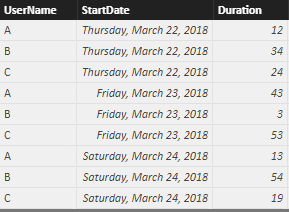
For test, I have made a sample table like this:

 7.PNG

To get the percentiles of Duration for each user on each day, you can create a calculate column and use DAX formula below:

Percentile =

VAR Duration_Sum =

SWITCH(Table1[UserName],

    "A", CALCULATE(SUM(Table1[Duration]), FILTER(Table1, Table1[UserName] = "A")),

    "B", CALCULATE(SUM(Table1[Duration]), FILTER(Table1, Table1[UserName] = "B")),

    "C", CALCULATE(SUM(Table1[Duration]), FILTER(Table1, Table1[UserName] = "C")))

RETURN

CALCULATE(DIVIDE(MAX(Table1[Duration]), Duration_SUm), FILTER(Table1, Table1[UserName] = EARLIER(Table1[UserName]) && Table1[StartDate] = EARLIER(Table1[StartDate])))


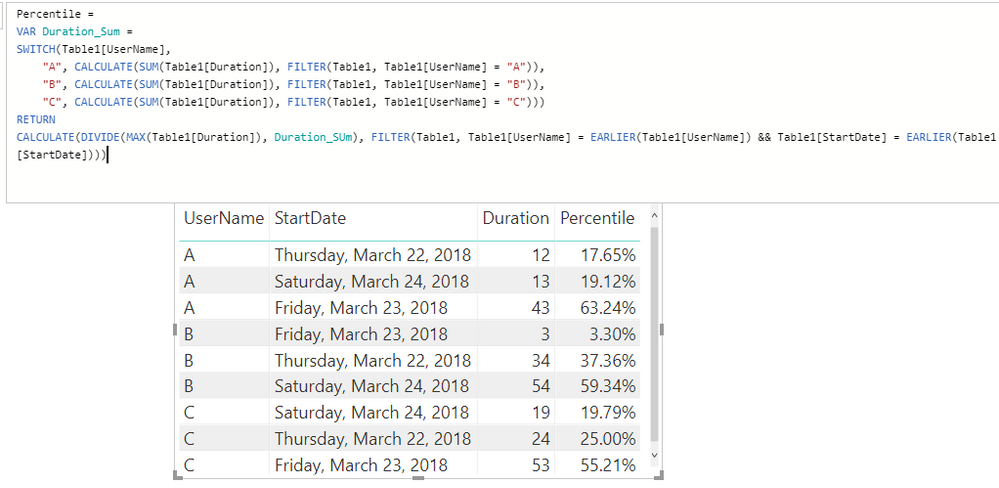
The result is like below:

 6.PNG


Sample PBIX here:

https://www.dropbox.com/s/sb5v6zpbq1kjlc5/For%20Chenxu.pbix?dl=0


Regards,

Jimmy Tao

View solution in original post

1 REPLY 1
v-yuta-msft
Community Support
Community Support

Hi Chenxu,


For test, I have made a sample table like this:

 7.PNG

To get the percentiles of Duration for each user on each day, you can create a calculate column and use DAX formula below:

Percentile =

VAR Duration_Sum =

SWITCH(Table1[UserName],

    "A", CALCULATE(SUM(Table1[Duration]), FILTER(Table1, Table1[UserName] = "A")),

    "B", CALCULATE(SUM(Table1[Duration]), FILTER(Table1, Table1[UserName] = "B")),

    "C", CALCULATE(SUM(Table1[Duration]), FILTER(Table1, Table1[UserName] = "C")))

RETURN

CALCULATE(DIVIDE(MAX(Table1[Duration]), Duration_SUm), FILTER(Table1, Table1[UserName] = EARLIER(Table1[UserName]) && Table1[StartDate] = EARLIER(Table1[StartDate])))


The result is like below:

 6.PNG


Sample PBIX here:

https://www.dropbox.com/s/sb5v6zpbq1kjlc5/For%20Chenxu.pbix?dl=0


Regards,

Jimmy Tao

Helpful resources

Announcements
November Power BI Update Carousel

Power BI Monthly Update - November 2025

Check out the November 2025 Power BI update to learn about new features.

Fabric Data Days Carousel

Fabric Data Days

Advance your Data & AI career with 50 days of live learning, contests, hands-on challenges, study groups & certifications and more!

FabCon Atlanta 2026 carousel

FabCon Atlanta 2026

Join us at FabCon Atlanta, March 16-20, for the ultimate Fabric, Power BI, AI and SQL community-led event. Save $200 with code FABCOMM.

Top Solution Authors
Top Kudoed Authors