cancel
Showing results for 
Search instead for 
Did you mean: 

Get Fabric Certified for FREE during Fabric Data Days. Don't miss your chance! Request now

Reply
NewbeePowerBI
Advocate I
Advocate I

How to find value for most recent date of the quarter

Hi,


I have below table:


artikeldatepreisyearquarter
110169220.01.201775,420161
110169221.01.201792,5820161
110169220.04.201775,420172
110169225.04.201792,5820172
110169320.01.201792,5820171
110169326.01.201775,420171


and I need to produce result like this i.e. i want to group by artical number, year, quarter and value of most recent date of the quarter:


110169221.01.201792,5820161
110169225.04.201792,5820172
110169326.01.201775,420171


I tried something like this but it is giving me same value for preis column. What am I doing wrong?

Table = SUMMARIZE(Test;Test[artikel];Test[year];Test[quarter];"Maxdate"; MAX(Test[date]);"preis";MAX(Test[preis]))

4 REPLIES 4
Anonymous
Not applicable

Hi,


You could try adding a calculated column which is a flag for latest date within the quarter:


Latest_Flag = IF( [date] = Calculate(MAX([date], Filter(Table, year = earlier(year) && quarter = earlier(quarter))), "Latest", "Not")


Then you can summarize filtering on Latest_Flag = "Latest"


Calculate(Summarize(Test;Test[artikel];Test[year];Test[quarter]; Test[date]), Test[Latest_Flag] = "Latest")


Unfortunately I don't have access to PBI to test this exactly but I believe this sort of logic should do the trick.


Thanks,


Will


NewbeePowerBI
Advocate I
Advocate I

I have tried the solution provided in 

https://community.powerbi.com/t5/Desktop/Latest-Value/m-p/101331#M42482


but it needs to steps and as my data sets are very big, join is taking too much time. Can we do it only with MAX ??

Hi @NewbeePowerBI,

Have you resolved your issue? If you have, please mark the right or helpful reply as answer.

Best Regards,
Angelia

Hi @NewbeePowerBI,

1. Create a new table using the formula below.


Table = SUMMARIZE(Test,Test[artikel],Test[year],Test[quarter],"Maxdate",MAX(Test[date]))


2. In new table and Test table, create a unique column, and create relationship between the column.

Column = Test[artikel]&Test[year]&Test[quarter]&Test[date]

Column = 'Table'[artikel]&'Table'[year]&'Table'[quarter]&'Table'[Maxdate]

1.PNG

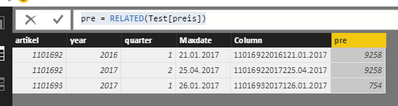
3. Create a calculated column to get the [preis] value.

pre = RELATED(Test[preis])

2.PNG

Best Regards,
Angelia

Helpful resources

Announcements
November Power BI Update Carousel

Power BI Monthly Update - November 2025

Check out the November 2025 Power BI update to learn about new features.

Fabric Data Days Carousel

Fabric Data Days

Advance your Data & AI career with 50 days of live learning, contests, hands-on challenges, study groups & certifications and more!

FabCon Atlanta 2026 carousel

FabCon Atlanta 2026

Join us at FabCon Atlanta, March 16-20, for the ultimate Fabric, Power BI, AI and SQL community-led event. Save $200 with code FABCOMM.

Top Solution Authors
Top Kudoed Authors