cancel
Showing results for 
Search instead for 
Did you mean: 

A new Data Days event is coming soon! This time we’re going bigger than ever. Fabric, Power BI, SQL, AI and more. Don't miss out.

Reply
Anonymous
Not applicable

How to find the user as per their type ??

Hello,

Hope you are doing well.


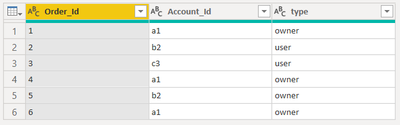
in the below screenshot how to write the DAX query to find ...

1> How many [account Id] are only owner (ans =  1, ie a1)

2> How many [account Id] are only user (ans =  1, ie c3)

3> How many [account Id] are only user and owner (ans =  1, ie b2)


kkpatel_1-1656344135533.png


note : all the a1 are having type owner. c3 is having type user. b2 is having both user and owner.

Hope this will help. Hope this question make sence. Incase don't, then just let me know.


1 ACCEPTED SOLUTION
PaulDBrown
Community Champion
Community Champion

1) Owners =

VAR _Owner = CALCULATETABLE(VALUES(Table[Account ID), Table[Type] = "Owner")

VAR _User = CALCULATETABLE(VALUES(Table[Account ID), Table[Type] = "User")

RETURN

COUNTROWS(EXCEPT(_Owner, _User))


2) User =

VAR _Owner = CALCULATETABLE(VALUES(Table[Account ID), Table[Type] = "Owner")

VAR _User = CALCULATETABLE(VALUES(Table[Account ID), Table[Type] = "User")

RETURN

COUNTROWS(EXCEPT(_User, _Owner))


3) both=

VAR _Owner = CALCULATETABLE(VALUES(Table[Account ID), Table[Type] = "Owner")

VAR _User = CALCULATETABLE(VALUES(Table[Account ID), Table[Type] = "User")

RETURN

COUNTROWS(INTERSECT(_Owner, _User))


Create 3 table visuals with the Table[Account[ID] field and add each measure to each table visual (1 measure per table) and set the Value as equal to 1


Did I answer your question? Mark my post as a solution!
In doing so, you are also helping me. Thank you!

Proud to be a Super User!
Paul on Linkedin.


View solution in original post

4 REPLIES 4
PaulDBrown
Community Champion
Community Champion

1) Owners =

VAR _Owner = CALCULATETABLE(VALUES(Table[Account ID), Table[Type] = "Owner")

VAR _User = CALCULATETABLE(VALUES(Table[Account ID), Table[Type] = "User")

RETURN

COUNTROWS(EXCEPT(_Owner, _User))


2) User =

VAR _Owner = CALCULATETABLE(VALUES(Table[Account ID), Table[Type] = "Owner")

VAR _User = CALCULATETABLE(VALUES(Table[Account ID), Table[Type] = "User")

RETURN

COUNTROWS(EXCEPT(_User, _Owner))


3) both=

VAR _Owner = CALCULATETABLE(VALUES(Table[Account ID), Table[Type] = "Owner")

VAR _User = CALCULATETABLE(VALUES(Table[Account ID), Table[Type] = "User")

RETURN

COUNTROWS(INTERSECT(_Owner, _User))


Create 3 table visuals with the Table[Account[ID] field and add each measure to each table visual (1 measure per table) and set the Value as equal to 1


Did I answer your question? Mark my post as a solution!
In doing so, you are also helping me. Thank you!

Proud to be a Super User!
Paul on Linkedin.


Anonymous
Not applicable

Thank you Paul. It works flawless.


Regards,

Kunal

Anonymous
Not applicable

@Seanan Hi,


Thanks for the respond.

no for the above senario it would be 1.


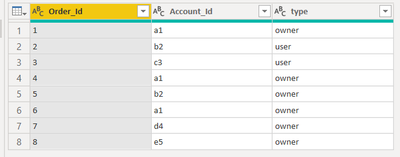
i have modified the senario. here i have insert d4 and e5.


kkpatel_0-1656348534379.png


1> How many [account Id] are only owner (ans =  1, ie a1,d4,e5)

2> How many [account Id] are only user (ans =  1, ie c3)

3> How many [account Id] are only user and owner (ans =  1, ie b2)


similarly i can add users too. Hope you got the point.


Seanan
Solution Supplier
Solution Supplier

Hi @Anonymous 

I'm a little bit confused by the outcome you are looking for here. For all 3 of the measures you'd like you said the answer = 1, and that all a1 are owner, c3 are type and b2 are both. Wouldn't this mean that your outcome would always be 1? 

Helpful resources

Announcements
May Power BI Update Carousel

Power BI Monthly Update - May 2026

Check out the May 2026 Power BI update to learn about new features.

Fabric SQL PBI Data Days

Data Days 2026 coming soon!

Sign up to receive a private message when registration opens and key events begin.

New to Fabric survey Carousel

New to Fabric Survey

If you have recently started exploring Fabric, we'd love to hear how it's going. Your feedback can help with product improvements.

Power BI DataViz World Championships carousel

Power BI DataViz World Championships - June 2026

A new Power BI DataViz World Championship is coming this June! Don't miss out on submitting your entry.