cancel
Showing results for 
Search instead for 
Did you mean: 

Get Fabric Certified for FREE during Fabric Data Days. Don't miss your chance! Request now

Reply
nj17
Helper III
Helper III

How to filter a bar chart by 2 selecting values from primary and secondary slicer

Hi,


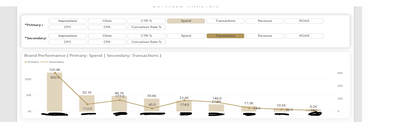
I need to create below where I will have primary and secondary slicers and user can select any value from these 2 slicers and the chart will show values selected.user can select single value from each of the slicer.


nj17_0-1672309365803.png


4 REPLIES 4
nj17
Helper III
Helper III

Any one having solution for this problem?

amitchandak
Super User
Super User

@nj17 , I think field parameters

Power BI Field Parameters — A Quick way for Dynamic Visuals: https://amitchandak.medium.com/power-bi-field-parameters-a-quick-way-for-dynamic-visuals-fc4095ae9af...
Power BI Field Parameters- Measure Slicer and Axis/Dimension slicer: https://youtu.be/lqF3Wa1FllE


You need to create two of them

Share with Power BI Enthusiasts: Full Power BI Video (20 Hours) YouTube
Microsoft Fabric Series 60+ Videos YouTube
Microsoft Fabric Hindi End to End YouTube

Thank you @amitchandak 

how can I set value as percentage even i formated as percentage but then also its showing me in decimal

nj17_1-1672377492261.png


HI @amitchandak I tried it by doing through field parameters but not working in my case

Helpful resources

Announcements
November Power BI Update Carousel

Power BI Monthly Update - November 2025

Check out the November 2025 Power BI update to learn about new features.

Fabric Data Days Carousel

Fabric Data Days

Advance your Data & AI career with 50 days of live learning, contests, hands-on challenges, study groups & certifications and more!

FabCon Atlanta 2026 carousel

FabCon Atlanta 2026

Join us at FabCon Atlanta, March 16-20, for the ultimate Fabric, Power BI, AI and SQL community-led event. Save $200 with code FABCOMM.

Top Solution Authors
Top Kudoed Authors