I have a inconvenent to obtein one calculated column doing two operations, one of sum and other of division as I show in this image:
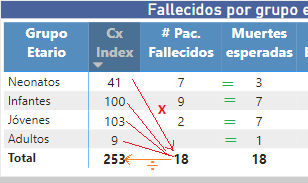
Resulted must be agregated to one table of visualization type matriz.
In the before picture the operation is for each row:
Row 1) 41 * 18 / 253 = 3 (value is round)
Row 2) 100 * 18 / 253 = 7
Row 3) 103 * 18 / 253 = 7
Row 4) 9 * 18 / 253 = 1
Note: Column CxIndex and #Pac Fallecidos are obteined with a messure for each one.
CxIndex =
VAR Valor =
CALCULATE(DISTINCTCOUNT('hce CirugiaCardioPediatrica'[IdDimCirugiaSts]),
FILTER('hce CirugiaCardioPediatrica', 'hce CirugiaCardioPediatrica'[CirugiaIndex] = 1)) --> Marca que indica que es Index (1)
RETURN
IF(ISBLANK(Valor), 0, Valor) --> Validate null values
Pac Fallecidos = -- Pacientes fallecidos agrupados por grupo etario
CALCULATE(DISTINCTCOUNT('hce CirugiaCardioPediatrica'[IdCliente]),
FILTER('hce CirugiaCardioPediatrica','hce CirugiaCardioPediatrica'[Estado Egreso] = "Muerto"),
FILTER('hce CirugiaCardioPediatrica', 'hce CirugiaCardioPediatrica'[CirugiaIndex] = 1) --> Cx Index (única por atención)
)


