Join us at FabCon Atlanta from March 16 - 20, 2026, for the ultimate Fabric, Power BI, AI and SQL community-led event. Save $200 with code FABCOMM.
Register now!The Power BI Data Visualization World Championships is back! Get ahead of the game and start preparing now! Learn more
Hello Everyone!
My apologies if my request is very basic, i tried to search for a long time on the forum but unfortunetly i didn't catch anything helpful for now.
Here is my situation:
I am working with multiples companies datasets (around 40 files).
Those datasets are all Excel tables only.
And all of them are located separately in the same Sharepoint site.
(Each Excel file only have 1 sheet)
I am working with Office 365 Business Essentials + Power BI Pro.
My 40 Excel tables have all exactly the same columns of course. Each of them represents a unique country.
In my Power Bi all the Excel Tables are gathered in 1 Query.
So for my situation, I am focusing on 2 columns :
What i would like to do, is to get a visualisation showing the companies which have a duplicate in all others Excel Country Tables.
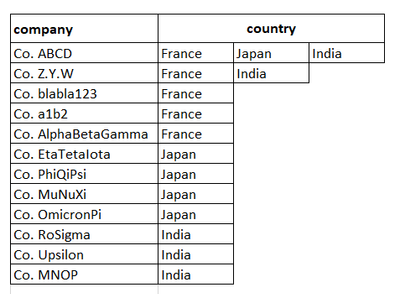
The idea would be to display a visualisation with the name of the company showing all the country having this same company.
Sample:
In this case I have 3 Excel tables (i plan to do it with more than 40)
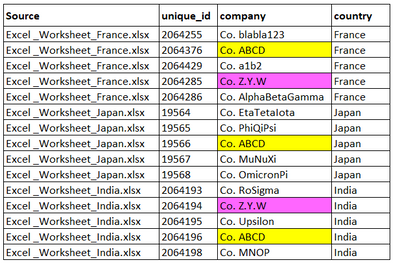
As you can see 2 companies have twins in other countries : Co.ABCD and Co.Z.Y.W

Just to remind, on Power BI all the Excel Tables Sources are gathered in one Query.(Excel_Worksheet_France.xlsx, Excel_Worksheet_Japan.xlsx, Excel_Worksheet_India.xlsx, etc...)
So actually it looks like that:
So what i would like to get is a visualization showing something like that (broadly):
At least to have a visual showing clearly in which countries a company is located.
It may also be good if I can separate the companies which are located in only 1 country and the other companies which are located in more than 1 country.
Any idea how to do that? 😄
Thanks a lot for those who have the patience to read all my stuff eheh 😛
Solved! Go to Solution.
Create measures
names of countries = CONCATENATEX(FILTER(ALL(Sheet3),Sheet3[company]=MAX(Sheet3[company])),[country],",") numbers of countries = CALCULATE(DISTINCTCOUNT(Sheet3[country]),FILTER(ALL(Sheet3),Sheet3[company]=MAX(Sheet3[company])))
Best Regards
Maggie
Create measures
names of countries = CONCATENATEX(FILTER(ALL(Sheet3),Sheet3[company]=MAX(Sheet3[company])),[country],",") numbers of countries = CALCULATE(DISTINCTCOUNT(Sheet3[country]),FILTER(ALL(Sheet3),Sheet3[company]=MAX(Sheet3[company])))
Best Regards
Maggie
My apologies if my request is very basic, i tried to search for a long time on the forum but unfortunetly i didn't catch anything helpful for now.
Here is my situation:
I am working with multiples companies datasets (around 40 files).
Those datasets are all Excel tables only.
And all of them are located separately in the same Sharepoint site.
(Each Excel file only have 1 sheet)
I am working with Office 365 Business Essentials + Power BI Pro.
My 40 Excel tables have all exactly the same columns of course. Each of them represents a unique country.
In my Power Bi all the Excel Tables are gathered in 1 Query.
So for my situation, I am focusing on 2 columns :
What i would like to do, is to get a visualisation showing the companies which have a duplicate in all others Excel Country Tables.
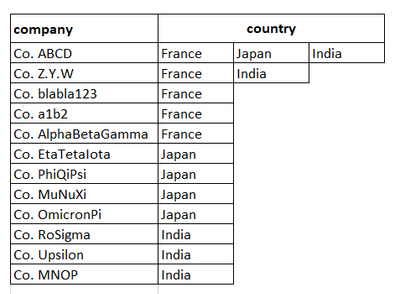
The idea would be to display a visualisation with the name of the company showing all the country having this same company.
Sample:
In this case I have 3 Excel tables (i plan to do it with more than 40)
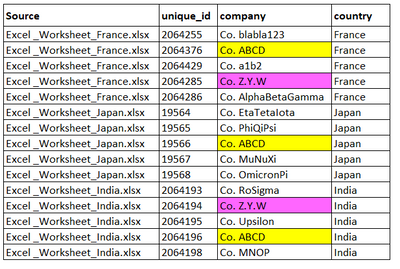
As you can see 2 companies have twins in other countries : Co.ABCD and Co.Z.Y.W
Just to remind, on Power BI all the Excel Tables Sources are gathered in one Query.(Excel_Worksheet_France.xlsx, Excel_Worksheet_Japan.xlsx, Excel_Worksheet_India.xlsx, etc...)
So actually it looks like that:
So what i would like to get is a visualization showing something like that (broadly):
At least to have a visual showing clearly in which countries a company is located.
It may also be good if I can separate the companies which are located in only 1 country and the other companies which are located in more than 1 country.
Any idea how to do that? 
Thanks a lot for those who have the patience to read all my stuff eheh
The Power BI Data Visualization World Championships is back! Get ahead of the game and start preparing now!
Check out the November 2025 Power BI update to learn about new features.
| User | Count |
|---|---|
| 66 | |
| 44 | |
| 40 | |
| 29 | |
| 19 |
| User | Count |
|---|---|
| 200 | |
| 126 | |
| 103 | |
| 70 | |
| 53 |