Join us at FabCon Atlanta from March 16 - 20, 2026, for the ultimate Fabric, Power BI, AI and SQL community-led event. Save $200 with code FABCOMM.
Register now!Learn from the best! Meet the four finalists headed to the FINALS of the Power BI Dataviz World Championships! Register now
Usage:
I have table view that has multiple columns where users need to scroll right most to get complete information. I was to display the selected row in a text box or a card with all the column details that I want to display.
What I tried:
I tried to use SELECTVALUE(), MAX(), MIN() and VALUE() in a measure to get all the values of each column. But I am getting an empty result although when I place this measure in the same table that I am retrieving data from each row has combined values.
For example:
Measure =
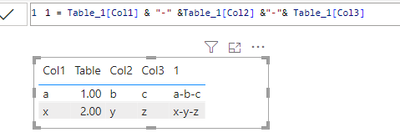
Table Col1 Col2 Col3 Col4 Measure
1 a b c d a - b - c - d
2 x y z r x - y - z - r
Measure is displayed as empty/Blank in a text box. I've tried MAX(), MIN(), and Value(). ===> Direct Query Mode
Please help me with this issue.
Thanks in advance.
Hi @pkoppurapu ,
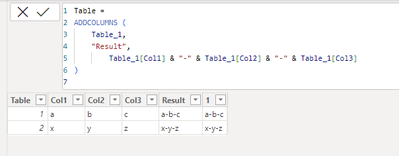
For direct query mode, you can't view table data in table view, you can only create calculated column to display the result in table visual or create calculated table with the help of addcolumn function. refer below:
Table =
ADDCOLUMNS (
Table_1,
"Result",
Table_1[Col1] & "-" & Table_1[Col2] & "-" & Table_1[Col3]
)
Best Regards,
Adamk Kong
If this post helps, then please consider Accept it as the solution to help the other members find it more quickly.
@Anonymous what if I want to display selected row of a table for a user? Like if a row is selected i want to display the whole row into a text box or a card visual.
calculated column provides the whole column values into a table.
Hi @pkoppurapu ,
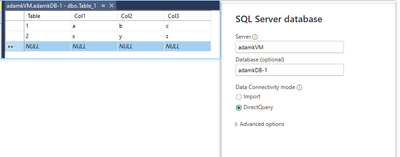
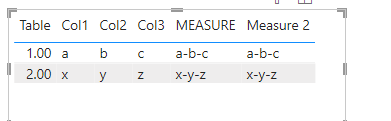
I replicated your scenario, connecting to a data source in a direct query. Tried the following formula, which displays the results correctly.
MEASURE =
SELECTEDVALUE ( Table_1[Col1] ) & "-"
& SELECTEDVALUE ( Table_1[Col2] ) & "-"
& SELECTEDVALUE ( Table_1[Col3] )
M_ =
MAX ( Table_1[Col1] ) & "-"
& MAX ( Table_1[Col2] ) & "-"
& MAX ( Table_1[Col3] )
Best Regards,
Adamk Kong
If this post helps, then please consider Accept it as the solution to help the other members find it more quickly
Hey @Anonymous
I can see the results in the same table of col1 and col2 but not in a text box/new table. Can you try to print these values in a text box/card/new table? I guess you would face the same issue.
Thank you.
Share feedback directly with Fabric product managers, participate in targeted research studies and influence the Fabric roadmap.
Check out the February 2026 Power BI update to learn about new features.
| User | Count |
|---|---|
| 53 | |
| 49 | |
| 33 | |
| 16 | |
| 15 |
| User | Count |
|---|---|
| 85 | |
| 70 | |
| 38 | |
| 28 | |
| 25 |