cancel
Showing results for 
Search instead for 
Did you mean: 

Get Fabric Certified for FREE during Fabric Data Days. Don't miss your chance! Request now

Reply
Anonymous
Not applicable

How to display Top 3 highest percentages as clustered column chart?

Hi,


I need to show just the top 3 highest percentages to appear in the chart.  Right now, they are all showing.  Any help would be appreciated.


Thanks

1 ACCEPTED SOLUTION

@Anonymous 


TopN is not available on measure data. only on dimensions.


For example if you want top 3 users (dimension) based on traffic (measure), then you should go to users field on filter pane and in the 'By Value' section the measure (in your case Non Engaged User %)

View solution in original post

3 REPLIES 3
themistoklis
Community Champion
Community Champion

@Anonymous 


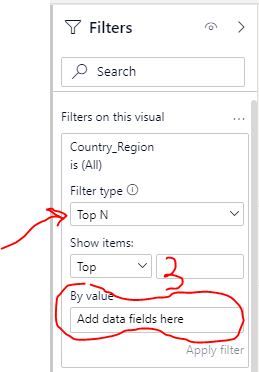
As a start have you tried using the Top N functionality from filter pane to see if it works on your data?

Image below:

top_3.JPG

Anonymous
Not applicable

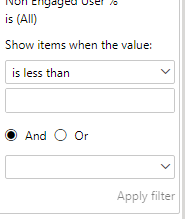
I don't see "filter type" in the panel.  This is what I see:


Capture.PNG

@Anonymous 


TopN is not available on measure data. only on dimensions.


For example if you want top 3 users (dimension) based on traffic (measure), then you should go to users field on filter pane and in the 'By Value' section the measure (in your case Non Engaged User %)

Helpful resources

Announcements
November Power BI Update Carousel

Power BI Monthly Update - November 2025

Check out the November 2025 Power BI update to learn about new features.

Fabric Data Days Carousel

Fabric Data Days

Advance your Data & AI career with 50 days of live learning, contests, hands-on challenges, study groups & certifications and more!

FabCon Atlanta 2026 carousel

FabCon Atlanta 2026

Join us at FabCon Atlanta, March 16-20, for the ultimate Fabric, Power BI, AI and SQL community-led event. Save $200 with code FABCOMM.

Top Solution Authors
Top Kudoed Authors