FabCon is coming to Atlanta
Join us at FabCon Atlanta from March 16 - 20, 2026, for the ultimate Fabric, Power BI, AI and SQL community-led event. Save $200 with code FABCOMM.
Register now!- Power BI forums
- Get Help with Power BI
- Desktop
- Service
- Report Server
- Power Query
- Mobile Apps
- Developer
- DAX Commands and Tips
- Custom Visuals Development Discussion
- Health and Life Sciences
- Power BI Spanish forums
- Translated Spanish Desktop
- Training and Consulting
- Instructor Led Training
- Dashboard in a Day for Women, by Women
- Galleries
- Data Stories Gallery
- Themes Gallery
- Contests Gallery
- QuickViz Gallery
- Quick Measures Gallery
- Visual Calculations Gallery
- Notebook Gallery
- Translytical Task Flow Gallery
- TMDL Gallery
- R Script Showcase
- Webinars and Video Gallery
- Ideas
- Custom Visuals Ideas (read-only)
- Issues
- Issues
- Events
- Upcoming Events
The Power BI Data Visualization World Championships is back! Get ahead of the game and start preparing now! Learn more
- Power BI forums
- Forums
- Get Help with Power BI
- Desktop
- Re: How to createtable from one table but filterin...
- Subscribe to RSS Feed
- Mark Topic as New
- Mark Topic as Read
- Float this Topic for Current User
- Bookmark
- Subscribe
- Printer Friendly Page

- Mark as New
- Bookmark
- Subscribe
- Mute
- Subscribe to RSS Feed
- Permalink
- Report Inappropriate Content
How to createtable from one table but filtering based on values from another table
Hello Friendly Helpers,
I have been racking my brain and the interwebs and the youtubes for this. I am former DB dev, and i could so this faily easily in SQL, but alas I am using the tools available to me. So I have a table with the following data:
This table has all employees in it with the id of the employee they report to.
| AllEmployees | ||
| EmployeeID | EmployeeName | ManagerID |
| 1 | A | 99 |
| 2 | B | 1 |
| 3 | C | 1 |
| 4 | D | 2 |
| 5 | E | 2 |
| 6 | F | 3 |
| 7 | G | 3 |
| 8 | H | 9 |
| 9 | I | 9 |
| 10 | J | 9 |
I created a table that where the managerID = 1 from the AllEmployees table.
| Level1Managers | ||
| EmployeeID | EmployeeName | ManagerID |
| 2 | B | 1 |
| 3 | C | 1 |
On this table, i would like to create a table that is populated with employees that have the ManagerID that is in Level1Managers.
| Level2Managers | ||
| EmployeeID | EmployeeName | ManagerID |
| 4 | D | 2 |
| 5 | E | 2 |
| 6 | F | 3 |
| 7 | G | 3 |
So essentially i am planning on creating an org hierarchy out of this, going many many times over until it is complete.
For now, i would like to create the 3rd table. I have been using createtable, but i am not sure how to put a list of dynamic values in the validation portion of the expression.
I tried:
Essentially i want to bring back the all the values from the AllEmployees table where ManagerID = LevelOneManagers.EmployeeID
Solved! Go to Solution.


- Mark as New
- Bookmark
- Subscribe
- Mute
- Subscribe to RSS Feed
- Permalink
- Report Inappropriate Content
Hi @rdwd15,
Have you considered using PATH as a basis to build your org heirachy?
Heirachy = PATH(Employee[EmployeeID],Employee[ManagerID])
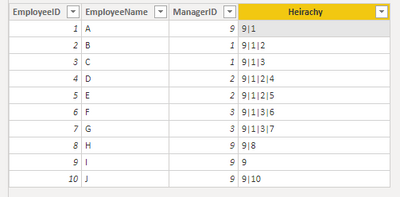
Let me know if that helps
- Mark as New
- Bookmark
- Subscribe
- Mute
- Subscribe to RSS Feed
- Permalink
- Report Inappropriate Content
To further expand on the above, splitting it can be done using PATHITEM (Index from left) or PATHITEMREVERSE (Index from right).
Manager 1 = PATHITEMREVERSE(Employee[Heirachy],2)
Manager 2 = PATHITEMREVERSE(Employee[Heirachy],3)
Manager 3 = PATHITEMREVERSE(Employee[Heirachy],4)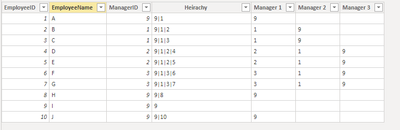
- Mark as New
- Bookmark
- Subscribe
- Mute
- Subscribe to RSS Feed
- Permalink
- Report Inappropriate Content
Thanks, that totally looks like what I want to do but with so many fewer complicated steps.
I will give this a try.
- Mark as New
- Bookmark
- Subscribe
- Mute
- Subscribe to RSS Feed
- Permalink
- Report Inappropriate Content
- Mark as New
- Bookmark
- Subscribe
- Mute
- Subscribe to RSS Feed
- Permalink
- Report Inappropriate Content
Hello J. Thanks so much, yes this will work exactly how i want it to, and so much easier than my long conviluted way i was going about it.
Thanks again.
- Mark as New
- Bookmark
- Subscribe
- Mute
- Subscribe to RSS Feed
- Permalink
- Report Inappropriate Content
Glad I could help and save you some time 👍
- Mark as New
- Bookmark
- Subscribe
- Mute
- Subscribe to RSS Feed
- Permalink
- Report Inappropriate Content
Hi @rdwd15,
Have you considered using PATH as a basis to build your org heirachy?
Heirachy = PATH(Employee[EmployeeID],Employee[ManagerID])
Let me know if that helps
- Mark as New
- Bookmark
- Subscribe
- Mute
- Subscribe to RSS Feed
- Permalink
- Report Inappropriate Content
To further expand on the above, splitting it can be done using PATHITEM (Index from left) or PATHITEMREVERSE (Index from right).
Manager 1 = PATHITEMREVERSE(Employee[Heirachy],2)
Manager 2 = PATHITEMREVERSE(Employee[Heirachy],3)
Manager 3 = PATHITEMREVERSE(Employee[Heirachy],4)

Helpful resources

Power BI Dataviz World Championships
The Power BI Data Visualization World Championships is back! Get ahead of the game and start preparing now!

Power BI Monthly Update - November 2025
Check out the November 2025 Power BI update to learn about new features.

FabCon Atlanta 2026
Join us at FabCon Atlanta, March 16-20, for the ultimate Fabric, Power BI, AI and SQL community-led event. Save $200 with code FABCOMM.

| User | Count |
|---|---|
| 59 | |
| 43 | |
| 42 | |
| 23 | |
| 17 |


| User | Count |
|---|---|
| 190 | |
| 122 | |
| 96 | |
| 66 | |
| 46 |


