Fabric Data Days starts November 4th!
Advance your Data & AI career with 50 days of live learning, dataviz contests, hands-on challenges, study groups & certifications and more!
Get registered- Power BI forums
- Get Help with Power BI
- Desktop
- Service
- Report Server
- Power Query
- Mobile Apps
- Developer
- DAX Commands and Tips
- Custom Visuals Development Discussion
- Health and Life Sciences
- Power BI Spanish forums
- Translated Spanish Desktop
- Training and Consulting
- Instructor Led Training
- Dashboard in a Day for Women, by Women
- Galleries
- Data Stories Gallery
- Themes Gallery
- Contests Gallery
- QuickViz Gallery
- Quick Measures Gallery
- Visual Calculations Gallery
- Notebook Gallery
- Translytical Task Flow Gallery
- TMDL Gallery
- R Script Showcase
- Webinars and Video Gallery
- Ideas
- Custom Visuals Ideas (read-only)
- Issues
- Issues
- Events
- Upcoming Events
Get Fabric Certified for FREE during Fabric Data Days. Don't miss your chance! Request now
- Power BI forums
- Forums
- Get Help with Power BI
- Desktop
- How to create ranking for highest value to lowest
- Subscribe to RSS Feed
- Mark Topic as New
- Mark Topic as Read
- Float this Topic for Current User
- Bookmark
- Subscribe
- Printer Friendly Page


- Mark as New
- Bookmark
- Subscribe
- Mute
- Subscribe to RSS Feed
- Permalink
- Report Inappropriate Content
How to create ranking for highest value to lowest
Hi
I want to create a rank by highest value, for example if I have this table:
| Routes: | Total Pax No.: |
| RUH | 10,000 |
| JED | 6,000 |
| RUH | 15,000 |
| ABH | 9,000 |
| JED | 7,000 |
I want to create a rank by routes pax no (highest to lowest), like this example:
| Routes: | Total Pax No.: | Rank: |
| RUH | 10,000 | 1 |
| JED | 6,000 | 2 |
| RUH | 15,000 | 1 |
| ABH | 9,000 | 3 |
| JED | 7,000 | 2 |
which shows RUH is 1 as have the highest value, JED is 2 and the lowest is ABH as 3.
Solved! Go to Solution.


- Mark as New
- Bookmark
- Subscribe
- Mute
- Subscribe to RSS Feed
- Permalink
- Report Inappropriate Content
Hello @RexaZii93 ,
Try creating below calculated column-
Rank =
RANKX (
    'Table',
    CALCULATE (
        SUM ( 'Table'[Total Pax No.] ),
        FILTER ( 'Table', 'Table'[Routes] = EARLIER ( 'Table'[Routes] ) )
    ),
    ,
    DESC,
    DENSE
)
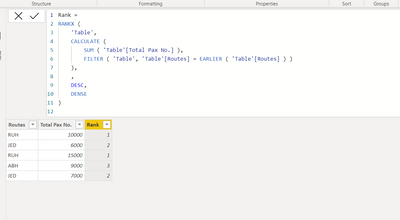
Please mark it as solution if it solves your issue. Kudos are also appreciated.
Shishir
- Mark as New
- Bookmark
- Subscribe
- Mute
- Subscribe to RSS Feed
- Permalink
- Report Inappropriate Content
Hello @RexaZii93 ,
Try creating below calculated column-
Rank =
RANKX (
    'Table',
    CALCULATE (
        SUM ( 'Table'[Total Pax No.] ),
        FILTER ( 'Table', 'Table'[Routes] = EARLIER ( 'Table'[Routes] ) )
    ),
    ,
    DESC,
    DENSE
)
Please mark it as solution if it solves your issue. Kudos are also appreciated.
Shishir
- Mark as New
- Bookmark
- Subscribe
- Mute
- Subscribe to RSS Feed
- Permalink
- Report Inappropriate Content
Thanks, it worked! but I have a column which filter internations and domestic routs and another one which filters departure and arrival, when I apply it show the rank of international for example it miss up the rank and goes 7 10 30 etc.
can I make the rank dynamicly to when I apply filters.
Thanks
- Mark as New
- Bookmark
- Subscribe
- Mute
- Subscribe to RSS Feed
- Permalink
- Report Inappropriate Content
In that case, you need to go for Measure in place of calculated column.
Create measure -
TotalPaxMeasure = Sum('Table'[Total Pax No.])
Create one more measure after creating above one and then use it for ranking.
RankMeasure =
CALCULATE (
    RANKX ( ALLSELECTED ( 'Table'[Routes] ), [TotalPaxMeasure],, DESC, DENSE )
)
Please mark it as answer if it resolves your issue. kudos are also appreciated.
Shishir
- Mark as New
- Bookmark
- Subscribe
- Mute
- Subscribe to RSS Feed
- Permalink
- Report Inappropriate Content
Thanks I added the 2 measures but how does work? do I just add the pax no. and the rank measures to the filtering option?
- Mark as New
- Bookmark
- Subscribe
- Mute
- Subscribe to RSS Feed
- Permalink
- Report Inappropriate Content
Just use rank measure as visual level filter and set to equal to 1.
Shishir
- Mark as New
- Bookmark
- Subscribe
- Mute
- Subscribe to RSS Feed
- Permalink
- Report Inappropriate Content
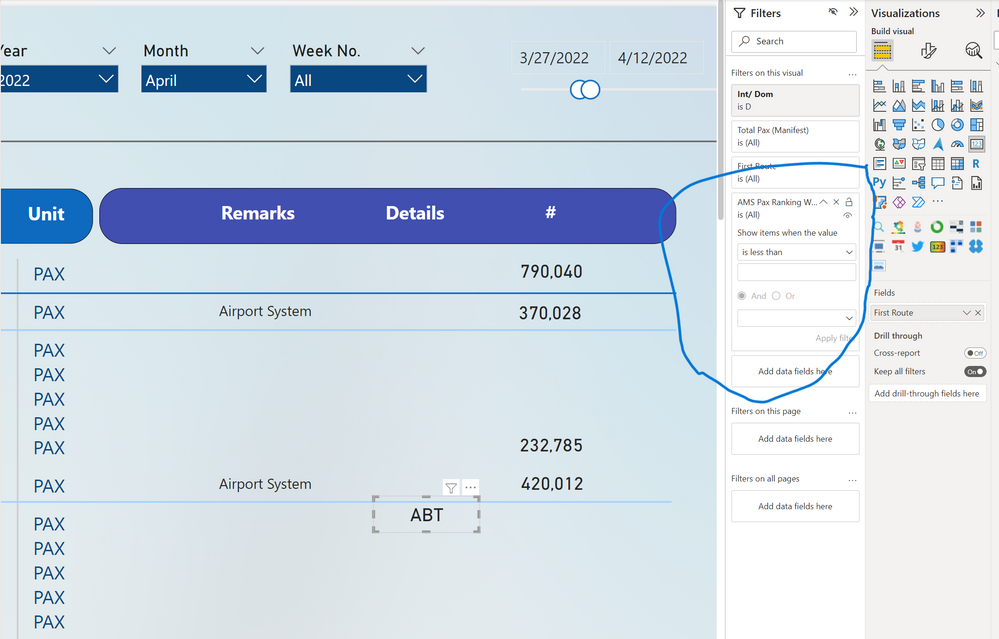
Thanks I tested to a list visual and it worked I can just change the number to any rank and it shows the data I want, but when I use a card visual and applied the measure it grays out do you know why is that and how to fix it?

- Mark as New
- Bookmark
- Subscribe
- Mute
- Subscribe to RSS Feed
- Permalink
- Report Inappropriate Content
Hi @RexaZii93
You can use this dax formula to create a new calculated column
Rank =
RANKX (
Table2,
CALCULATE (
SUM ( Table2[Total Pax No] ),
ALLEXCEPT (
Table2,
Table2[Routes]
)
),
,
DESC,
DENSE
)
This is the output of teh calculated column
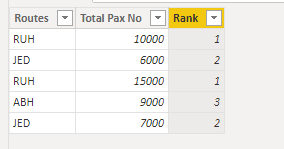
If this post helps, Accept it as a solution.
Helpful resources

Power BI Monthly Update - November 2025
Check out the November 2025 Power BI update to learn about new features.

Fabric Data Days
Advance your Data & AI career with 50 days of live learning, contests, hands-on challenges, study groups & certifications and more!

FabCon Atlanta 2026
Join us at FabCon Atlanta, March 16-20, for the ultimate Fabric, Power BI, AI and SQL community-led event. Save $200 with code FABCOMM.


| User | Count |
|---|---|
| 97 | |
| 73 | |
| 50 | |
| 46 | |
| 44 |


