Fabric Data Days starts November 4th!
Advance your Data & AI career with 50 days of live learning, dataviz contests, hands-on challenges, study groups & certifications and more!
Get registered- Power BI forums
- Get Help with Power BI
- Desktop
- Service
- Report Server
- Power Query
- Mobile Apps
- Developer
- DAX Commands and Tips
- Custom Visuals Development Discussion
- Health and Life Sciences
- Power BI Spanish forums
- Translated Spanish Desktop
- Training and Consulting
- Instructor Led Training
- Dashboard in a Day for Women, by Women
- Galleries
- Data Stories Gallery
- Themes Gallery
- Contests Gallery
- QuickViz Gallery
- Quick Measures Gallery
- Visual Calculations Gallery
- Notebook Gallery
- Translytical Task Flow Gallery
- TMDL Gallery
- R Script Showcase
- Webinars and Video Gallery
- Ideas
- Custom Visuals Ideas (read-only)
- Issues
- Issues
- Events
- Upcoming Events
Get Fabric Certified for FREE during Fabric Data Days. Don't miss your chance! Request now
- Power BI forums
- Forums
- Get Help with Power BI
- Desktop
- Re: How to create new GROUP field ?
- Subscribe to RSS Feed
- Mark Topic as New
- Mark Topic as Read
- Float this Topic for Current User
- Bookmark
- Subscribe
- Printer Friendly Page

- Mark as New
- Bookmark
- Subscribe
- Mute
- Subscribe to RSS Feed
- Permalink
- Report Inappropriate Content
How to create new GROUP field ?
Hi All
My PBI FILE :-
https://www.dropbox.com/s/vsas6b4276pbwq4/GROUP%20V001.pbix?dl=0
Mt expected result shown in yellow :-
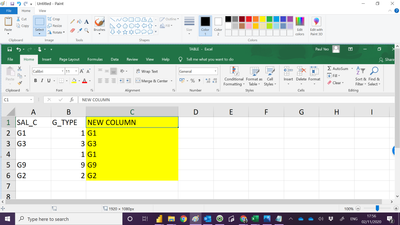
Solved! Go to Solution.


- Mark as New
- Bookmark
- Subscribe
- Mute
- Subscribe to RSS Feed
- Permalink
- Report Inappropriate Content
Hi @Anonymous ,
Try to create the new column like this:
New Column_ =
IF (
    "G" & CONVERT ( [G_TYPE], STRING ) = [SAL_C]
        || [SAL_C] = BLANK (),
    "G" & CONVERT ( [G_TYPE], STRING ),
    [SAL_C]
)
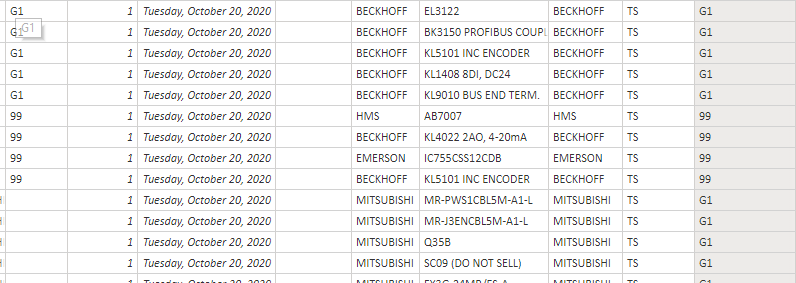
Attached the modified sample file in the below, hopes to help you.
Best Regards,
Community Support Team _ Yingjie Li
If this post helps, then please consider Accept it as the solution to help the other members find it more quickly.


- Mark as New
- Bookmark
- Subscribe
- Mute
- Subscribe to RSS Feed
- Permalink
- Report Inappropriate Content
you can create a new column in Power Query to meet your conditions.
if [YOUR GTYPE COLUMN] = null
or [YOUR GTYPE COLUMN] = ""
and ([YOUR SAL_C COLUMN] = null
or [YOUR SAL_C COLUMN] = "")
then null
else

if [YOUR GTYPE COLUMN] = null
or [YOUR GTYPE COLUMN] = ""
and ([YOUR SAL_C COLUMN] <> null
or [YOUR SAL_C COLUMN] <> "")
then [YOUR SAL_C COLUMN]
else

if [YOUR SAL_C COLUMN] = null
or [YOUR SAL_C COLUMN] = ""
then "G" & Number.ToText([YOUR GTYPE COLUMN])
else
[YOUR SAL_C COLUMN]
- Mark as New
- Bookmark
- Subscribe
- Mute
- Subscribe to RSS Feed
- Permalink
- Report Inappropriate Content
Hi @Anonymous ,
You can create a column like this:
New Column =
CALCULATE (
    MAX ( 'TABLE'[SAL_C] ),
    FILTER ( ALL ( 'TABLE' ), 'TABLE'[G_TYPE] = EARLIER ( 'TABLE'[G_TYPE] ) )
)

Attached the modified sample file in the below, hopes to help you.
Best Regards,
Community Support Team _ Yingjie Li
If this post helps, then please consider Accept it as the solution to help the other members find it more quickly.
- Mark as New
- Bookmark
- Subscribe
- Mute
- Subscribe to RSS Feed
- Permalink
- Report Inappropriate Content
Hi Ying
When i apply your acript into my actual pbi file . the result is wrong.
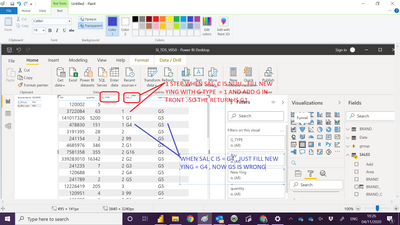
my pbi file , ref to Tab "Recode SAL_C"
https://www.dropbox.com/s/46wxf6wk6wb13g1/SI_TDS_V050.pbix?dl=0
Thank you for your help
Paul
- Mark as New
- Bookmark
- Subscribe
- Mute
- Subscribe to RSS Feed
- Permalink
- Report Inappropriate Content
Hi @Anonymous ,
Based on the sample file, I want to comfirm some logic about this case(For example [G_Type = 1]):
When [SAL_C] is blank or equals G1, the value of the new column should be G1, otherwise the value of the new column should be the same as [SAL_C].
Is it right or anywhere wrong?
Best Regards,
Community Support Team _ Yingjie Li
- Mark as New
- Bookmark
- Subscribe
- Mute
- Subscribe to RSS Feed
- Permalink
- Report Inappropriate Content
Hi Ying
Thank you for your help , yes you are correct.
paul
- Mark as New
- Bookmark
- Subscribe
- Mute
- Subscribe to RSS Feed
- Permalink
- Report Inappropriate Content
you can create a new column in Power Query to meet your conditions.
if [YOUR GTYPE COLUMN] = null
or [YOUR GTYPE COLUMN] = ""
and ([YOUR SAL_C COLUMN] = null
or [YOUR SAL_C COLUMN] = "")
then null
else

if [YOUR GTYPE COLUMN] = null
or [YOUR GTYPE COLUMN] = ""
and ([YOUR SAL_C COLUMN] <> null
or [YOUR SAL_C COLUMN] <> "")
then [YOUR SAL_C COLUMN]
else

if [YOUR SAL_C COLUMN] = null
or [YOUR SAL_C COLUMN] = ""
then "G" & Number.ToText([YOUR GTYPE COLUMN])
else
[YOUR SAL_C COLUMN]
- Mark as New
- Bookmark
- Subscribe
- Mute
- Subscribe to RSS Feed
- Permalink
- Report Inappropriate Content
Hi @Anonymous ,
Try to create the new column like this:
New Column_ =
IF (
    "G" & CONVERT ( [G_TYPE], STRING ) = [SAL_C]
        || [SAL_C] = BLANK (),
    "G" & CONVERT ( [G_TYPE], STRING ),
    [SAL_C]
)
Attached the modified sample file in the below, hopes to help you.
Best Regards,
Community Support Team _ Yingjie Li
If this post helps, then please consider Accept it as the solution to help the other members find it more quickly.
- Mark as New
- Bookmark
- Subscribe
- Mute
- Subscribe to RSS Feed
- Permalink
- Report Inappropriate Content
Hi Ying
You are good,finally it work.
thank you very much.
Paul


- Mark as New
- Bookmark
- Subscribe
- Mute
- Subscribe to RSS Feed
- Permalink
- Report Inappropriate Content
@Anonymous Create a new column like below

Did I answer your question? Mark my post as a solution!
Appreciate your Kudos
Proud to be a Super User!
Follow me on linkedin
- Mark as New
- Bookmark
- Subscribe
- Mute
- Subscribe to RSS Feed
- Permalink
- Report Inappropriate Content
Hi Negi
Thank you for your reply.
First take SAL_C value , in case it is missing , replace by GROUP_TYPE and Add G infront.
| SAL_C |
| G1 |
| G3 |
| G9 |
| G2 |

- Mark as New
- Bookmark
- Subscribe
- Mute
- Subscribe to RSS Feed
- Permalink
- Report Inappropriate Content
- Mark as New
- Bookmark
- Subscribe
- Mute
- Subscribe to RSS Feed
- Permalink
- Report Inappropriate Content
Hi Amit
Thank you for your help.
I get error msg :-
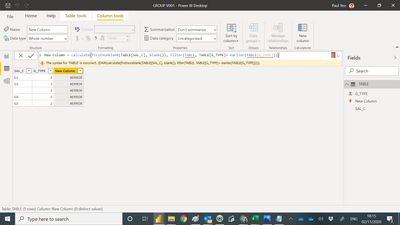
- Mark as New
- Bookmark
- Subscribe
- Mute
- Subscribe to RSS Feed
- Permalink
- Report Inappropriate Content
- Mark as New
- Bookmark
- Subscribe
- Mute
- Subscribe to RSS Feed
- Permalink
- Report Inappropriate Content
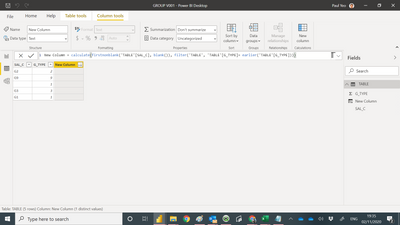
Hi Amit
not more error but return null.
Helpful resources

Fabric Data Days
Advance your Data & AI career with 50 days of live learning, contests, hands-on challenges, study groups & certifications and more!

Power BI Monthly Update - October 2025
Check out the October 2025 Power BI update to learn about new features.

FabCon Atlanta 2026
Join us at FabCon Atlanta, March 16-20, for the ultimate Fabric, Power BI, AI and SQL community-led event. Save $200 with code FABCOMM.


