cancel
Showing results for 
Search instead for 
Did you mean: 

Learn from the best! Meet the four finalists headed to the FINALS of the Power BI Dataviz World Championships! Register now

Reply
ohkokken
Regular Visitor

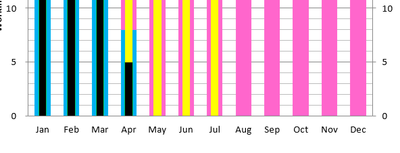
How to create column chart with overlapped x-axis and different column width?

Anyone has idea how to create this in column chart(black and blue column)? Similar one as excel.


column graph.png

1 ACCEPTED SOLUTION
AllisonKennedy
Community Champion
Community Champion

@ohkokken  here's a great example of similar to what you want: https://www.linkedin.com/posts/rickmaurinus_powerbi-businessintelligence-powerbi-activity-6918573717... 


Please @mention me in your reply if you want a response.

Copying DAX from this post? Click here for a hack to quickly replace it with your own table names

Has this post solved your problem? Please Accept as Solution so that others can find it quickly and to let the community know your problem has been solved.
If you found this post helpful, please give Kudos C

I work as a Microsoft trainer and consultant, specialising in Power BI and Power Query.
www.excelwithallison.com

View solution in original post

3 REPLIES 3
v-henryk-mstf
Community Support
Community Support

Hi @ohkokken ,


Whether the advice given by @AllisonKennedy  has solved your confusion, if the problem has been solved you can mark the reply for the standard answer to help the other members find it more quickly. If not, please point it out.


Looking forward to your feedback.


Best Regards,
Henry

AllisonKennedy
Community Champion
Community Champion

@ohkokken  here's a great example of similar to what you want: https://www.linkedin.com/posts/rickmaurinus_powerbi-businessintelligence-powerbi-activity-6918573717... 


Please @mention me in your reply if you want a response.

Copying DAX from this post? Click here for a hack to quickly replace it with your own table names

Has this post solved your problem? Please Accept as Solution so that others can find it quickly and to let the community know your problem has been solved.
If you found this post helpful, please give Kudos C

I work as a Microsoft trainer and consultant, specialising in Power BI and Power Query.
www.excelwithallison.com

AllisonKennedy
Community Champion
Community Champion

@ohkokken there may be something in custom visuals - charticulator will make this possible as well. 


Please @mention me in your reply if you want a response.

Copying DAX from this post? Click here for a hack to quickly replace it with your own table names

Has this post solved your problem? Please Accept as Solution so that others can find it quickly and to let the community know your problem has been solved.
If you found this post helpful, please give Kudos C

I work as a Microsoft trainer and consultant, specialising in Power BI and Power Query.
www.excelwithallison.com

Helpful resources

Announcements
Join our Fabric User Panel

Join our Fabric User Panel

Share feedback directly with Fabric product managers, participate in targeted research studies and influence the Fabric roadmap.

February Power BI Update Carousel

Power BI Monthly Update - February 2026

Check out the February 2026 Power BI update to learn about new features.

FabCon Atlanta 2026 carousel

FabCon Atlanta 2026

Join us at FabCon Atlanta, March 16-20, for the ultimate Fabric, Power BI, AI and SQL community-led event. Save $200 with code FABCOMM.