Party with Power BI’s own Guy in a Cube
Power BI is turning 10! Tune in for a special live episode on July 24 with behind-the-scenes stories, product evolution highlights, and a sneak peek at what’s in store for the future.
Save the date- Power BI forums
- Get Help with Power BI
- Desktop
- Service
- Report Server
- Power Query
- Mobile Apps
- Developer
- DAX Commands and Tips
- Custom Visuals Development Discussion
- Health and Life Sciences
- Power BI Spanish forums
- Translated Spanish Desktop
- Training and Consulting
- Instructor Led Training
- Dashboard in a Day for Women, by Women
- Galleries
- Webinars and Video Gallery
- Data Stories Gallery
- Themes Gallery
- Contests Gallery
- Quick Measures Gallery
- Notebook Gallery
- Translytical Task Flow Gallery
- R Script Showcase
- Ideas
- Custom Visuals Ideas (read-only)
- Issues
- Issues
- Events
- Upcoming Events
Enhance your career with this limited time 50% discount on Fabric and Power BI exams. Ends August 31st. Request your voucher.
- Power BI forums
- Forums
- Get Help with Power BI
- Desktop
- Re: How to create a custom week number by date'
- Subscribe to RSS Feed
- Mark Topic as New
- Mark Topic as Read
- Float this Topic for Current User
- Bookmark
- Subscribe
- Printer Friendly Page


- Mark as New
- Bookmark
- Subscribe
- Mute
- Subscribe to RSS Feed
- Permalink
- Report Inappropriate Content
How to create a custom week number by date'
Dear super users.
I need to create a column with week number according to a date range since "START" to "END".
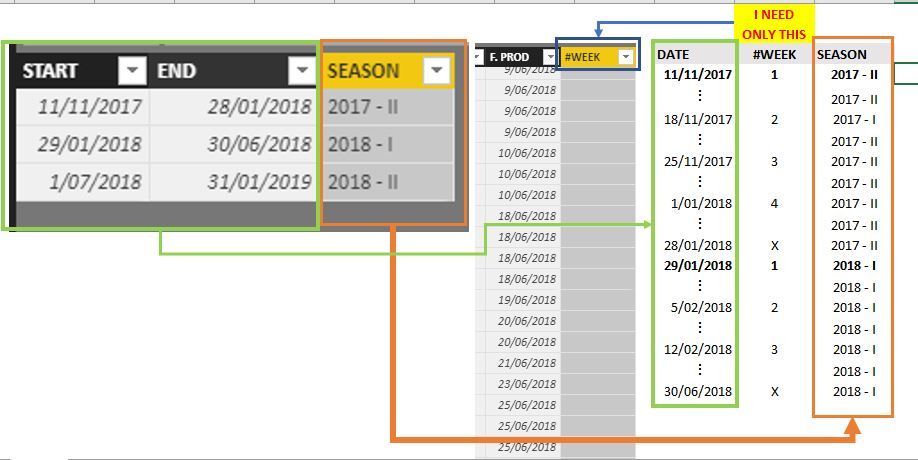
TY for your support.
Regards.
@Vvelarde disculpa por etiquetarte pero en el pasado tu me ayudaste con tu solución.
Solved! Go to Solution.
- Mark as New
- Bookmark
- Subscribe
- Mute
- Subscribe to RSS Feed
- Permalink
- Report Inappropriate Content
I got it !!
#week = var datestart = MAXX(FILTER(TEMPORADAS,TEMPORADAS[INICIO]<='E+R+N'[F. PROD]&&TEMPORADAS[FIN]>'E+R+N'[F. PROD]),TEMPORADAS[INICIO])
        return
        DATEDIFF(datestart,'E+R+N'[F. PROD],WEEK)+1
thanks.
- Mark as New
- Bookmark
- Subscribe
- Mute
- Subscribe to RSS Feed
- Permalink
- Report Inappropriate Content
I got it !!
#week = var datestart = MAXX(FILTER(TEMPORADAS,TEMPORADAS[INICIO]<='E+R+N'[F. PROD]&&TEMPORADAS[FIN]>'E+R+N'[F. PROD]),TEMPORADAS[INICIO])
        return
        DATEDIFF(datestart,'E+R+N'[F. PROD],WEEK)+1
thanks.


- Mark as New
- Bookmark
- Subscribe
- Mute
- Subscribe to RSS Feed
- Permalink
- Report Inappropriate Content
You want to build a date table. With Dates for your entire range and columns that include at least WEEKNumber and Season for every date.
Here is a example of some DAX that will build date table dynamically from the beginning of year 2 years ago to the end of the current year. you can adjsut to iclude a calcuation using SWITCH to calcuate the SEASON. The you you can link your date table to the key date form your FACT table build whatever visuals you want.
- Mark as New
- Bookmark
- Subscribe
- Mute
- Subscribe to RSS Feed
- Permalink
- Report Inappropriate Content
I have a table with the seasons, here is the range dates and i have other table where do i want to put the custom weeks,
Thanks @Seward12533
- Mark as New
- Bookmark
- Subscribe
- Mute
- Subscribe to RSS Feed
- Permalink
- Report Inappropriate Content
I'm recommending a single date table that includes the seasons. Its MUCH easier to work with. If you realy want the table of seasons you would add week numbers in your table with the range of dates or just have a measure to calcualte the week number and displaythat. You can use the table as seasons but the measures are messier and if you use the date table with seasons approach PowerBI will do all the work for you and you don't need write measures in many cases and if you do they will be simple ones.
- Mark as New
- Bookmark
- Subscribe
- Mute
- Subscribe to RSS Feed
- Permalink
- Report Inappropriate Content
i would like that!.
I have been working with data since 2001. it's too much.
- Mark as New
- Bookmark
- Subscribe
- Mute
- Subscribe to RSS Feed
- Permalink
- Report Inappropriate Content
TIP check out DATEDIFF function it will return the number of DAY, WEEKS, QUARTERs, YEARS, SECONDS or whatever you want from any two DATE/DATETIME values.
So as a calculated column
NumWeeks = VAR RefStartDate = CALCULATE(MIN(seasons[StartDate]),seasons[Season]=[Season]) RETURN
DATEDIFF([DateField],RefStartDate,Weeks)
But if you use the Date Table aproach this is not neccessary.
- Mark as New
- Bookmark
- Subscribe
- Mute
- Subscribe to RSS Feed
- Permalink
- Report Inappropriate Content
Dear @Seward12533, thanks you for helping me, but I have some problems.
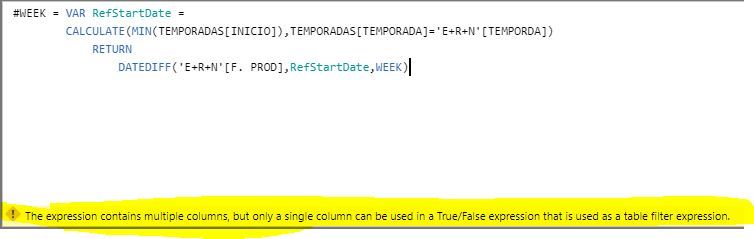
Well, here is my detailed tables, and I hope you help me.
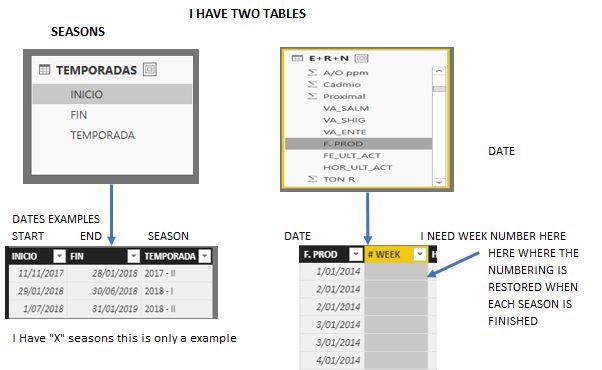
- Mark as New
- Bookmark
- Subscribe
- Mute
- Subscribe to RSS Feed
- Permalink
- Report Inappropriate Content
Looks like your using this as a measure the example I geve you was for a calculate column. If so you need to use an aggregate value you can't just reference and entire column. Try
DATEDIFF(MIN('E+R+N'[F. PROD]),RefStartDate,WEEK)
However I still recommend a Calendar Table based approach its much more flexible.
See the attached PBIX file - https://1drv.ms/u/s!AuCIkLeqFmlhhJhuwkc_FWIXnAPPvw
I created a Seasons table
| Season | Start | End |
| 2014 - 1 | 4/1/2014 | 6/1/2014 |
| 2014 - 2 | 6/2/2014 | 12/31/2014 |
| 2015 - 1 | 1/1/2015 | 6/4/2015 |
| 2015 - 2 | 6/5/2015 | 1/24/2016 |
| 2016 - 1 | 1/25/2016 | 5/30/2016 |
| 2016 - 2 | 5/31/2016 | 1/26/2017 |
| 2017 - 1 | 1/27/2017 | 6/1/2017 |
| 2017 - 2 | 11/11/2017 | 1/28/2018 |
| 2018 - 1 | 1/29/2018 | 5/30/2018 |
| 2018 - 2 | 7/1/2018 | 1/31/2019 |
Then using DAX I created a Calendar Table that includes Seasons and Season Week along with Calendar Week.
DIMDATE =
ADDCOLUMNS (
    CALENDAR ( DATE ( 2014, 1, 1 ), DATE ( 2020, 12, 1 ) ),
    "Calendar Week", FORMAT ( [Date], "WW" ),
    "Season",
        VAR DateCheck = [Date]
        VAR RefStartDate = CALCULATE ( MIN ( SEASONS[Start] ), SEASONS[End] >= DateCheck )
        RETURN
        LOOKUPVALUE ( SEASONS[Season], SEASONS[Start], RefStartDate ),
     "Season Week",
        VAR DateCheck = [Date]
        VAR RefStartDate = CALCULATE ( MIN ( SEASONS[Start] ), SEASONS[End] >= DateCheck )
        RETURN
        VAR Result = DATEDIFF(RefStartDate,[Date],WEEK)+1 RETURN
        IF(Result>0,Result)
)

- Mark as New
- Bookmark
- Subscribe
- Mute
- Subscribe to RSS Feed
- Permalink
- Report Inappropriate Content
= WEEKNUM([Start],1) 1 in this case is Sunday. If you want Monday use 2 etc.
- Mark as New
- Bookmark
- Subscribe
- Mute
- Subscribe to RSS Feed
- Permalink
- Report Inappropriate Content

Helpful resources

Fabric Community Update - July 2025
Find out what's new and trending in the Fabric community.

Power BI Monthly Update - July 2025
Check out the July 2025 Power BI update to learn about new features.

Join our Fabric User Panel
This is your chance to engage directly with the engineering team behind Fabric and Power BI. Share your experiences and shape the future.

| User | Count |
|---|---|
| 72 | |
| 72 | |
| 38 | |
| 31 | |
| 26 |


| User | Count |
|---|---|
| 94 | |
| 50 | |
| 43 | |
| 40 | |
| 35 |


