cancel
Showing results for 
Search instead for 
Did you mean: 

The Power BI Data Visualization World Championships is back! Get ahead of the game and start preparing now! Learn more

Reply
Anonymous
Not applicable

How to count customers who buy only A or A+B?

Hi there,

I have a problem with counting specific group of customers. I have dataset as below:


Customer

Customer ID

Customer Name

1

Mary

2

Jack

3

Eric

4

Nancy

5

Jenny


Product

Product ID

Customer Name

1

A

2

B

3

C

4

D

5

E


Purchase

Customer ID

Product ID

1

1

1

2

1

3

2

1

3

2

3

4

4

1

4

2

4

3

4

4

5

1

5

2


Now I need to count how many customers buy only A or A+B. For the example above, the answer should be 2 (Jack & Jenny).

I tried many ways to do that but failed. Please help me with this, thanks!

1 ACCEPTED SOLUTION
v-alq-msft
Community Support
Community Support

Hi, @Anonymous 


Based on your description, i created data to reproduce your scenario. The pbix file is attached in the end.

Customer:

a1.png


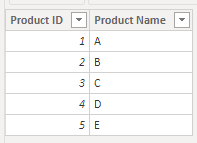
Product:

a2.png


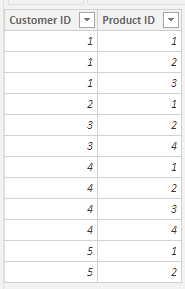
Purchase:

a3.png


Slicer(a calculated table):

Slicer = DISTINCT('Product'[Product Name])


Relationship:
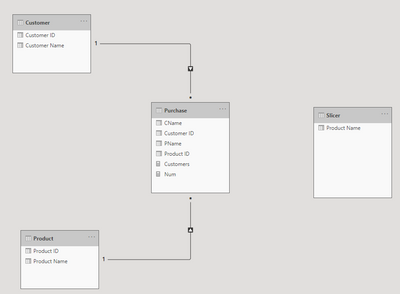
a4.png


You may create two measures as below.

Customers = 
var t1 = DISTINCT(Slicer[Product Name])
var t = 
SUMMARIZE(
    Customer,
    Customer[Customer Name],
    "Flag",
    var t2 = 
    CALCULATETABLE(
        DISTINCT('Product'[Product Name]),
        FILTER(
            ALL(Purchase),
            RELATED(Customer[Customer Name])=EARLIER(Customer[Customer Name])
        )
    )
    return
    IF(
        COUNTROWS(t1)=COUNTROWS(t2)&&
        COUNTROWS(t1)=COUNTROWS(INTERSECT(t1,t2)),
        1,0
    )
)
return
CONCATENATEX(
    FILTER(
        t,
        [Flag]=1
    ),
    [Customer Name],
    ","
)


Num = 
var t1 = DISTINCT(Slicer[Product Name])
var t = 
SUMMARIZE(
    Customer,
    Customer[Customer Name],
    "Flag",
    var t2 = 
    CALCULATETABLE(
        DISTINCT('Product'[Product Name]),
        FILTER(
            ALL(Purchase),
            RELATED(Customer[Customer Name])=EARLIER(Customer[Customer Name])
        )
    )
    return
    IF(
        COUNTROWS(t1)=COUNTROWS(t2)&&
        COUNTROWS(t1)=COUNTROWS(INTERSECT(t1,t2)),
        1,0
    )
)
return
COUNTROWS(
    FILTER(
        t,
        [Flag]=1
    )
)


Result:
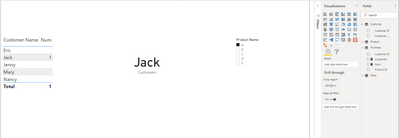
a5.pnga6.png


Best Regards

Allan


If this post helps, then please consider Accept it as the solution to help the other members find it more quickly.

View solution in original post

2 REPLIES 2
v-alq-msft
Community Support
Community Support

Hi, @Anonymous 


Based on your description, i created data to reproduce your scenario. The pbix file is attached in the end.

Customer:

a1.png


Product:

a2.png


Purchase:

a3.png


Slicer(a calculated table):

Slicer = DISTINCT('Product'[Product Name])


Relationship:

a4.png


You may create two measures as below.

Customers = 
var t1 = DISTINCT(Slicer[Product Name])
var t = 
SUMMARIZE(
    Customer,
    Customer[Customer Name],
    "Flag",
    var t2 = 
    CALCULATETABLE(
        DISTINCT('Product'[Product Name]),
        FILTER(
            ALL(Purchase),
            RELATED(Customer[Customer Name])=EARLIER(Customer[Customer Name])
        )
    )
    return
    IF(
        COUNTROWS(t1)=COUNTROWS(t2)&&
        COUNTROWS(t1)=COUNTROWS(INTERSECT(t1,t2)),
        1,0
    )
)
return
CONCATENATEX(
    FILTER(
        t,
        [Flag]=1
    ),
    [Customer Name],
    ","
)


Num = 
var t1 = DISTINCT(Slicer[Product Name])
var t = 
SUMMARIZE(
    Customer,
    Customer[Customer Name],
    "Flag",
    var t2 = 
    CALCULATETABLE(
        DISTINCT('Product'[Product Name]),
        FILTER(
            ALL(Purchase),
            RELATED(Customer[Customer Name])=EARLIER(Customer[Customer Name])
        )
    )
    return
    IF(
        COUNTROWS(t1)=COUNTROWS(t2)&&
        COUNTROWS(t1)=COUNTROWS(INTERSECT(t1,t2)),
        1,0
    )
)
return
COUNTROWS(
    FILTER(
        t,
        [Flag]=1
    )
)


Result:
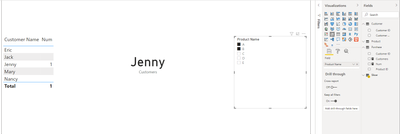
a5.pnga6.png


Best Regards

Allan


If this post helps, then please consider Accept it as the solution to help the other members find it more quickly.

amitchandak
Super User
Super User

@Anonymous , Create a measure like and try


Countx(filter(summarize(purchase, Customer[Customer Name], "_1", countrows(filter(Product , [Product name] = "A"))+0 , "_2", countrows(filter(Product , [Product name] = "B"))+0 ),
[_1]>0 || ([_1] >0 && [_2] >0)),[Customer Name])

Share with Power BI Enthusiasts: Full Power BI Video (20 Hours) YouTube
Microsoft Fabric Series 60+ Videos YouTube
Microsoft Fabric Hindi End to End YouTube

Helpful resources

Announcements
Power BI DataViz World Championships

Power BI Dataviz World Championships

The Power BI Data Visualization World Championships is back! Get ahead of the game and start preparing now!

December 2025 Power BI Update Carousel

Power BI Monthly Update - December 2025

Check out the December 2025 Power BI Holiday Recap!

FabCon Atlanta 2026 carousel

FabCon Atlanta 2026

Join us at FabCon Atlanta, March 16-20, for the ultimate Fabric, Power BI, AI and SQL community-led event. Save $200 with code FABCOMM.