

Join us at FabCon Atlanta from March 16 - 20, 2026, for the ultimate Fabric, Power BI, AI and SQL community-led event. Save $200 with code FABCOMM.
Register now!Get Fabric Certified for FREE during Fabric Data Days. Don't miss your chance! Request now
How to convert date time to decimal so that the time can be presented on a trendline
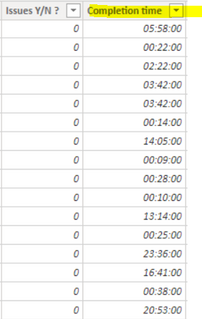
I have this column (Completion Time):
I would like to see as a result: 5.58 for exampl if the completion time is 5:58 or some kind of alternative that allows me to use this field to presnet in a trendline completion time by month and calculate YTD completion time etc.
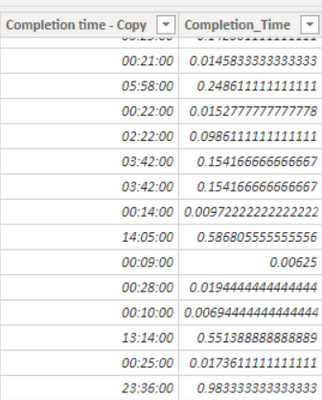
I tried using convert but I do not like the result I see:
Thanks!
thanks for feedback. Completion Time is just a column and not a measure and therefore power bi doesnt accept it in the formula..do you have another solution?
Hi @Anonymous ,
You could create a column as below:-
Column = round(FORMAT('Table (6)'[Completion tme],"HH")&"."&FORMAT('Table (6)'[Completion tme],"NN"),2)
BR,
Samarth
Best Regards,
Samarth
If this post helps, please consider accepting it as the solution to help the other members find it more quickly.
Appreciate your Kudos!!
Connect on Linkedin
Hi, I managed to create a new measure, however it looks like text. How can I convert it to double (round can not work as it is text):
@Anonymous Please create a column only. I have updated the code as per your table name. Please try this:-
Column =
ROUND (
FORMAT ( 'Daily Issues'[Completion_time], "HH" ) & "."
& FORMAT ( 'Daily Issues'[Completion_time], "NN" ),
2
)
Note:- I have considered the completion_time as column only.
Best Regards,
Samarth
If this post helps, please consider accepting it as the solution to help the other members find it more quickly.
Appreciate your Kudos!!
Connect on Linkedin
Check out the November 2025 Power BI update to learn about new features.
Advance your Data & AI career with 50 days of live learning, contests, hands-on challenges, study groups & certifications and more!