This time we’re going bigger than ever. Fabric, Power BI, SQL, AI and more. We're covering it all. You won't want to miss it.
Learn moreGet Fabric Certified for FREE during AI Skills Fest. This week only. Secure your voucher now.
Hi,
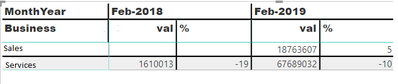
I have attached the sample data. I required the percentage of report as together comparing with the year-wise report
Having data as this
Required as this
Hi @Uma_Dhandpani ,
You can add a new calculated column to calculate the diffenrences of percentage and use this new column in the visual.
Your sample data is like a matrix that is complex for PowerBI to handle. I think a table is better if you can get it.
Check out the May 2026 Power BI update to learn about new features.
Sign up to receive a private message when registration opens and key events begin.
| User | Count |
|---|---|
| 23 | |
| 21 | |
| 20 | |
| 20 | |
| 15 |
| User | Count |
|---|---|
| 58 | |
| 55 | |
| 42 | |
| 26 | |
| 24 |