Get certified for free when you join Fabric Data Days 2026 and dive into Fabric, Power BI, SQL, AI, and other essential data skills.
Join nowData Days is here! Join us now for 60+ days of learning, challenges, and connection. Learn more
Hi,
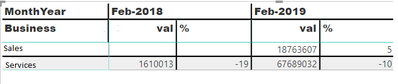
I have attached the sample data. I required the percentage of report as together comparing with the year-wise report
Having data as this
Required as this
Hi @Uma_Dhandpani ,
You can add a new calculated column to calculate the diffenrences of percentage and use this new column in the visual.
Your sample data is like a matrix that is complex for PowerBI to handle. I think a table is better if you can get it.
Don't miss out on Data Days, June 15 through August 7. Learn Fabric, Power BI, SQL, AI and more.
Check out the May 2026 Power BI update to learn about new features.
| User | Count |
|---|---|
| 22 | |
| 21 | |
| 20 | |
| 19 | |
| 13 |
| User | Count |
|---|---|
| 58 | |
| 52 | |
| 37 | |
| 31 | |
| 27 |