Forum Discussion

How to change the date format?
 10 years ago
sanchit This is controlled by the Locale Setting!
MM/DD/YYYY is the US format (and maybe some other countires not sure???)
But your csv file likely came form a place where they use DD/MM/YYYY
To have PBI recognize those as dates Go to File => Options and settings => Options => Locale => change to your country/region


 Advocate I
Another way of doing:
In Power Query Editor, right-click on the column header / "Change Type" / "Using Locale..." / then choose Date format with the locale you want
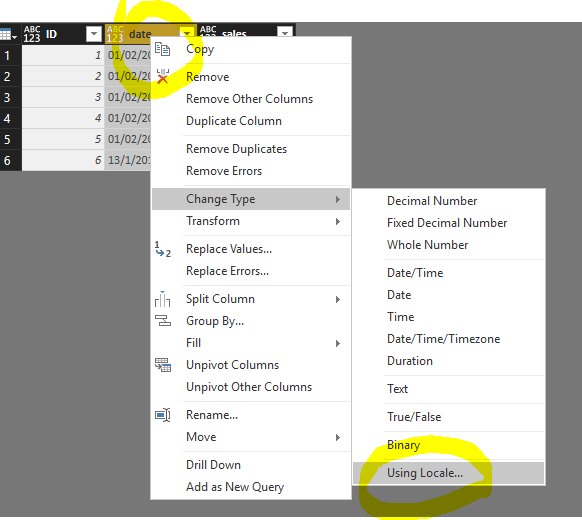
source:
https://community.powerbi.com/t5/Desktop/date-format-is-changed-in-power-bi-desktop/m-p/45385#M17618
 vinayjayappa9 years agoNew Member
How do we change only the column header to date format and the data to be in the number format?
Many thanks
Vinay
 hellovaras8 years agoRegular Visitor
Hello,
Tried the "Change Type" using "Locale" but I get errors. It seems all the errors happen for the "01", January. Please see below. How to fix this issue?
Error message:
DataFormat.Error: We couldn't parse the input provided as a Date value.
Details:
25/01/2005- amk273 years agoNew Member
You can also alternatively try this as a new column, adjust the sequence of first and second expression depending upon the date format that you have and concat them in the new column.
List.First(List.RemoveFirstN(Splitter.SplitTextByDelimiter("/")([Date]),1)) -> Evaluates second number in the Date valueList.First(Splitter.SplitTextByDelimiter("/")([Date])) -> Evaluates first number in the date value
List.Last(Splitter.SplitTextByDelimiter("/")([Date])) -> Evaluates year in the date value