Forum Discussion

How to change the date format?
 10 years ago
sanchit This is controlled by the Locale Setting!
MM/DD/YYYY is the US format (and maybe some other countires not sure???)
But your csv file likely came form a place where they use DD/MM/YYYY
To have PBI recognize those as dates Go to File => Options and settings => Options => Locale => change to your country/region

 Advocate I
Another way of doing:
In Power Query Editor, right-click on the column header / "Change Type" / "Using Locale..." / then choose Date format with the locale you want
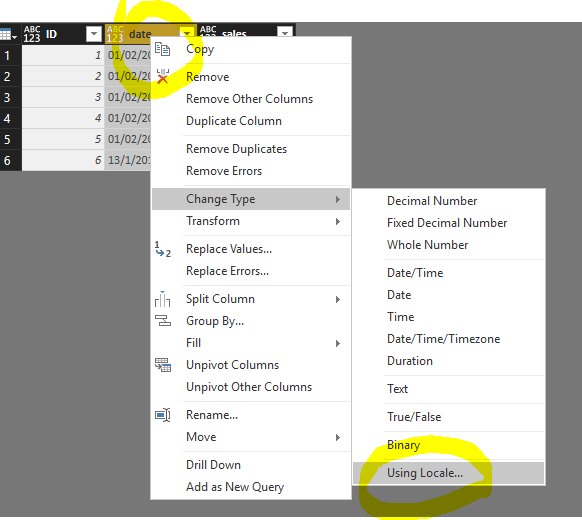
source:
https://community.powerbi.com/t5/Desktop/date-format-is-changed-in-power-bi-desktop/m-p/45385#M17618

Hello,
Tried the "Change Type" using "Locale" but I get errors. It seems all the errors happen for the "01", January. Please see below. How to fix this issue?
Error message:
DataFormat.Error: We couldn't parse the input provided as a Date value.
Details:
25/01/2005
- amk274 years agoNew Member
You can also alternatively try this as a new column, adjust the sequence of first and second expression depending upon the date format that you have and concat them in the new column.
List.First(List.RemoveFirstN(Splitter.SplitTextByDelimiter("/")([Date]),1)) -> Evaluates second number in the Date valueList.First(Splitter.SplitTextByDelimiter("/")([Date])) -> Evaluates first number in the date value
List.Last(Splitter.SplitTextByDelimiter("/")([Date])) -> Evaluates year in the date value