cancel
Showing results for 
Search instead for 
Did you mean: 

The Power BI Data Visualization World Championships is back! Get ahead of the game and start preparing now! Learn more

Reply
tonioknuth
New Member

How to change column order

Hi, 


does anyone know how the change the column order in a table ? Especially when doing a UNION, having all tables in the same order is extremely important. 

When adding / removing columns in a query, it seems the column order is partly determined by the order in the original dataset, and party by the order in which columns where added / removed. I have not yet found a reliable logic there, though.


It would be amazing if one could determine the order in which the column appear in the table somewhere, does anyone know of such an option ? 


Best,

Tonio


3 REPLIES 3
v-caliao-msft
Microsoft Employee
Microsoft Employee

Hi @tonioknuth,


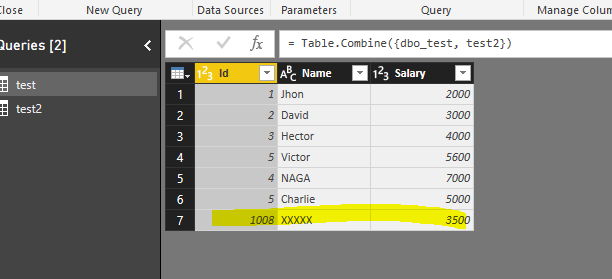
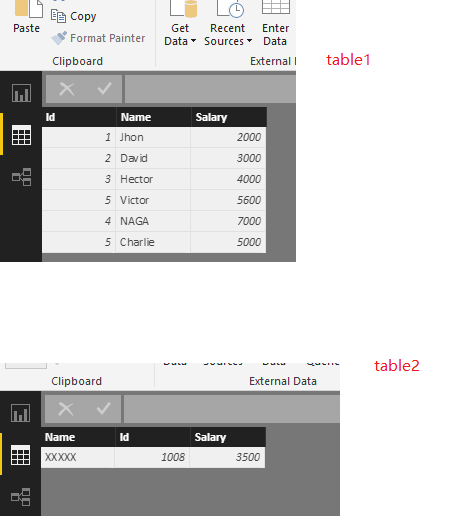
I have tested it on my local environment, when appending query, Power BI will ignoce the oclumn order and append the same column name in a column if you have the same name in two tables.

Capture.PNGUntitled.png


Regards,

Charlie Liao

Hi @v-caliao-msft,


thank you for your quick reply, and your tests!


From what I can see, you are combining the tables on the query level, right ? 

In my case, I am combining the tables later in the model, as before uniting them, I have to add columns with table specific values

(e.g. document types: SalesInvoice / SalesCreditMemo)) to be able to calculate correctly in the UNION table.


The column order as specified in the query somehow does not reflect the column order of the tables in the model later. 

Do I have the option to take the queries column order over to the model, or should I try to add the needed columns on the query level somehow ? 


Best,

Tonio

Hi @tonioknuth,


I combine the tables using append querys in the model. When you have additional rows of data that you’d like to add to an existing query, you append the query. Please refer to the link below.
https://powerbi.microsoft.com/en-us/documentation/powerbi-desktop-shape-and-combine-data/

Regards,

Charlie Liao

Helpful resources

Announcements
Power BI DataViz World Championships

Power BI Dataviz World Championships

The Power BI Data Visualization World Championships is back! Get ahead of the game and start preparing now!

December 2025 Power BI Update Carousel

Power BI Monthly Update - December 2025

Check out the December 2025 Power BI Holiday Recap!

FabCon Atlanta 2026 carousel

FabCon Atlanta 2026

Join us at FabCon Atlanta, March 16-20, for the ultimate Fabric, Power BI, AI and SQL community-led event. Save $200 with code FABCOMM.