cancel
Showing results for 
Search instead for 
Did you mean: 

The Power BI Data Visualization World Championships is back! Get ahead of the game and start preparing now! Learn more

Reply
Anonymous
Not applicable

How to calculate the Overdue time difference

Hi everyone,


I have been trying to get a result of time difference and also to identify when it is overdue for a particular entry. Asset number will always be unique. Hope someone can assist me with this issue:


I have a few thousand rows of data which consist of the below data:


Asset NumberAsset_Estimated_Exit_DateTimeAsset_Exit_DateTime
21169723/10/2017 06:00:15 PM23/10/2017 11:00:50 AM
21167420/10/2017 03:14:33 PM20/10/2017 02:00:48 PM
21166420/10/2017 01:00:52 PM20/10/2017 01:00:16 PM
21166220/10/2017 02:40:39 PM20/10/2017 12:00:53 PM
21165320/10/2017 12:02:51 PM20/10/2017 12:00:11 PM
21164920/10/2017 06:00:25 PM20/10/2017 02:00:45 PM
21164120/10/2017 12:00:46 PM20/10/2017 12:00:17 PM
21164020/10/2017 11:00:45 AM20/10/2017 11:00:18 AM
21163120/10/2017 04:00:10 PM20/10/2017 04:00:32 PM
21163020/10/2017 02:00:08 PM20/10/2017 02:00:18 PM
21162520/10/2017 04:00:51 PM20/10/2017 02:00:34 PM


Is there anyway we could highlight something in dashboard like a "notification" for any overdue "asset entry"?


Hope someone can help with this.


Thanks,


Ron

1 ACCEPTED SOLUTION
Anonymous
Not applicable

Based on the error message it would seem to me that you have stored this DateTime data inside Power BI using the datatype of "Text".


My recommendation would be to go into Edit Queries and change the data type of both columns to "DateTime".


For the "Overdue" portion, i'd simply create a new column (do this from inside Edit Queries) to flag if any row is overdue.  This could be done from the Add Column option and simply use

[Asset_Exit_DateTime] > [Asset_Estimated_Exit_DateTime]

Set this column to be of type "True/False"

View solution in original post

5 REPLIES 5
Anonymous
Not applicable

tried this function,
 
DATEDIFF('Table[Asset_Estimated_Exit_DateTime],'Table[Asset_Exit_DateTime],MINUTE).  Its saying "Cannot convert value 'NULL' of type Text to type date'.
 
kindly assist..
 
thanks

Hi @Anonymous,


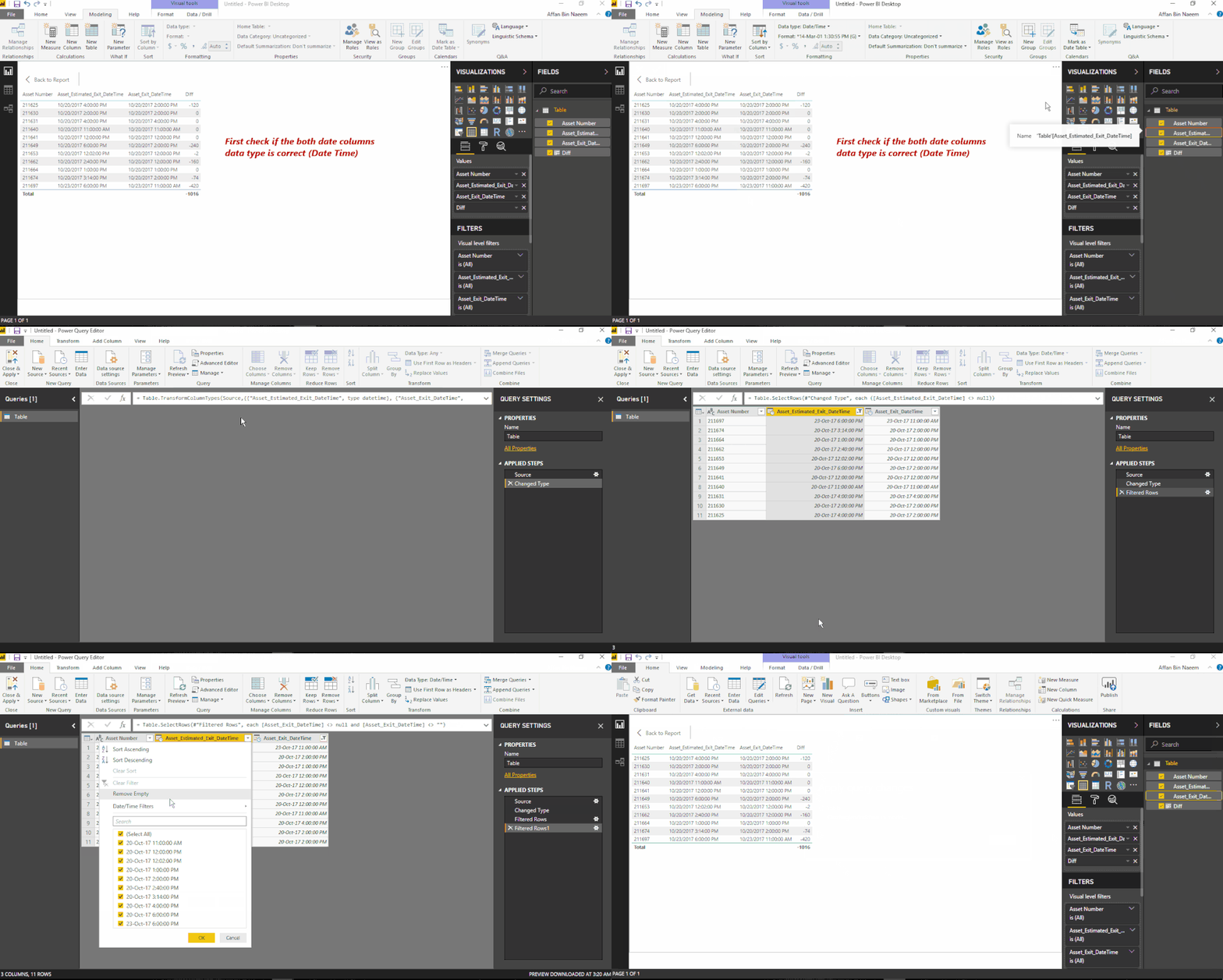
As the code you have mentioned for the difference column, this seems to be working fine. You need to check if both your date columns are having correct data type. The second thing you need to consider is to remove any 'null' or blank values which may be causing error in the data model to convert the column to date time format.

dateformat issue null val.gif


If this helped you, please mark this post as an accepted solution and like to give KUDOS .


Regards,

Affan

Anonymous
Not applicable

thanks @affan.. got the desired result. now finding ways to represent the duration values in graphical chart or something.. any suggestions would be highly appreciated


thanks

Anonymous
Not applicable

Based on the error message it would seem to me that you have stored this DateTime data inside Power BI using the datatype of "Text".


My recommendation would be to go into Edit Queries and change the data type of both columns to "DateTime".


For the "Overdue" portion, i'd simply create a new column (do this from inside Edit Queries) to flag if any row is overdue.  This could be done from the Add Column option and simply use

[Asset_Exit_DateTime] > [Asset_Estimated_Exit_DateTime]

Set this column to be of type "True/False"

Anonymous
Not applicable

Thanks @Anonymous. I am now getting the details without any error and also able to derive overdue(true/false). Now, finding hard to visualize the "Duration" field ie. time difference data. can you suggest the best way to represent the info?


appreciate your help and assisntance.


regards

Helpful resources

Announcements
November Power BI Update Carousel

Power BI Monthly Update - November 2025

Check out the November 2025 Power BI update to learn about new features.

Fabric Data Days Carousel

Fabric Data Days

Advance your Data & AI career with 50 days of live learning, contests, hands-on challenges, study groups & certifications and more!

FabCon Atlanta 2026 carousel

FabCon Atlanta 2026

Join us at FabCon Atlanta, March 16-20, for the ultimate Fabric, Power BI, AI and SQL community-led event. Save $200 with code FABCOMM.

Top Kudoed Authors