FabCon is coming to Atlanta
Join us at FabCon Atlanta from March 16 - 20, 2026, for the ultimate Fabric, Power BI, AI and SQL community-led event. Save $200 with code FABCOMM.
Register now!- Power BI forums
- Get Help with Power BI
- Desktop
- Service
- Report Server
- Power Query
- Mobile Apps
- Developer
- DAX Commands and Tips
- Custom Visuals Development Discussion
- Health and Life Sciences
- Power BI Spanish forums
- Translated Spanish Desktop
- Training and Consulting
- Instructor Led Training
- Dashboard in a Day for Women, by Women
- Galleries
- Data Stories Gallery
- Themes Gallery
- Contests Gallery
- QuickViz Gallery
- Quick Measures Gallery
- Visual Calculations Gallery
- Notebook Gallery
- Translytical Task Flow Gallery
- TMDL Gallery
- R Script Showcase
- Webinars and Video Gallery
- Ideas
- Custom Visuals Ideas (read-only)
- Issues
- Issues
- Events
- Upcoming Events
Get Fabric Certified for FREE during Fabric Data Days. Don't miss your chance! Request now
- Power BI forums
- Forums
- Get Help with Power BI
- Desktop
- How to calculate monthly totals?
- Subscribe to RSS Feed
- Mark Topic as New
- Mark Topic as Read
- Float this Topic for Current User
- Bookmark
- Subscribe
- Printer Friendly Page


- Mark as New
- Bookmark
- Subscribe
- Mute
- Subscribe to RSS Feed
- Permalink
- Report Inappropriate Content
How to calculate monthly totals?
Hi All,
I have the following data
Country Product Sales Qty Sales Date
| A | Product 1 | 100 | 10 | 2/01/2018 |
| B | Product 2 | 200 | 20 | 2/01/2018 |
| C | Product 3 | 300 | 30 | 3/01/2018 |
| D | Product 1 | 400 | 40 | 5/01/2018 |
| E | Product 2 | 500 | 50 | 7/02/2018 |
| A | Product 1 | 600 | 60 | 10/02/2018 |
| B | Product 2 | 700 | 70 | 11/02/2018 |
| C | Product 2 | 800 | 80 | 12/03/2018 |
| D | Product 2 | 850 | 90 | 14/03/2018 |
| D | Product 3 | 1000 | 100 | 15/03/2018 |
I want to calucate the total for each month.
Country Product Sales Qty Sales Date Month Sales
| A | Product 1 | 100 | 10 | 2/01/2018 | |
| B | Product 2 | 200 | 20 | 2/01/2018 | |
| C | Product 3 | 300 | 30 | 3/01/2018 | |
| D | Product 1 | 400 | 40 | 5/01/2018 | 1000 |
| E | Product 2 | 500 | 50 | 7/02/2018 | |
| A | Product 1 | 600 | 60 | 10/02/2018 | |
| B | Product 2 | 700 | 70 | 11/02/2018 | 1800 |
| C | Product 2 | 800 | 80 | 12/03/2018 | |
| D | Product 2 | 850 | 90 | 14/03/2018 | |
| D | Product 3 | 1000 | 100 | 15/03/2018 | 2650 |
Any help would be appreciated.
Solved! Go to Solution.
- Mark as New
- Bookmark
- Subscribe
- Mute
- Subscribe to RSS Feed
- Permalink
- Report Inappropriate Content
Right click on Calendar Date, new hierarchy, I suppose this will solve your problem.
Then you should have year, quarter, month and day available.


- Mark as New
- Bookmark
- Subscribe
- Mute
- Subscribe to RSS Feed
- Permalink
- Report Inappropriate Content
Hi @anandav,
As @Anonymous mentioned, you could create a table with Date hierarchy like below then you could get Month total sales.
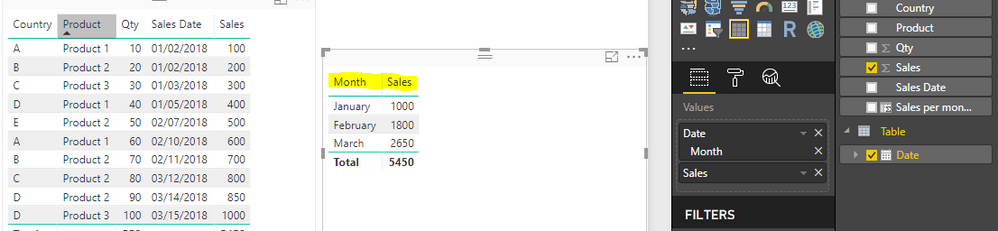
In addition, you could create a calculated column with the formula below.
Sales per month =
CALCULATE (
    SUM ( Sales[Sales] ),
    FILTER (
        'Sales',
        MONTH ( 'Sales'[Sales Date] ) = MONTH ( EARLIER ( 'Sales'[Sales Date] ) )
    )
)
Then you could get your expected output.

For reference, you could have a look at this similar thread.
Best Regards,
Cherry
If this post helps, then please consider Accept it as the solution to help the other members find it more quickly.

- Mark as New
- Bookmark
- Subscribe
- Mute
- Subscribe to RSS Feed
- Permalink
- Report Inappropriate Content
Hi. I have a similar situation and I want the result as the other user. I tried the bellow options but none worked.
I want to calculate Each Employees Monthly Working Hours - therefore by employe and month-year.
I am using below formula:
- Mark as New
- Bookmark
- Subscribe
- Mute
- Subscribe to RSS Feed
- Permalink
- Report Inappropriate Content
Hi @anandav,
As @Anonymous mentioned, you could create a table with Date hierarchy like below then you could get Month total sales.
In addition, you could create a calculated column with the formula below.
Sales per month =
CALCULATE (
    SUM ( Sales[Sales] ),
    FILTER (
        'Sales',
        MONTH ( 'Sales'[Sales Date] ) = MONTH ( EARLIER ( 'Sales'[Sales Date] ) )
    )
)
Then you could get your expected output.
For reference, you could have a look at this similar thread.
Best Regards,
Cherry
If this post helps, then please consider Accept it as the solution to help the other members find it more quickly.
- Mark as New
- Bookmark
- Subscribe
- Mute
- Subscribe to RSS Feed
- Permalink
- Report Inappropriate Content
Hi!
Could you just explain what the EARLIER does here? I'm a bit confused by that function TBH.
Thanks!
- Mark as New
- Bookmark
- Subscribe
- Mute
- Subscribe to RSS Feed
- Permalink
- Report Inappropriate Content
Hi @Anonymous,
Check this article. It may help you and also explain how you can use variables to avoid using EARLIER.
https://www.sqlbi.com/articles/variables-in-dax/
- Mark as New
- Bookmark
- Subscribe
- Mute
- Subscribe to RSS Feed
- Permalink
- Report Inappropriate Content
Do you have a Calendar Table? On the field list, do you see any "Date Hierarchy"?
- Mark as New
- Bookmark
- Subscribe
- Mute
- Subscribe to RSS Feed
- Permalink
- Report Inappropriate Content
@Anonymous,
Yes, I have a calendar table and relationsip established with Sales Date in Sales table.
No, I cannot see the date hierarchy.
- Mark as New
- Bookmark
- Subscribe
- Mute
- Subscribe to RSS Feed
- Permalink
- Report Inappropriate Content
Right click on Calendar Date, new hierarchy, I suppose this will solve your problem.
Then you should have year, quarter, month and day available.
Helpful resources

Power BI Monthly Update - November 2025
Check out the November 2025 Power BI update to learn about new features.

Fabric Data Days
Advance your Data & AI career with 50 days of live learning, contests, hands-on challenges, study groups & certifications and more!

FabCon Atlanta 2026
Join us at FabCon Atlanta, March 16-20, for the ultimate Fabric, Power BI, AI and SQL community-led event. Save $200 with code FABCOMM.


