FabCon is coming to Atlanta
Join us at FabCon Atlanta from March 16 - 20, 2026, for the ultimate Fabric, Power BI, AI and SQL community-led event. Save $200 with code FABCOMM.
Register now!- Power BI forums
- Get Help with Power BI
- Desktop
- Service
- Report Server
- Power Query
- Mobile Apps
- Developer
- DAX Commands and Tips
- Custom Visuals Development Discussion
- Health and Life Sciences
- Power BI Spanish forums
- Translated Spanish Desktop
- Training and Consulting
- Instructor Led Training
- Dashboard in a Day for Women, by Women
- Galleries
- Data Stories Gallery
- Themes Gallery
- Contests Gallery
- QuickViz Gallery
- Quick Measures Gallery
- Visual Calculations Gallery
- Notebook Gallery
- Translytical Task Flow Gallery
- TMDL Gallery
- R Script Showcase
- Webinars and Video Gallery
- Ideas
- Custom Visuals Ideas (read-only)
- Issues
- Issues
- Events
- Upcoming Events
Get Fabric Certified for FREE during Fabric Data Days. Don't miss your chance! Request now
- Power BI forums
- Forums
- Get Help with Power BI
- Desktop
- Re: How to calculate future months
- Subscribe to RSS Feed
- Mark Topic as New
- Mark Topic as Read
- Float this Topic for Current User
- Bookmark
- Subscribe
- Printer Friendly Page

- Mark as New
- Bookmark
- Subscribe
- Mute
- Subscribe to RSS Feed
- Permalink
- Report Inappropriate Content
How to calculate future months
I have a forecast table that has all the forecast amounts from January 2017 - December 2017. However, I want to create a measure that only calculate the future months forecast based off the current month (e.g. July 2017 -> December 2017). This is what I have so far, but it's giving me the total forecast (i.e. January -> December 2017). Any ideas on how to fix this?
CALCULATE (
  SUM ( OPEX_Forecast[Forecast] ),
  FILTER (
    ALL ( 'Date'[Date] ),
    MONTH(TODAY() <= MAX ( 'Date'[Date] )
  )
))
Solved! Go to Solution.


- Mark as New
- Bookmark
- Subscribe
- Mute
- Subscribe to RSS Feed
- Permalink
- Report Inappropriate Content
@Anonymous
Based on your description, you want to calculate total from current row all the way up to Dec 2017 for all dates later than today. It's like a reverse running total. Right?
You need to use the Total from Today() to End Of Year, minus the running total from Today() to End Of Year. Please refer to measure below:
Forecast =
IF (
    MAX ( 'Fact'[Date] ) >= TODAY (),
    CALCULATE (
        SUM ( 'Fact'[Amount] ),
        DATESBETWEEN ( 'Fact'[Date], TODAY (), LASTDATE ( ALL ( 'Fact'[Date] ) ) )
    )
        - CALCULATE (
            SUM ( 'Fact'[Amount] ),
            DATESBETWEEN ( 'Fact'[Date], TODAY (), LASTDATE ( 'Fact'[Date] ) )
        ),
    BLANK ()
)
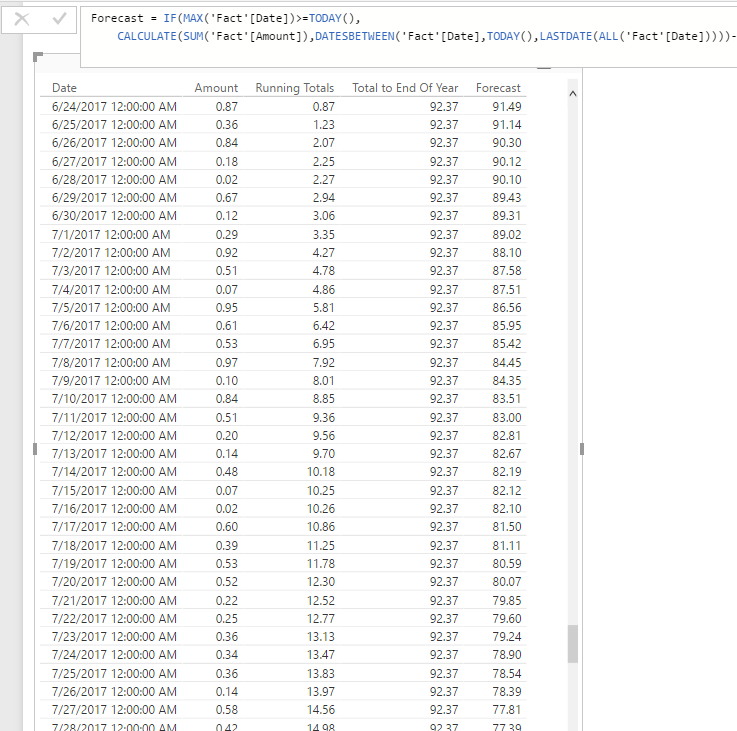
Regards,
- Mark as New
- Bookmark
- Subscribe
- Mute
- Subscribe to RSS Feed
- Permalink
- Report Inappropriate Content
bump
- Mark as New
- Bookmark
- Subscribe
- Mute
- Subscribe to RSS Feed
- Permalink
- Report Inappropriate Content
@Anonymous
Based on your description, you want to calculate total from current row all the way up to Dec 2017 for all dates later than today. It's like a reverse running total. Right?
You need to use the Total from Today() to End Of Year, minus the running total from Today() to End Of Year. Please refer to measure below:
Forecast =
IF (
    MAX ( 'Fact'[Date] ) >= TODAY (),
    CALCULATE (
        SUM ( 'Fact'[Amount] ),
        DATESBETWEEN ( 'Fact'[Date], TODAY (), LASTDATE ( ALL ( 'Fact'[Date] ) ) )
    )
        - CALCULATE (
            SUM ( 'Fact'[Amount] ),
            DATESBETWEEN ( 'Fact'[Date], TODAY (), LASTDATE ( 'Fact'[Date] ) )
        ),
    BLANK ()
)
Regards,


- Mark as New
- Bookmark
- Subscribe
- Mute
- Subscribe to RSS Feed
- Permalink
- Report Inappropriate Content
Hi @Anonymous,
I made an example and assume you are using the Date table linked to the OPEX_Forecast and add this formula:
Future_Month_forecast = CALCULATE (
  CALCULATE(SUM(OPEX_Forecast[Forecast]),OPEX_Forecast[Date]>=TODAY())
)
You can see the result below, by month and in total in a card visual.

Regards,
MFelix
Regards
Miguel Félix
Did I answer your question? Mark my post as a solution!
Proud to be a Super User!
Check out my blog: Power BI em Português
- Mark as New
- Bookmark
- Subscribe
- Mute
- Subscribe to RSS Feed
- Permalink
- Report Inappropriate Content
This formula does almost what I want. However, I would like it to calculate whole months. For example I want to take actuals from Jan-May and then add the forecast from June -Dec. This formula is only calculating only couple remaining days in June rather than all of June. I am hoping this is just a simple fix.
- Mark as New
- Bookmark
- Subscribe
- Mute
- Subscribe to RSS Feed
- Permalink
- Report Inappropriate Content
Hi Jotten, how did you resolve this?? I have the same problem statement.
- Mark as New
- Bookmark
- Subscribe
- Mute
- Subscribe to RSS Feed
- Permalink
- Report Inappropriate Content
In your measure you are comparing the month of the dates that are lower than today of today (6) date this will give you the always a lower number in month than in date you probably need to change it to.somwthing like this
CALCULATE (
SUM ( OPEX_Forecast[Forecast] ),
FILTER (
ALL ( 'Date'[Date] ),
TODAY() <= MAX ( 'Date'[Date] )
))
Just took.month out not on.computer but this.may work.
Regards,
MFelix
Regards
Miguel Félix
Did I answer your question? Mark my post as a solution!
Proud to be a Super User!
Check out my blog: Power BI em Português- Mark as New
- Bookmark
- Subscribe
- Mute
- Subscribe to RSS Feed
- Permalink
- Report Inappropriate Content
Thanks, MFelix. However, it's still showing the sum of all the months instead of all the months starting from July.
Helpful resources

Power BI Monthly Update - November 2025
Check out the November 2025 Power BI update to learn about new features.

Fabric Data Days
Advance your Data & AI career with 50 days of live learning, contests, hands-on challenges, study groups & certifications and more!

FabCon Atlanta 2026
Join us at FabCon Atlanta, March 16-20, for the ultimate Fabric, Power BI, AI and SQL community-led event. Save $200 with code FABCOMM.


