This is best Fabric, Power BI, SQL and AI community event. How do we know? The last event sold out! Save €200 with code FABCMTY200.
Register nowA new Data Days event is coming soon! This time we’re going bigger than ever. Fabric, Power BI, SQL, AI and more. Don't miss out.
I have a table A that looks like this:
| Time | Value | Service |
| 2022-01-01 | 10 | Service A |
| 2022-01-01 | 5 | Service B |
| 2022-01-02 | 8 | Service A |
| 2022-01-02 | 7 | Service B |
| 2022-01-03 | 4 | Service A |
| 2022-01-03 | 3 | Service B |
How do I calculate a column that takes the difference for Service A and Service B at each timestep? Either that the result is in a new column in Table A or in a entierly new Table B.
Solved! Go to Solution.
Hi @Anonymous ,
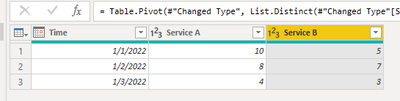
Easiest way is pivot table in Power Query like below:
let
Source = Table.FromRows(Json.Document(Binary.Decompress(Binary.FromText("i45WMjIwMtI1MAQiJR0lQwMgEZxaVJaZnKrgqBSrgyZviiTthCptBJSywK0bJG2OW7cxUMoEt26QtDGq7lgA", BinaryEncoding.Base64), Compression.Deflate)), let _t = ((type nullable text) meta [Serialized.Text = true]) in type table [Time = _t, Value = _t, Service = _t]),
#"Changed Type" = Table.TransformColumnTypes(Source,{{"Time", type date}, {"Value", Int64.Type}, {"Service", type text}}),
#"Pivoted Column" = Table.Pivot(#"Changed Type", List.Distinct(#"Changed Type"[Service]), "Service", "Value", List.Sum)
in
#"Pivoted Column"
Then you could directly create a column use [Service A] - [Service B].
Best Regards,
Jay
Hi @Anonymous ,
Easiest way is pivot table in Power Query like below:
let
Source = Table.FromRows(Json.Document(Binary.Decompress(Binary.FromText("i45WMjIwMtI1MAQiJR0lQwMgEZxaVJaZnKrgqBSrgyZviiTthCptBJSywK0bJG2OW7cxUMoEt26QtDGq7lgA", BinaryEncoding.Base64), Compression.Deflate)), let _t = ((type nullable text) meta [Serialized.Text = true]) in type table [Time = _t, Value = _t, Service = _t]),
#"Changed Type" = Table.TransformColumnTypes(Source,{{"Time", type date}, {"Value", Int64.Type}, {"Service", type text}}),
#"Pivoted Column" = Table.Pivot(#"Changed Type", List.Distinct(#"Changed Type"[Service]), "Service", "Value", List.Sum)
in
#"Pivoted Column"
Then you could directly create a column use [Service A] - [Service B].
Best Regards,
Jay
@Anonymous , refer this
Compare Categorical Data Using Slicers - Compare two Brands: https://youtu.be/exN4nTewgbc
Check out the May 2026 Power BI update to learn about new features.
Sign up to receive a private message when registration opens and key events begin.
If you have recently started exploring Fabric, we'd love to hear how it's going. Your feedback can help with product improvements.
| User | Count |
|---|---|
| 30 | |
| 28 | |
| 23 | |
| 19 | |
| 17 |
| User | Count |
|---|---|
| 49 | |
| 47 | |
| 41 | |
| 21 | |
| 19 |