Join us at FabCon Atlanta from March 16 - 20, 2026, for the ultimate Fabric, Power BI, AI and SQL community-led event. Save $200 with code FABCOMM.
Register now!View all the Fabric Data Days sessions on demand. View schedule
I have a Sales table and related dimension tables. MySales table contains columns : Week, StoreID, SalesSeasonID,ProductKey and metrics. My dimensions are related to sales table (Date,SalesSeason, Store,Product tables).
I need to find Sales Quantity (Last Year), as a measure
You can find a sample below:
YearWeek SalesSeasonID StoreID ProductKey SalesQuantity
201742 4 CM56 2C00521A22209S01118108 4
201642 2 CM56 2C00521A22209S01118108 2
201642 3 CM56 2C00521A22209S01118108 1
SalesSeason Table
SalesSeasonID LYSalesSeasonID
4 2
3 1
My purpose is when user selected SaleseasonID[4] then it will return 2 as SalesQuantity.
How can I calculate this measure by DAX formula?
Hi @Anonymous
You can create measure SalesQuantity in table SalesSeason based on created relationship between sales[SalesSeasonID] and SalesSeason[LYSalesSeasonID] .
SalesQuantity = LOOKUPVALUE(sales[SalesQuantity],sales[SalesSeasonID],MAX(SalesSeason[LYSalesSeasonID]))
As you said:
>>My purpose is when user selected SaleseasonID[4] then it will return 2 as SalesQuantity.
Is it referred to get the SalesQuantity value of last year in table sales when choose SalesSeason[4]? If I misunderstand it ,could you please show more desired result in screenshot or pbix file, you can also upload sample pbix to OneDrive and post the link here. Do mask sensitive data before uploading.
Here is my test pbix: https://qiuyunus-my.sharepoint.com/:u:/g/personal/pbipro_qiuyunus_onmicrosoft_com/EbzKxMPg-mVPnOl1kN6el8sBHcVtUR-TFrSg8NYEpC3puQ?e=NSZAxh
Best Regards,
Amy
If this post helps, then please consider Accept it as the solution to help the other members find it more quickly.
Hi @v-xicai
If user filter SalesSeasonID[4] only, then it should return all weeks in SalesSeasonID[2] and aggregate them (sum). If user filter both SalesSeasonID[4] and YearWeek[201742] then it should return sum of all rows with SalesSeasonID[2] and [201642]. I have so many rows in my data.
Both SalesSeasonID and YearWeek choices should filter my SalesQuantity_LY measure. I would do this process by adding LY columns to my SalesData while importing it, but I dont want to add columns. I am looking for a way to handle this need by adding a measure. By the way, I am working on a tabular model.
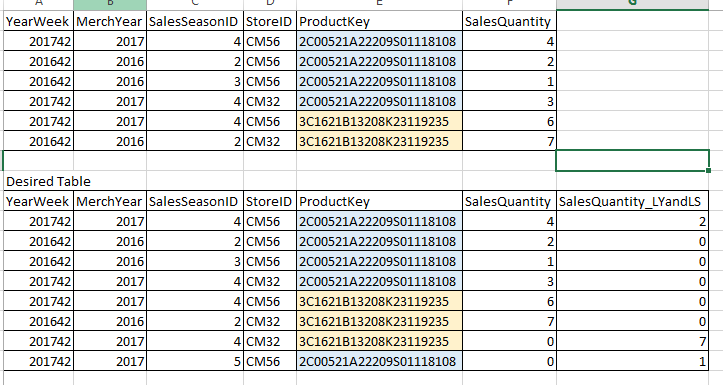
For clearifying my case, I will add some rows:
I am trying to find out SUM(SalesQuantity_LY_LS) measure in desired table without adding this column
Check out the November 2025 Power BI update to learn about new features.
Advance your Data & AI career with 50 days of live learning, contests, hands-on challenges, study groups & certifications and more!