Join us at FabCon Atlanta from March 16 - 20, 2026, for the ultimate Fabric, Power BI, AI and SQL community-led event. Save $200 with code FABCOMM.
Register now!The Power BI Data Visualization World Championships is back! Get ahead of the game and start preparing now! Learn more
| A | B | C | D | Fiscal Period | Fiscal Year | Period | Cost |
| xx | yy | zz | kk | 2018-P01 | 2018 | P01 | 100 |
| aa | bb | cc | dd | 2018-P01 | 2018 | P01 | 100 |
| aa | bb | cc | dd | 2018-P02 | 2018 | P02 | 200 |
| aa | bb | cc | dd | 2018-P03 | 2018 | P03 | 300 |
| aa | yy | zz | kk | 2018-P04 | 2018 | P04 | 400 |
| xx | ba | ca | da | 2018-P05 | 2018 | P05 | 500 |
| xx | bc | cb | db | 2018-P06 | 2018 | P06 | 600 |
| xx | bd | cb | dc | 2018-P07 | 2018 | P07 | 700 |
| xx | bb | cb | dd | 2018-P08 | 2018 | P08 | 800 |
| xz | bs | cc | de | 2018-P09 | 2018 | P09 | 900 |
| xz | ba | cd | df | 2018-P10 | 2018 | P10 | 1000 |
| xz | bl | cd | dg | 2018-P11 | 2018 | P11 | 1100 |
| xz | bm | ca | dl | 2018-P12 | 2018 | P12 | 1200 |
| xx | yy | zz | kk | 2019-P01 | 2019 | P01 | 1300 |
| aa | bb | cc | dd | 2019-P02 | 2019 | P02 | 1400 |
| aa | bb | cc | dd | 2019-P03 | 2019 | P03 | 1500 |
| aa | bb | cc | dd | 2019-P04 | 2019 | P04 | 1600 |
| aa | yy | zz | kk | 2019-P05 | 2019 | P05 | 1700 |
| xx | ba | ca | da | 2019-P06 | 2019 | P06 | 1800 |
| xx | bc | cb | db | 2019-P07 | 2019 | P07 | 1900 |
| xx | bd | cb | dc | 2019-P08 | 2019 | P08 | 2000 |
| xx | bb | cb | dd | 2019-P09 | 2019 | P09 | 2100 |
| xz | bs | cc | de | 2019-P10 | 2019 | P10 | 2200 |
| xz | ba | cd | df | 2019-P11 | 2019 | P11 | 2300 |
| xz | bl | cd | dg | 2019-P12 | 2019 | P12 | 2400 |
Solved! Go to Solution.
Hi @Anonymous ,
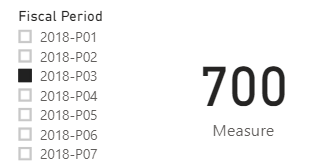
I create a sample based on your description. It can get sum of cost when we use slicer. For example, it will show sum of P01+P02+P03 while selecting P03.
Fiscal Period = VALUES('Table'[Fiscal Period])Measure =
VAR prd_selection =
SELECTEDVALUE ( 'Fiscal Period'[Fiscal Period] )
VAR yr =
VALUE ( LEFT ( prd_selection, 4 ) )
VAR prd =
RIGHT ( prd_selection, 3 )
VAR result =
CALCULATE (
SUM ( 'Table'[Cost] ),
FILTER ( ALL ( 'Table' ), 'Table'[Fiscal Year] = yr && 'Table'[Period] <= prd )
)
RETURN
IF (
HASONEVALUE ( 'Fiscal Period'[Fiscal Period] ),
result,
SUM ( 'Table'[Cost] )
)
For more details, please see the attachment.
Hi @Anonymous ,
I create a sample based on your description. It can get sum of cost when we use slicer. For example, it will show sum of P01+P02+P03 while selecting P03.
Fiscal Period = VALUES('Table'[Fiscal Period])Measure =
VAR prd_selection =
SELECTEDVALUE ( 'Fiscal Period'[Fiscal Period] )
VAR yr =
VALUE ( LEFT ( prd_selection, 4 ) )
VAR prd =
RIGHT ( prd_selection, 3 )
VAR result =
CALCULATE (
SUM ( 'Table'[Cost] ),
FILTER ( ALL ( 'Table' ), 'Table'[Fiscal Year] = yr && 'Table'[Period] <= prd )
)
RETURN
IF (
HASONEVALUE ( 'Fiscal Period'[Fiscal Period] ),
result,
SUM ( 'Table'[Cost] )
)
For more details, please see the attachment.
@Anonymous , Move all you period related stuff in a new table, if not date it can period key that can join
New columns in Date/period table
Period Year = [Fiscal Year] & [Period]
Period Rank = RANKX(ALL('Date'),'Date'[Period Year],,DESC,Dense)
period No = right([Period],2)
Measure
This Period = CALCULATE(sum('order'[Qty]), FILTER(ALL('Date'),'Date'[Period Rank]=max('Date'[Period Rank])))
Last Period = CALCULATE(sum('order'[Qty]), FILTER(ALL('Date'),'Date'[Period Rank]=max('Date'[Period Rank])-1))
Period Till Date = CALCULATE(sum('order'[Qty]), FILTER(ALL('Date'),'Date'[Fiscal Year]=max('Date'[Fiscal Year]) && 'Date'[period No] <=max('Date'[period No])))
Very similar or How I deal with the week here
Check out the November 2025 Power BI update to learn about new features.
Advance your Data & AI career with 50 days of live learning, contests, hands-on challenges, study groups & certifications and more!