cancel
Showing results for 
Search instead for 
Did you mean: 

The Power BI Data Visualization World Championships is back! Get ahead of the game and start preparing now! Learn more

Reply
LucasCamargo
Helper I
Helper I

How to build Forecast with Week number and Weekdays

I am trying to build a Forecast using the Weeks numbers and Weekdays, so my Line Chart shows me the peaks according to the weekdays, analysing by week (like, week 42, 43...). 


The problem is: every time I tried to add the weekdays or week nº fields, even been a numbers fields (not text), the Forecast option disappears and i'm not able to use it properly.


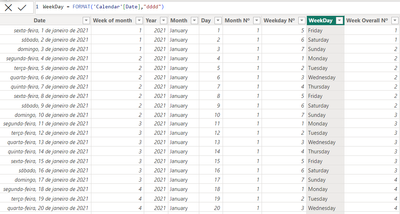
For my chart i'm not using the normal Date Hierarchy power BI gives me automatically. Instead, In my Calendar table I created columns for weekdays and months so I had control to start the week on "monday" and to have a better visualization in my graphs. (As image below)

LucasCamargo_0-1700662211764.png


Is there a way to fix it? Or a way to introduce in my Date Hierarchy the Week numbers and Weekdays?

1 ACCEPTED SOLUTION
Anonymous
Not applicable

Hi @LucasCamargo ,


Referring to the document, there are some limitations to the prediction function.

vtangjiemsft_0-1700812305274.png

You can create a column.

weekday_num = WEEKDAY('DateTable'[Date],2) 

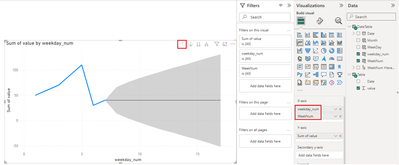
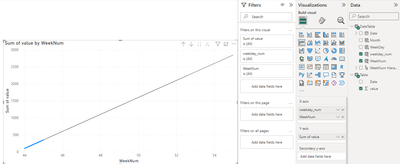
Place the [weekday_num] and [WeekNum] fields on the x-axis of the line graph to turn on the forecasting function of the Analysis pane. Make sure your line chart is not drilled down for you to see the forecast function.

vtangjiemsft_1-1700812591298.pngvtangjiemsft_2-1700812605514.png


View solution in original post

1 REPLY 1
Anonymous
Not applicable

Hi @LucasCamargo ,


Referring to the document, there are some limitations to the prediction function.

vtangjiemsft_0-1700812305274.png

You can create a column.

weekday_num = WEEKDAY('DateTable'[Date],2) 

Place the [weekday_num] and [WeekNum] fields on the x-axis of the line graph to turn on the forecasting function of the Analysis pane. Make sure your line chart is not drilled down for you to see the forecast function.

vtangjiemsft_1-1700812591298.pngvtangjiemsft_2-1700812605514.png


Helpful resources

Announcements
November Power BI Update Carousel

Power BI Monthly Update - November 2025

Check out the November 2025 Power BI update to learn about new features.

Fabric Data Days Carousel

Fabric Data Days

Advance your Data & AI career with 50 days of live learning, contests, hands-on challenges, study groups & certifications and more!

FabCon Atlanta 2026 carousel

FabCon Atlanta 2026

Join us at FabCon Atlanta, March 16-20, for the ultimate Fabric, Power BI, AI and SQL community-led event. Save $200 with code FABCOMM.

Top Kudoed Authors