Join us at FabCon Atlanta from March 16 - 20, 2026, for the ultimate Fabric, Power BI, AI and SQL community-led event. Save $200 with code FABCOMM.
Register now!The Power BI Data Visualization World Championships is back! Get ahead of the game and start preparing now! Learn more
I'm using ArcGIS maps. I have 3 columns, region_name, temperature and date_time.
I want on the map, at the tooltip that appears when you hover your mouse over the bubble, for the latest temperature to appear for each region.
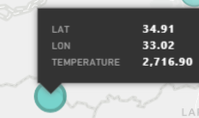
Write now when I add the Temperature column on the "tooltips", it shows me the sum of the temperature:
What I want it to show is the temperature of the latest date and time on my table, for each region.
I know I can find the latest date and time by using Max function, but I don't know how to show the temperature of the rows that qualify.
Thank you.
Solved! Go to Solution.
Hi @Anonymous
Give this a go instead
Max Temp =
VAR _last = { CALCULATE(
MAX( 'Table'[date_time] ),
ALL( 'Table'[date_time])
) }
RETURN CALCULATE(
MAX( 'Table'[temperature] ),
TREATAS( _last, 'Table'[date_time] )
)
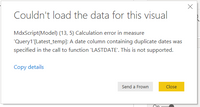
I get the following error:
It's true that I have several date_times that are the same, because I have several regions. Each region has its own date_time. How could I fix this?
Thank you.
Hi @Anonymous
Give this a go instead
Max Temp =
VAR _last = { CALCULATE(
MAX( 'Table'[date_time] ),
ALL( 'Table'[date_time])
) }
RETURN CALCULATE(
MAX( 'Table'[temperature] ),
TREATAS( _last, 'Table'[date_time] )
)
@Mariusz Thank you so much, I appreciate it.
Would you mind explaining why your 2nd solution fixes the issue I had on your 1st one?
Hi @Anonymous
No problem happy I could help.
For the explanation please refer to @v-frfei-msft post.
Hi @Anonymous ,
Refering to the document abouth LASTDATE. When the current context is a single date, the date returned by the FIRSTDATE and LASTDATE functions will be equal. That's why you got the error message.
The Power BI Data Visualization World Championships is back! Get ahead of the game and start preparing now!
Check out the November 2025 Power BI update to learn about new features.
| User | Count |
|---|---|
| 59 | |
| 43 | |
| 42 | |
| 23 | |
| 17 |
| User | Count |
|---|---|
| 190 | |
| 122 | |
| 96 | |
| 66 | |
| 47 |