Join us at FabCon Atlanta from March 16 - 20, 2026, for the ultimate Fabric, Power BI, AI and SQL community-led event. Save $200 with code FABCOMM.
Register now!The Power BI Data Visualization World Championships is back! It's time to submit your entry. Live now!
Hi,
My datasource looks like below where I have Duplicate rows. I would like to sum the Days column for duplicated rows. For below data the sume will be 9 for Name1 and 3 for Name2. I am not sure how to achieve this? Any help is appreciated! Thanks in advance for your time!
Solved! Go to Solution.
@Anonymous
Drag and drop the Name field onto a Table visual and add the following measure next to it.
Total = SUM ( TableName[Days] )
⭕ Subscribe and learn Power BI from these videos
⚪ Website ⚪ LinkedIn ⚪ PBI User Group
Hi @Anonymous ,
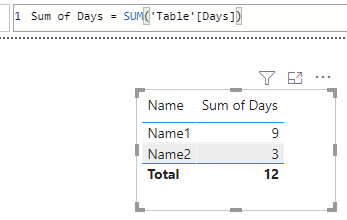
you can do it like this:
Sum of Days = SUM('Table'[Days])
With kind regards from the town where the legend of the 'Pied Piper of Hamelin' is at home
FrankAT (Proud to be a Datanaut)
Thank you!
@Anonymous
Drag and drop the Name field onto a Table visual and add the following measure next to it.
Total = SUM ( TableName[Days] )
⭕ Subscribe and learn Power BI from these videos
⚪ Website ⚪ LinkedIn ⚪ PBI User Group
Thank you. It worked
| User | Count |
|---|---|
| 56 | |
| 41 | |
| 38 | |
| 21 | |
| 21 |
| User | Count |
|---|---|
| 140 | |
| 102 | |
| 64 | |
| 36 | |
| 35 |