Join us at FabCon Atlanta from March 16 - 20, 2026, for the ultimate Fabric, Power BI, AI and SQL community-led event. Save $200 with code FABCOMM.
Register now!Get Fabric Certified for FREE during Fabric Data Days. Don't miss your chance! Request now
Hello
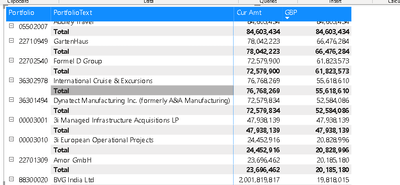
I have a matrix. There are 2 rows, Portfolio and PortfolioText and 2 Values cur_Amount and GBP.
I'd like to get the totals of all the rows into one final grand total at the botttom of the report but I dont want the individual row totals.
Is this possible? Otherwise the report looks messy like below
Solved! Go to Solution.
Hi @Anonymous,
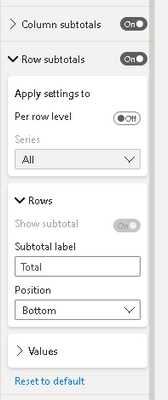
I create a sample to test with subtotal options, they work well to change the 'total level' visibility when I modify the 'per row total'.
Can you please share a pbix or some dummy data that keep the raw data structure? It should help us clarify your scenario and test.
How to Get Your Question Answered Quickly
In addition, have you tried to turn off the new format panel and test again with these options at the old format panel?
Regards,
Xiaoxin Sheng
Yes try with the old format pane to make it easy:
Hi
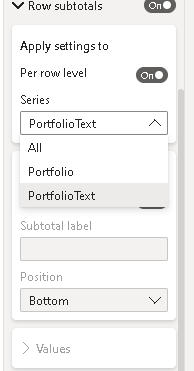
The problem is that i get 3 options, All, Portfolio or PortfolioText. Turning any of them off doesnt make any change - i still see the subtotals per row
Hi @Anonymous,
I create a sample to test with subtotal options, they work well to change the 'total level' visibility when I modify the 'per row total'.
Can you please share a pbix or some dummy data that keep the raw data structure? It should help us clarify your scenario and test.
How to Get Your Question Answered Quickly
In addition, have you tried to turn off the new format panel and test again with these options at the old format panel?
Regards,
Xiaoxin Sheng
Check out the November 2025 Power BI update to learn about new features.
Advance your Data & AI career with 50 days of live learning, contests, hands-on challenges, study groups & certifications and more!