Join us at FabCon Atlanta from March 16 - 20, 2026, for the ultimate Fabric, Power BI, AI and SQL community-led event. Save $200 with code FABCOMM.
Register now!The Power BI Data Visualization World Championships is back! Get ahead of the game and start preparing now! Learn more
Hello,
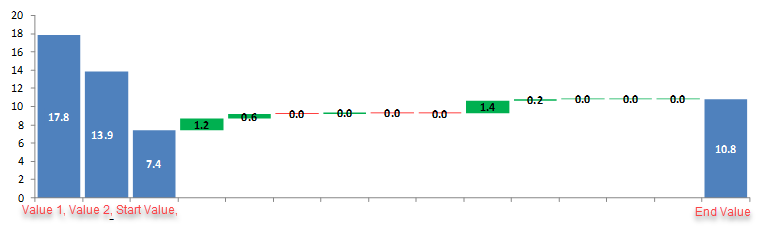
How can I get this chart
Hi Giotto,
Thank you for your example.
I also took that approach, mimicking the Excel way.
I was hoping to have a solution that would allow me to use two different Measures for Value 1 and 2.
Regards,
Tamir
Hi,
I think there is no such visual can show like your screenshots.
Best Regards,
Giotto
@Anonymous , refer if this custom visual
https://xviz.com/blogs/waterfall-chart-advanced-custom-visuals-for-power-bi/
At these can help
Hello Amit,
The links are not helping to my scenario.
Thanks for your time,
Regards,
Tamir
The Power BI Data Visualization World Championships is back! Get ahead of the game and start preparing now!
| User | Count |
|---|---|
| 60 | |
| 43 | |
| 40 | |
| 36 | |
| 21 |
| User | Count |
|---|---|
| 178 | |
| 127 | |
| 115 | |
| 77 | |
| 54 |